

Directorist Listing Importer NewTrending
Build a richer directory faster by importing business listings from Google Maps or any RSS/Atom feed directly into your Directorist website. Directorist Listing Importer helps directory owners turn Google Places data and external feed content into ready-to-review Directorist listings. Search by keyword, choose a location, set a radius, preview the businesses you want, and import listing details without manually copying names, addresses, phone numbers, websites, photos, ratings, and reviews one by one. Or connect any RSS or Atom feed and import listings from external sources once, or on an automatic sync schedule.
SAVE BIG by Unlocking All Premium Themes & Extensions
Product Overview
Directorist Listing Importer gives directory website owners a faster way to populate local business directories, niche directories, service marketplaces, city guides, job boards, event directories, and real estate directories. Instead of researching businesses manually or building listing databases from scratch, you can run a focused Google Maps search from your WordPress dashboard and import matching places into Directorist or connect an RSS/Atom feed from any external source and pull its listings in automatically. The extension helps you create useful listing inventory faster while keeping control over what gets published, which category each listing belongs to, whether reviews and photos are imported, and whether existing imported listings should be refreshed. It is especially useful for directory launches, category expansion, location-based growth, agency client builds, and directories that need a practical starting database before outreach or monetization begins.
Stop Building Listings One by One
Creating a directory from scratch often starts with the same slow work: searching for businesses, copying contact details, checking addresses, adding websites, uploading images, and repeating the process again and again.
Directorist Listing Importer reduces that initial workload by helping you import structured business data from Google Places in focused batches, or by connecting external RSS feeds that keep your directory populated automatically.
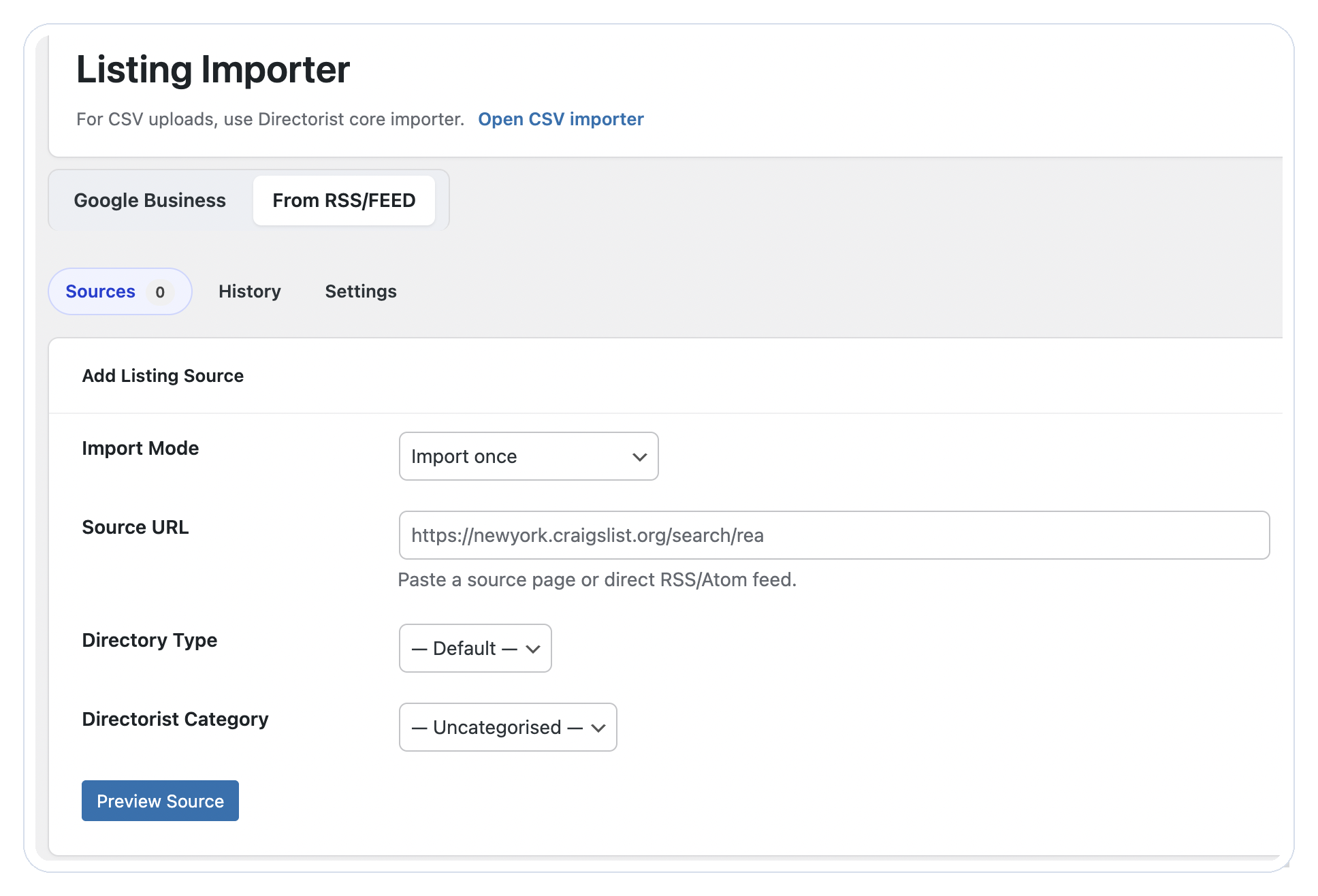
Two Ways to Import Listings
Import from Google Maps
Enter a keyword, choose a location, define a radius, and let the importer fetch matching businesses through the Google Places API. Review the results before importing, select the listings you want, skip duplicates, and send everything into Directorist with the listing status you choose.
Import from RSS / Atom Feeds
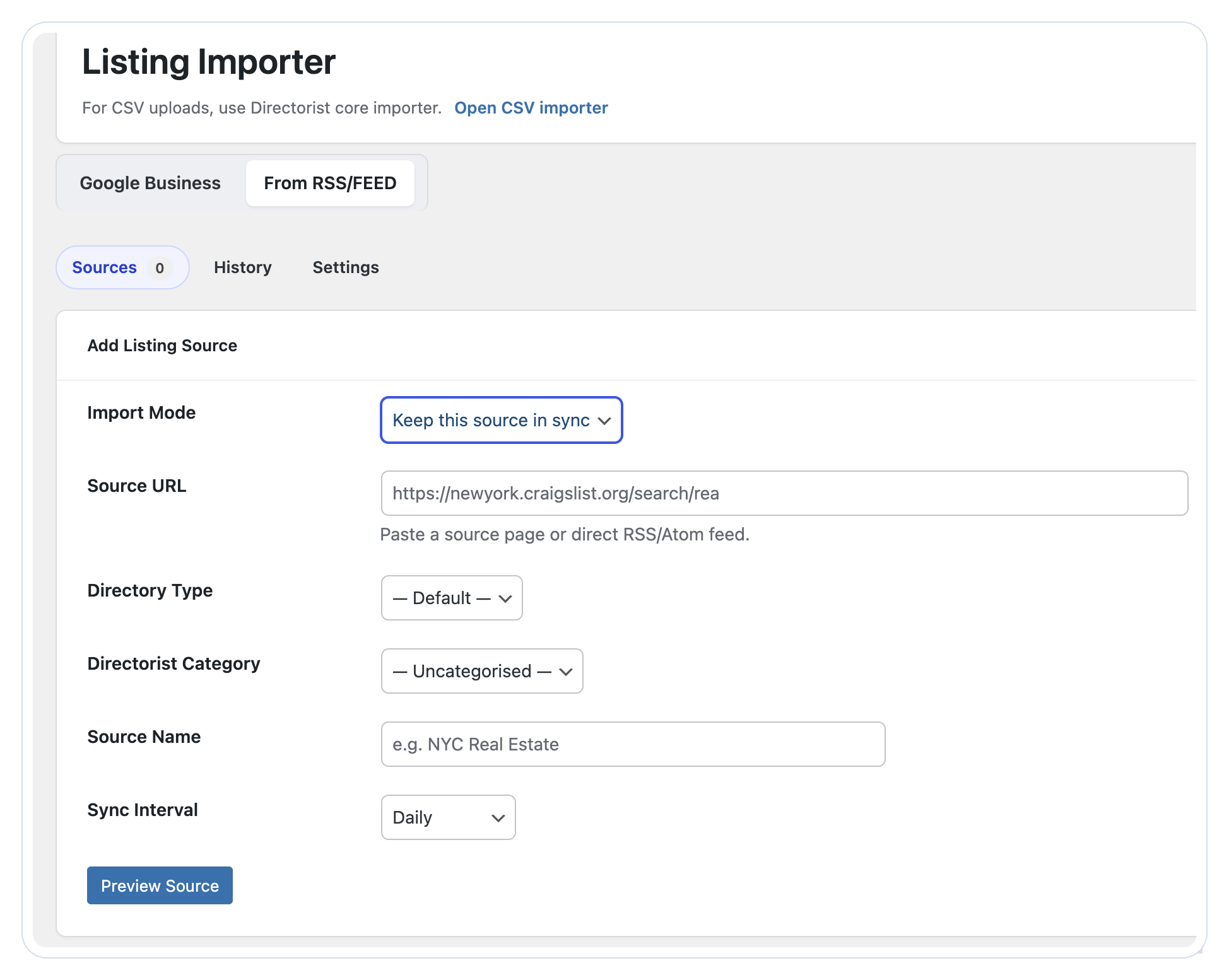
Connect any standard RSS or Atom feed URL and import listings from it into your directory. Import once for a one-off batch, or keep the source in sync so your directory updates automatically as new content is published to the feed.
Search by Keyword, Location, and Radius
Run targeted Google Maps imports for the exact market you are building. Search for restaurants in Brooklyn, dentists in Banani, hotels near a travel destination, gyms within a city area, or pet groomers in a local service directory.
The radius option helps you control how broad or focused each import should be.
Preview Before You Import
The importer shows found places in a selectable preview list. Choose individual businesses, select all, or deselect all before the import begins.
This keeps you in control and helps avoid irrelevant businesses, duplicates, or listings that do not fit your directory.
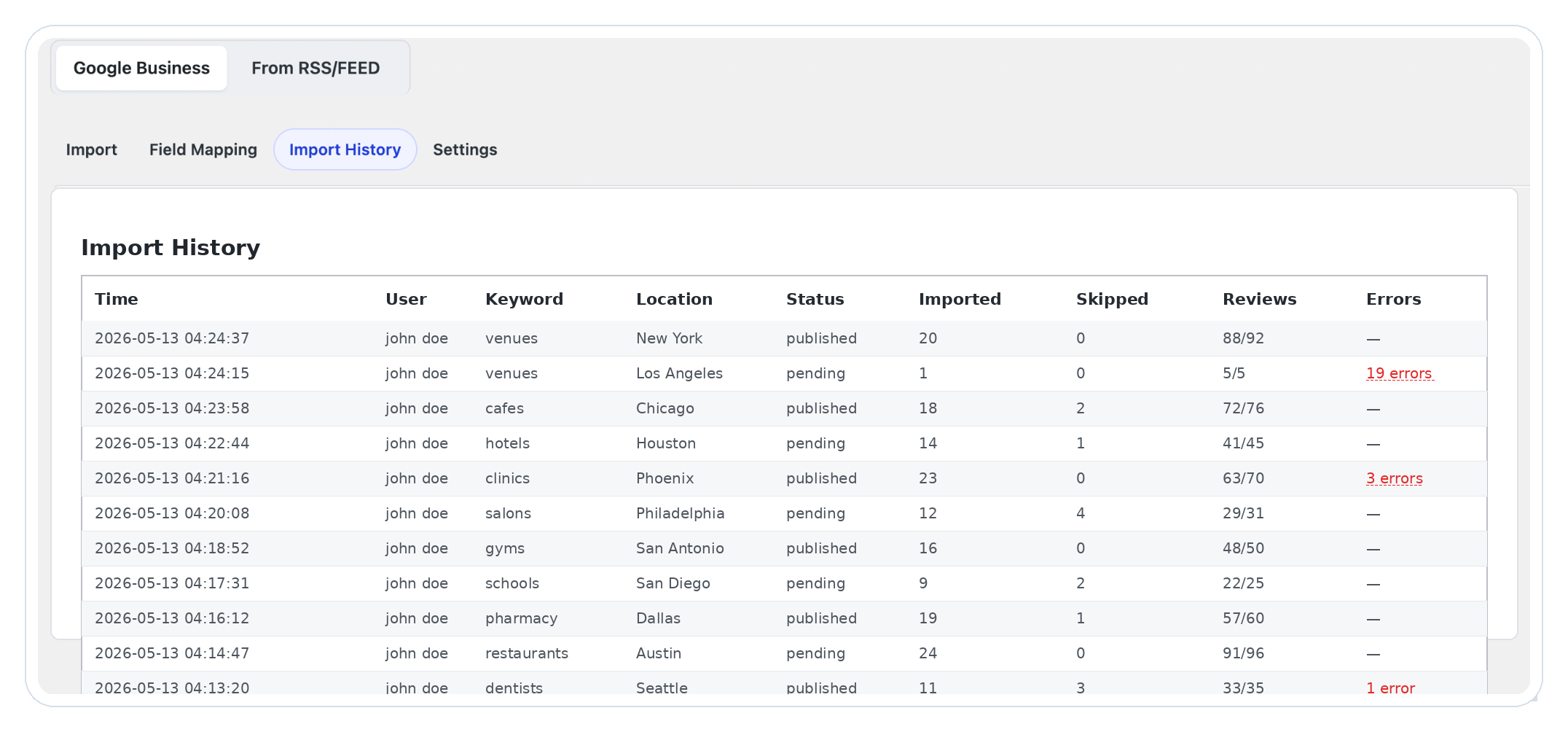
Track Every Import
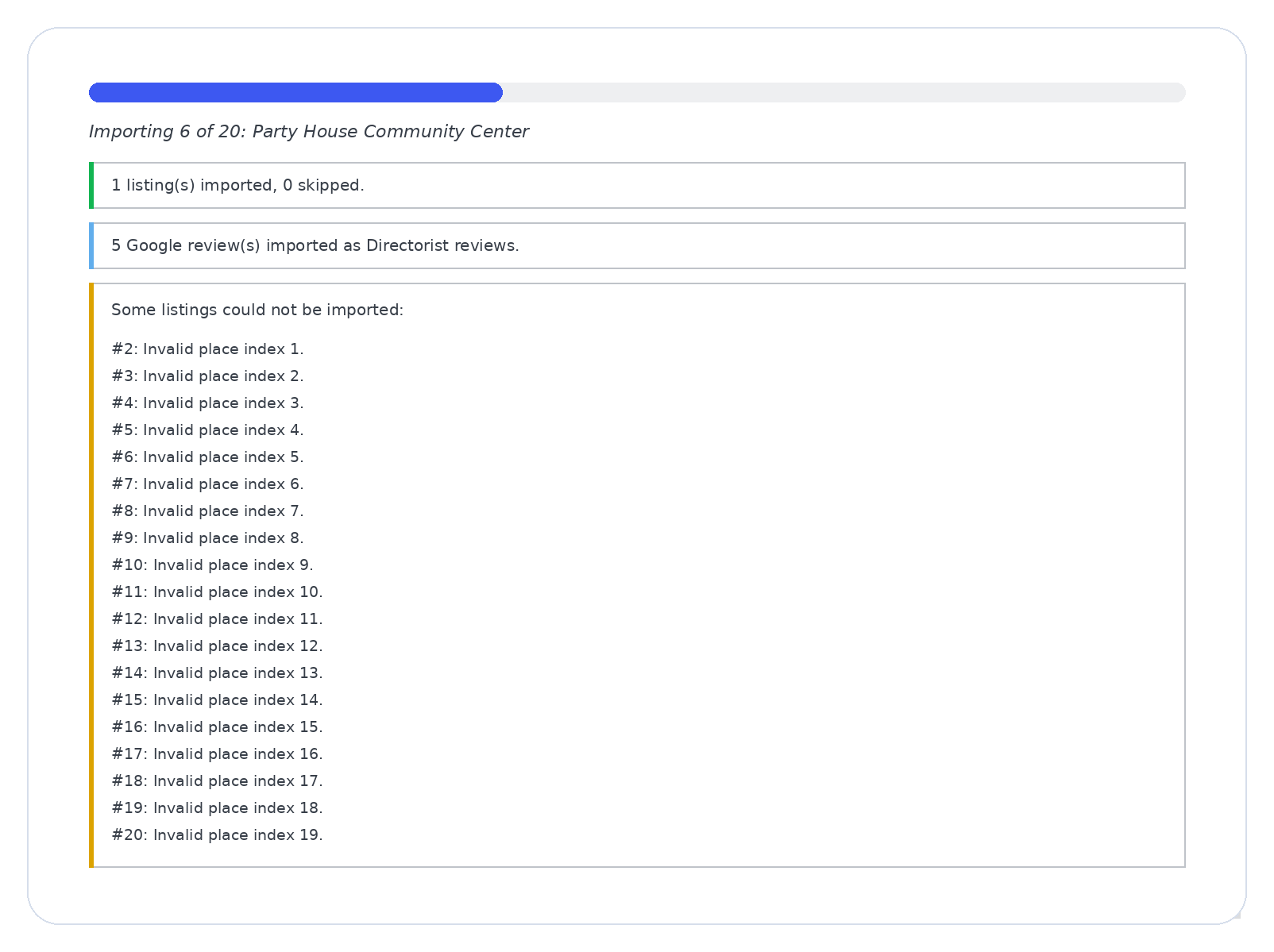
The Import History tab helps you review previous import runs with useful details such as time, user, keyword, location, status, imported listings, skipped listings, imported reviews, and errors.
This is helpful for agencies, teams, and site owners who import listings across multiple categories or locations.
Import Useful Business Details
Depending on what Google returns for each place, imported listings can include:
- Business name
- Featured image from Google photos
- Description where available
- Address
- Phone number
- Website URL
- Ratings
- Google reviews as Directorist review comments
- Business hours and refreshed details where supported
Imported listings are created inside Directorist, so you can manage, edit, approve, categorize, and display them like any other listing on your site.
Keep Existing Listings Updated
Use the Update Existing option to refresh listings that were already imported. This helps keep important business details such as address, phone, hours, and rating more current without recreating duplicate listings.
Key Features
- Import business listings from Google Maps using the Google Places API.
- Import listings from any standard RSS or Atom feed.
- Keep RSS feed sources in sync on an automatic schedule.
- Search by keyword, location, and radius.
- Preview matching places before importing.
- Select or skip individual businesses.
- Import listings into a selected Directorist category and location.
- Choose listing status per import run.
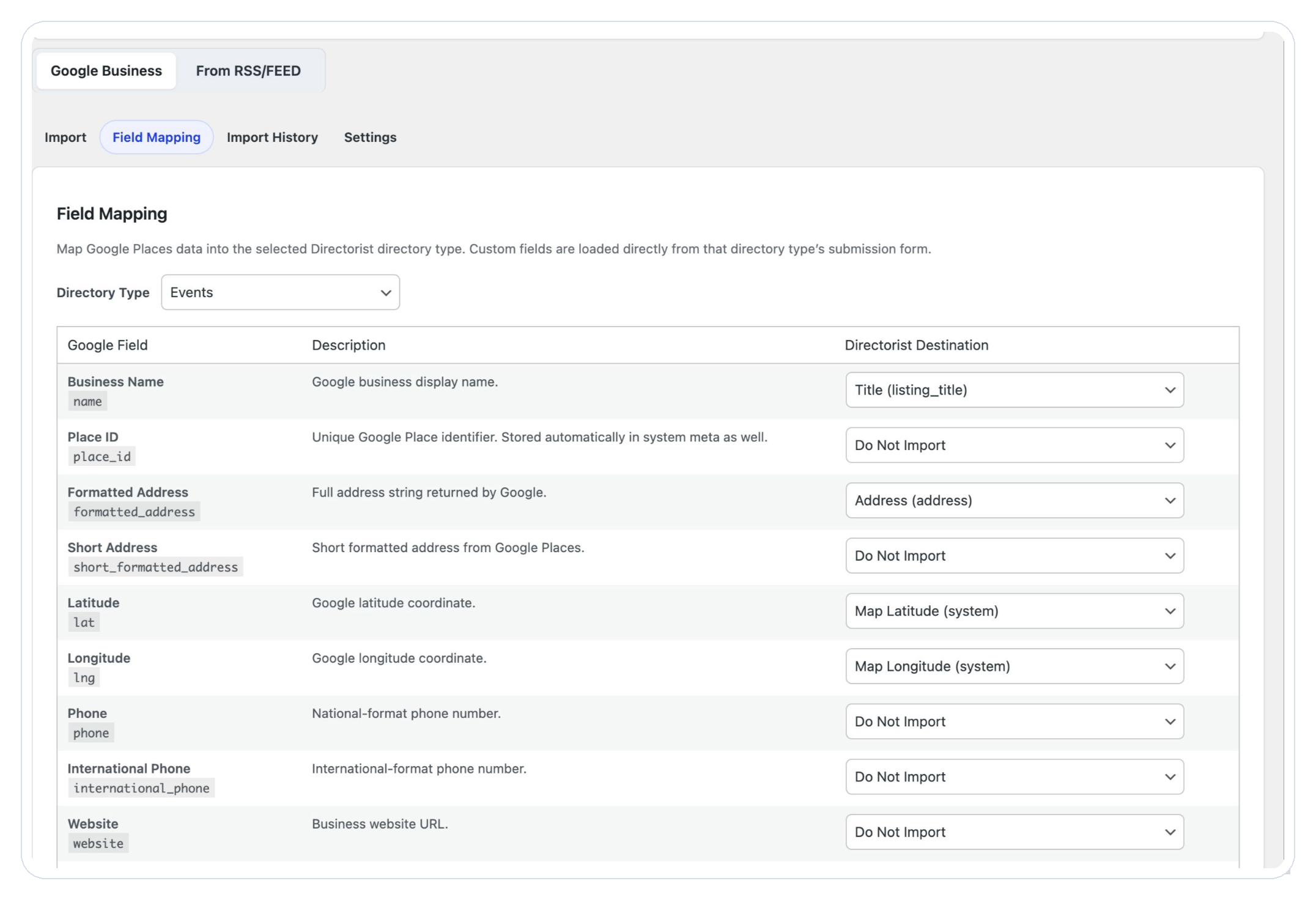
- Map Google Places fields to Directorist listing fields per directory type.
- Import available business descriptions when returned by the data source.
- Import Google reviews as Directorist review comments.
- Sideload the first Google photo as the listing featured image.
- Refresh previously imported listings with updated business data.
- Track import history with imported, skipped, review, and error counts.
- Import up to 60 listings per run, depending on API results and configuration.
Key Benefits
- Launch Faster Create the first layer of your directory inventory without manually adding each business. This helps new directories move from empty pages to useful category and location coverage faster.
- Scale Across Niches and Locations Repeat the workflow for different keywords, cities, neighborhoods, and categories. Build restaurant directories, doctor directories, local services directories, tourism guides, professional directories, event listings, real estate directories, and more.
- Improve Listing Completeness Listings with names, addresses, phone numbers, websites, photos, ratings, and reviews give visitors more useful information from the start.
- Reduce Repetitive Admin Work Spend less time copying business data and more time reviewing quality, improving categories, contacting business owners, and growing the directory.
- Keep Control in WordPress The full workflow runs inside your WordPress dashboard and imports data into Directorist listings, so your team can manage everything from the same place.
Frequently Asked Questions
Everything you need to know before importing listings into Directorist.
It imports business listings into Directorist from two sources: Google Maps via the Google Places API, and any standard RSS or Atom feed. For Google Maps, you search by keyword, location, and radius, preview results, and import selected businesses. For RSS/Feed, you connect a feed URL and import its listings once or keep it in sync automatically.
Yes. For Google Business imports, the importer shows a preview list of found places so you can select or skip businesses before importing. For RSS/Feed imports, you preview the source before committing.
Yes, when review import is enabled and Google returns reviews for the place. Google may return a limited number of reviews per business.
Yes. Enable Update Existing to refresh listings that were already imported instead of creating duplicates.
Yes. Set the Import Mode to Keep this source in sync and choose a sync interval. The importer will check the feed on that schedule and create new listings as new content is published.
Local business directories, restaurant directories, healthcare directories, hotel and travel directories, service provider directories, professional directories, event directories, job boards, real estate directories, classifieds, and niche marketplaces.
Yes, for Google Business imports. You need a Google Cloud project with billing enabled, Places API enabled, and an API key configured in the extension settings. RSS/Feed imports do not require an API key.
Yes. You can import listings with a status of Pending Review and publish them after checking the details.
Yes. When photo import is enabled, the importer sideloads the first available Google photo as the listing featured image.
The extension supports up to 60 listings per Google Business import run. Google returns results in pages, and larger imports may require additional API requests. RSS/Feed import volume depends on the feed content.
Yes. The importer speeds up listing creation, but you should still review imported data for accuracy, relevance, formatting, and compliance with your directory standards.