 Up to 35% Off!



Table of Contents
Directorist Pricing Plans — Migration Guide & What’s New
-

- Product Updates Extensions
- 4 mins read
The Directorist Pricing Plans extension has been significantly upgraded with a rebuilt payment system, a redesigned plan structure, and several new features that improve the experience for both website owners and end users. This guide walks you through how to activate the extension, complete the migration process, and highlights what’s new in this version.
How To Migrate
Step 1 — Upgrade & Activate the Pricing Plans Extension
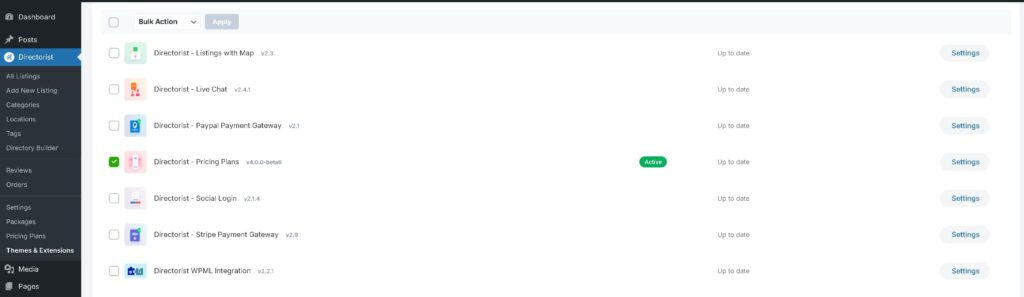
Before anything else, make sure the Pricing Plans extension is installed and active on your WordPress site.
- Go to WordPress Dashboard → Plugins → Installed Plugins.
- Find Directorist Pricing Plans and click Activate.
If the extension is not yet installed, you can install it via the Directorist Themes & Extensions page.
Step 2 — Complete the Migration Process
After activation, you will need to complete a migration process before you can start using the new system.
Method 1 — First-Time Setup
If this is your first time using the Pricing Plans extension, you will see the following notice after activation:
Directorist Notice: There are [X] directory types that need plan assignment. Assign them now?
This means each directory type on your site must be assigned a pricing plan before you can proceed — it cannot be left empty.
Steps:
A pop-up window will appear listing all your directory types. Click Assign Plans.

For each directory, select a pricing plan (e.g., Basic Plan) and set the Order Status (e.g., Paid). Click Assign.
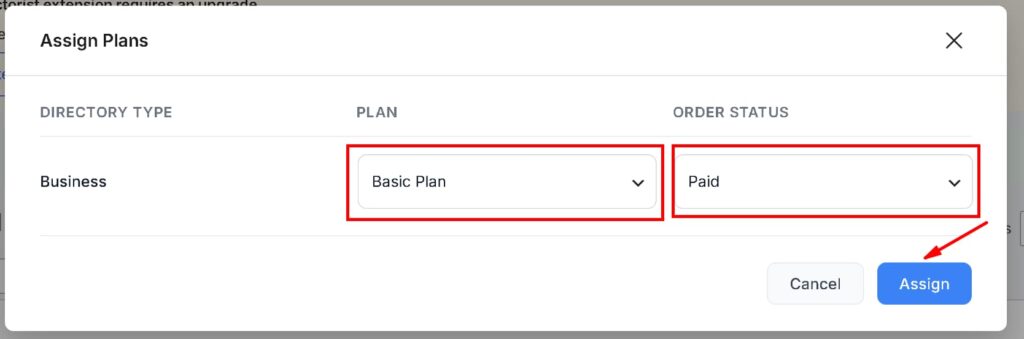
Your setup is now complete. You can create new plans or edit existing ones at any time from the Pricing Plan settings.

Method 2 — Upgrading from the Old Pricing Plan System
If your site already has existing pricing plans, orders, user packages, demo data, or listings imported via the Directorist Listing Importer, you will see a different notice:
Click the Migrate Now button. Directorist will automatically handle the entire migration process.

Once complete, you will see a confirmation message: Directorist Pricing Plan: Migration completed successfully.

Note: If you encounter any issues during migration, contact the Directorist support team for assistance.
📢What’s New in the Upgraded Pricing Plans
The new version of Pricing Plans is a major upgrade — rebuilt from the ground up for better performance, flexibility, and ease of use. Here is a summary of all the key improvements.
⭐Rebuilt Payment System
The entire payment workflow has been rebuilt from scratch. Directorist now supports offline gateway and popular three online payment gateways, all redeveloped for greater stability and a smoother checkout experience:
- PayPal
- Stripe
- Authorize.net
⭐Redesigned Plan Structure
The pricing plan structure has been completely redesigned, giving website owners significantly more flexibility when creating and managing packages. You can now configure plans with different listing limits, featured listing quotas, and feature sets to suit a wide range of user needs.
⭐Improved Expiration Date Calculation
| Old System | New System | |
| Expiration based on | Listing creation date | Plan purchase date |
Expiration is now calculated from the plan purchase date, making subscription management more accurate and predictable for both owners and users.
⭐One Active Plan at a Time
Users can now only have one active pricing plan at a time, simplifying plan management and reducing conflicts. Existing users who had multiple active plans under the old system will continue using those plans without disruption until further notice.
⭐Smarter Plan Switching
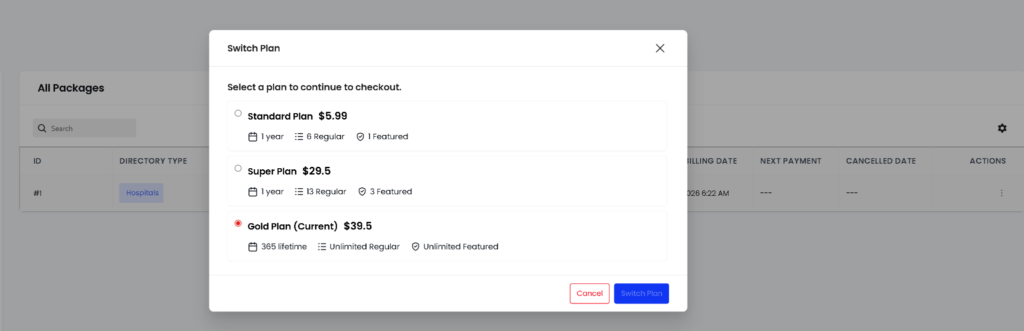
Switching between plans has been improved with proportional pricing adjustments:
- Upgrading to a higher plan — Pricing is adjusted proportionally based on the remaining period of the current plan.
- Downgrading to a lower plan — The subscription duration is automatically extended based on the remaining value.
Important: Switching between Pay Per Package plans and Package plans is currently not supported.
⭐Built-in Trial System

A built-in trial system has been introduced for new users, making it easier for website owners to offer trial periods without any custom configuration.
⭐Refund System
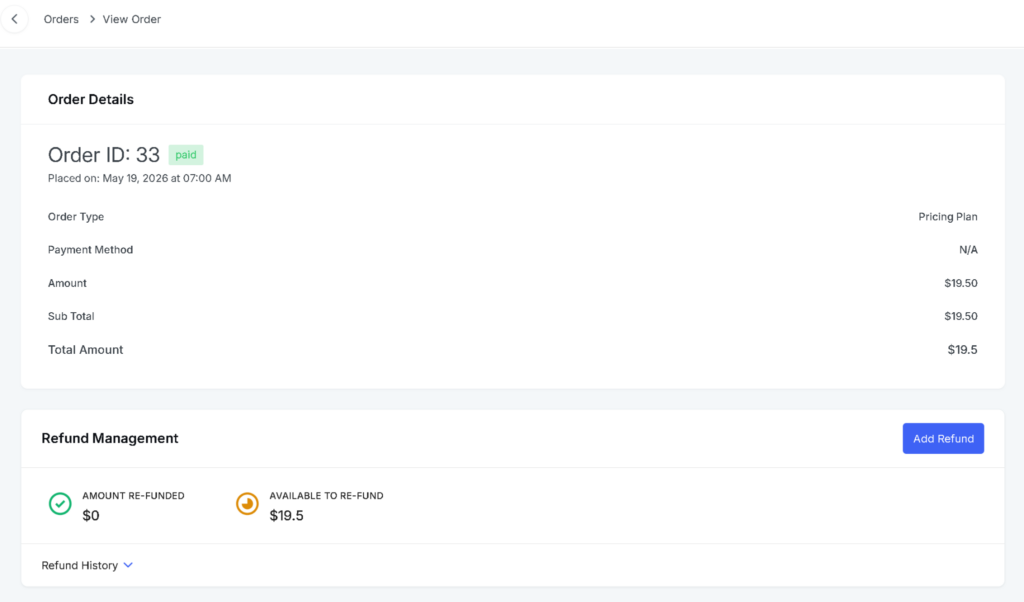
A dedicated refund system is now available, making payment handling more flexible and giving website owners better control over financial workflows.
⭐Fallback Plan System
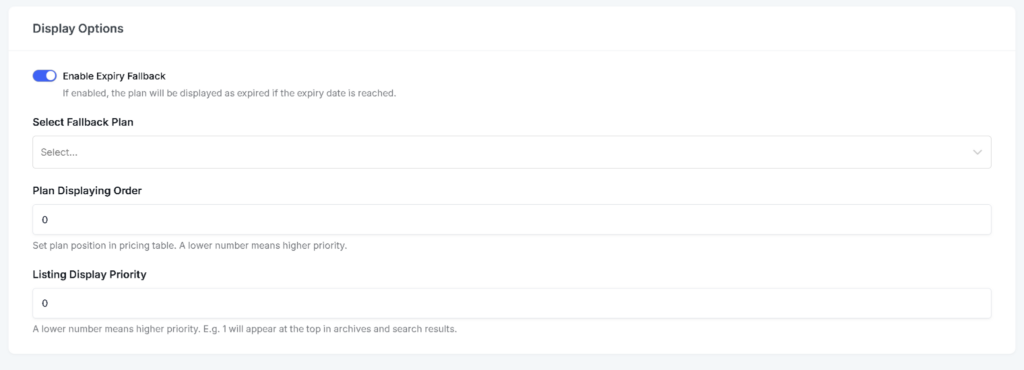
Directorist now includes a fallback plan feature. When a subscription expires or a payment fails, the system automatically assigns an alternative plan to the user — preventing disruptions and keeping users on a valid plan at all times.
⭐Dedicated Admin Package Menu
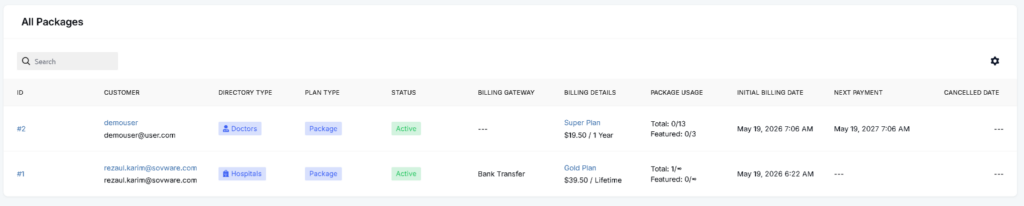
A new Admin Package menu has been added to the dashboard, making it easier to view and manage all available pricing plans from a single location without navigating through multiple settings pages.
Summary
| Feature | Status |
| Rebuilt payment system (PayPal, Stripe, Authorize) | ✅ New |
| Redesigned plan structure | ✅ New |
| Expiration based on purchase date | ✅ Improved |
| One active plan per user | ✅ New |
| Proportional plan switching | ✅ New |
| Built-in trial system | ✅ New |
| Refund system | ✅ New |
| Fallback plan for expired/failed subscriptions | ✅ New |
| Admin Package menu | ✅ New |
For additional support, reach out to the Directorist support team via the official support channels.

Rezaul Karim
Rezaul Karim is a Digital Marketer and Content Strategist at wpWax, the team behind Directorist — trusted by 20,000+ directory websites worldwide. With 6+ years of experience in SEO-driven content and WordPress plugin marketing, he provides data-backed insights on building high-authority directory businesses. From optimizing search visibility to streamlining directory user experiences, Rezaul focuses on practical solutions that drive impressions and conversions. When he isn't auditing site performance or exploring the latest AI-integrated marketing tools, he is an avid reader and advocate for sustainable digital growth.


Leave a Reply
You must be logged in to post a comment.