 Up to 35% Off!

Directorist AI Search New
Run smarter directories across all your sites without extra complexity. AI Search understands intent, matches listings by meaning, and surfaces relevant results naturally. No API key. No OpenAI setup. No per-search billing. Install once, index your listings, and your directory instantly becomes smarter. Visitors find what they mean. Visitors engage more, listing owners get discovered more, featured placements perform better, and your directories build the reputation that keeps listing owners renewing year after year.
SAVE BIG by Unlocking All Premium Themes & Extensions
Product Overview
Every day, visitors leave your directory frustrated. They typed exactly what they were looking for - but your search returned nothing, or the wrong thing. Not because the listing doesn't exist. Because the words didn't match perfectly. That lost visitor was a potential click, a potential lead, and a potential renewal for one of your listing owners. Directorist AI Search fixes that. AI Search transforms the way visitors discover listings inside your directory website. AI Search helps visitors find what they actually mean - not just the exact words they typed into the search box. The extension works as a semantic layer on top of your existing Directorist search, improving result quality behind the scenes without replacing your current search interface. It enhances both Core Directorist Search and Universal Search automatically once listings are indexed.
No API or Token Needed
Most AI tools for WordPress mean setting up API keys, managing third-party accounts, and worrying about per-request billing that adds up fast. It's technical, risky, and expensive - before a single visitor even benefits.
Directorist AI Search handles everything on its own servers. Install the extension, click Index All, and your listings are immediately smarter. No configuration. No ongoing AI costs. No complexity passed on to you.
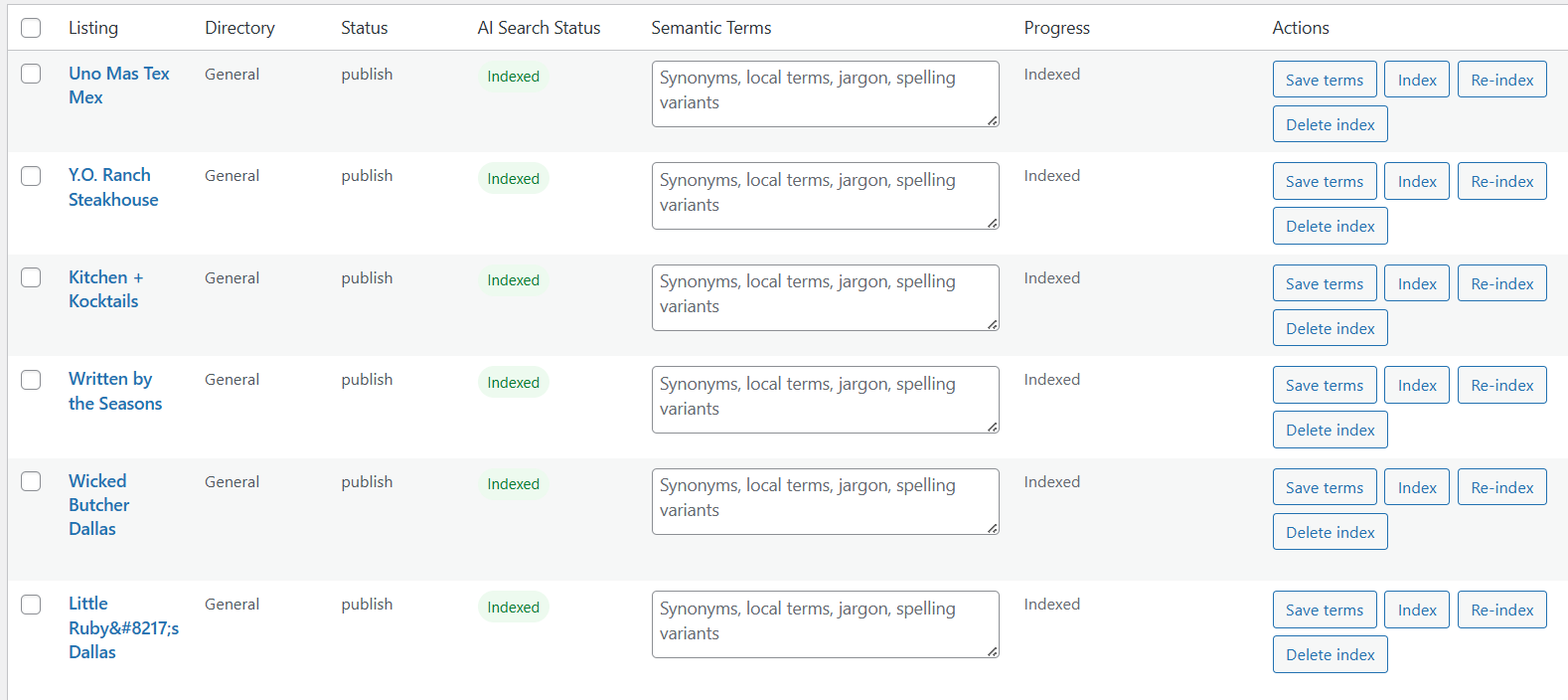
Add Semantic Terms Manually
AI indexes every listing automatically - but you know your niche better than any algorithm. Every industry has its own local terms, regional phrases, and words visitors actually use when searching that never appear in listing descriptions.
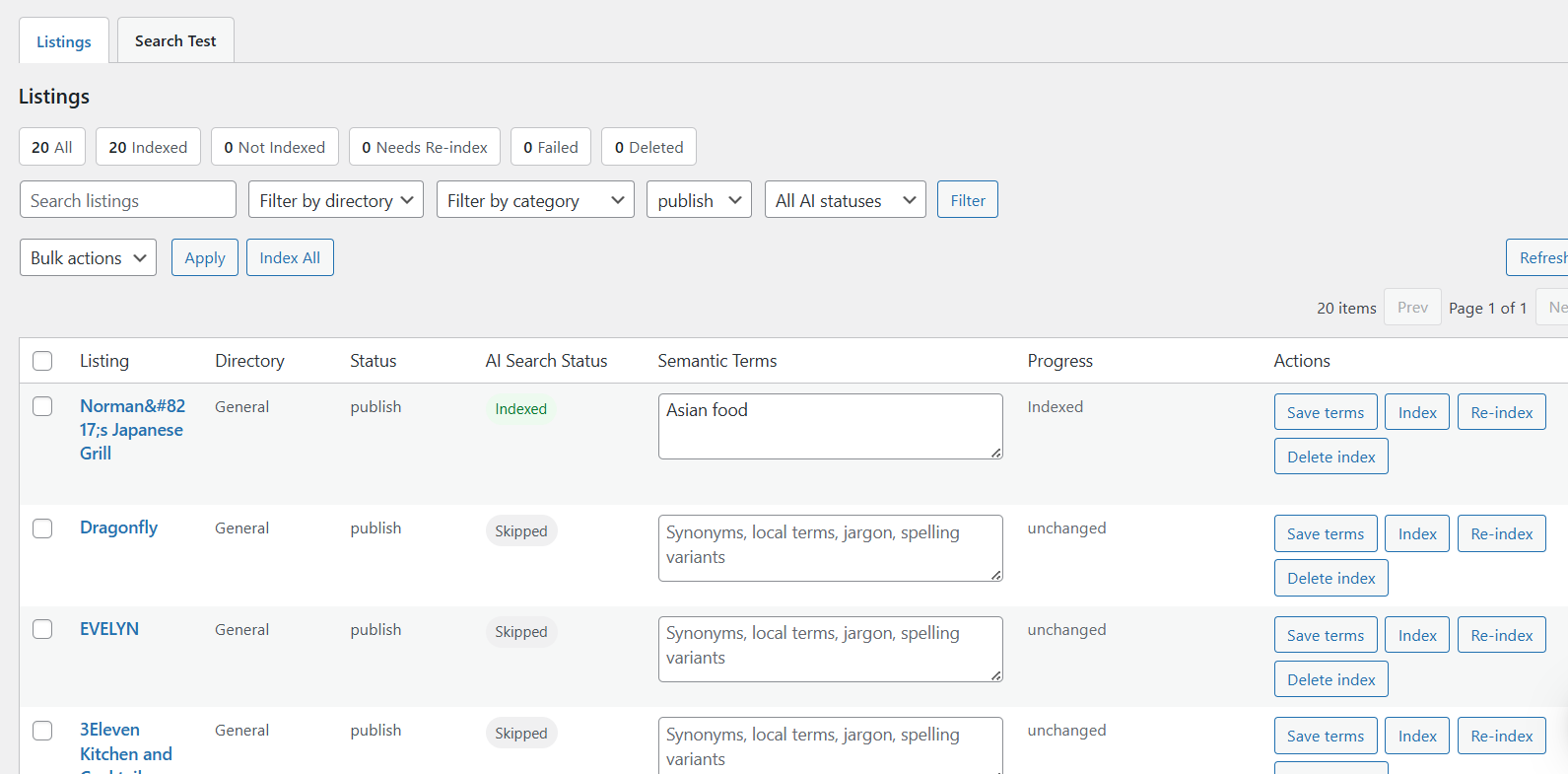
Open any listing in the AI Search panel, type your custom synonyms, local terminology, jargon, or spelling variants into the Semantic Terms field and save. That listing immediately starts surfacing in searches it never appeared in before.
Admin Search Test Panel
Most directory owners have no idea what search results look like for any given query. They assume it's working. Visitors quietly leave when it isn't. There's no way to know until someone complains.
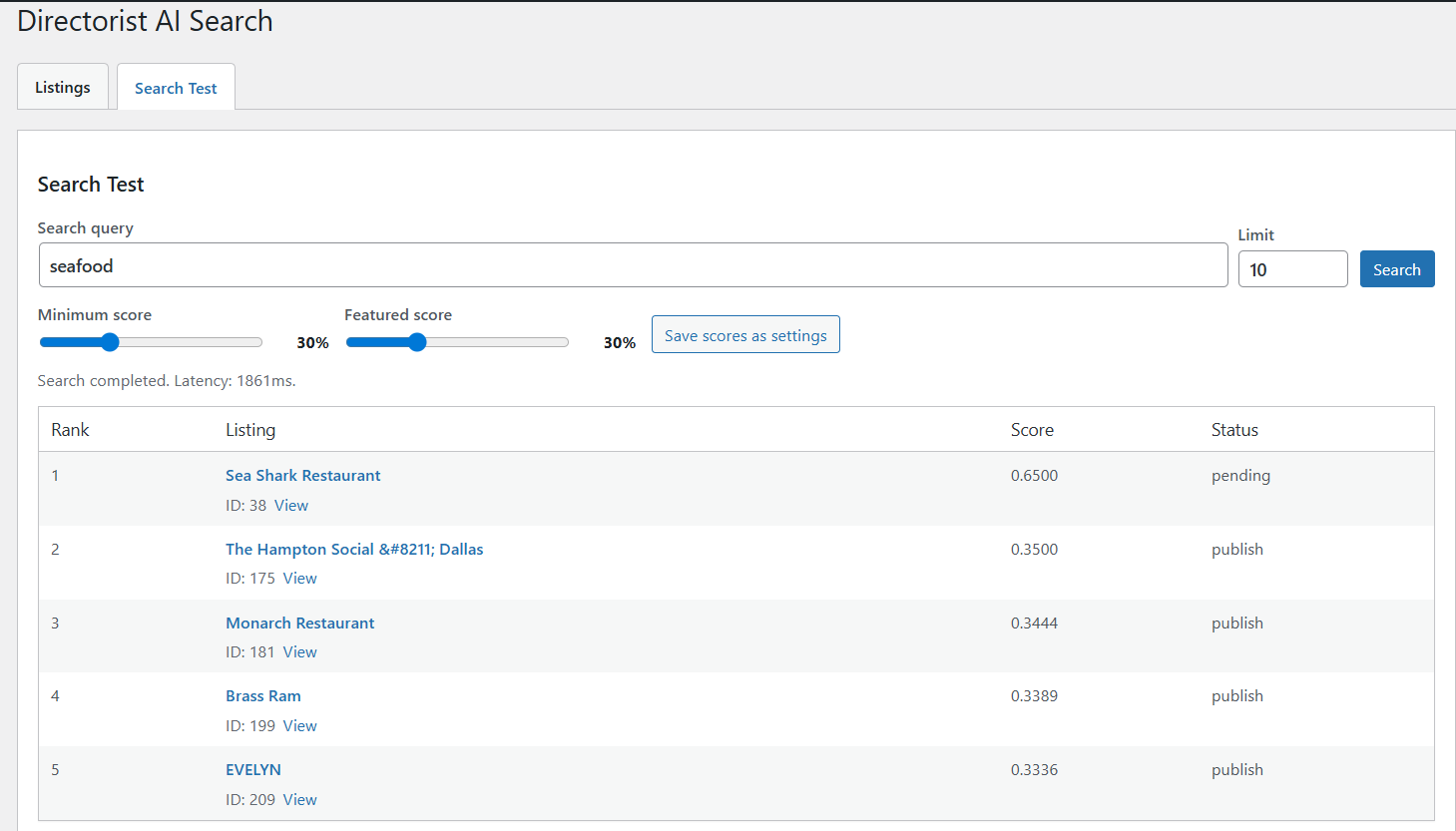
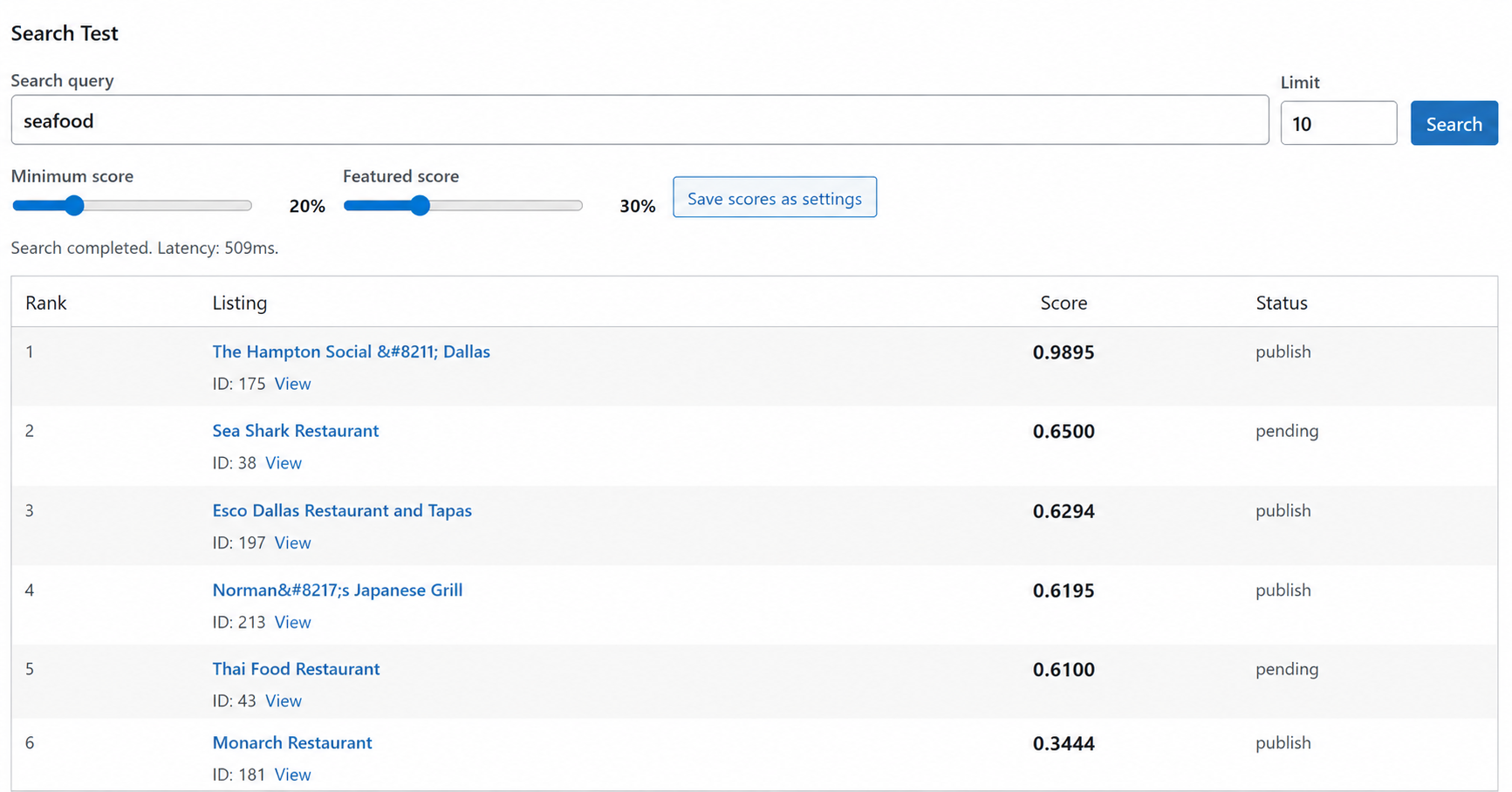
The Search Test panel changes that. Type any query and see a live ranked list of results with match scores before a single visitor does. Test ten different queries in five minutes, adjust your settings, and go live knowing your search is dialed in perfectly.
Control Score to Adjust Search Result
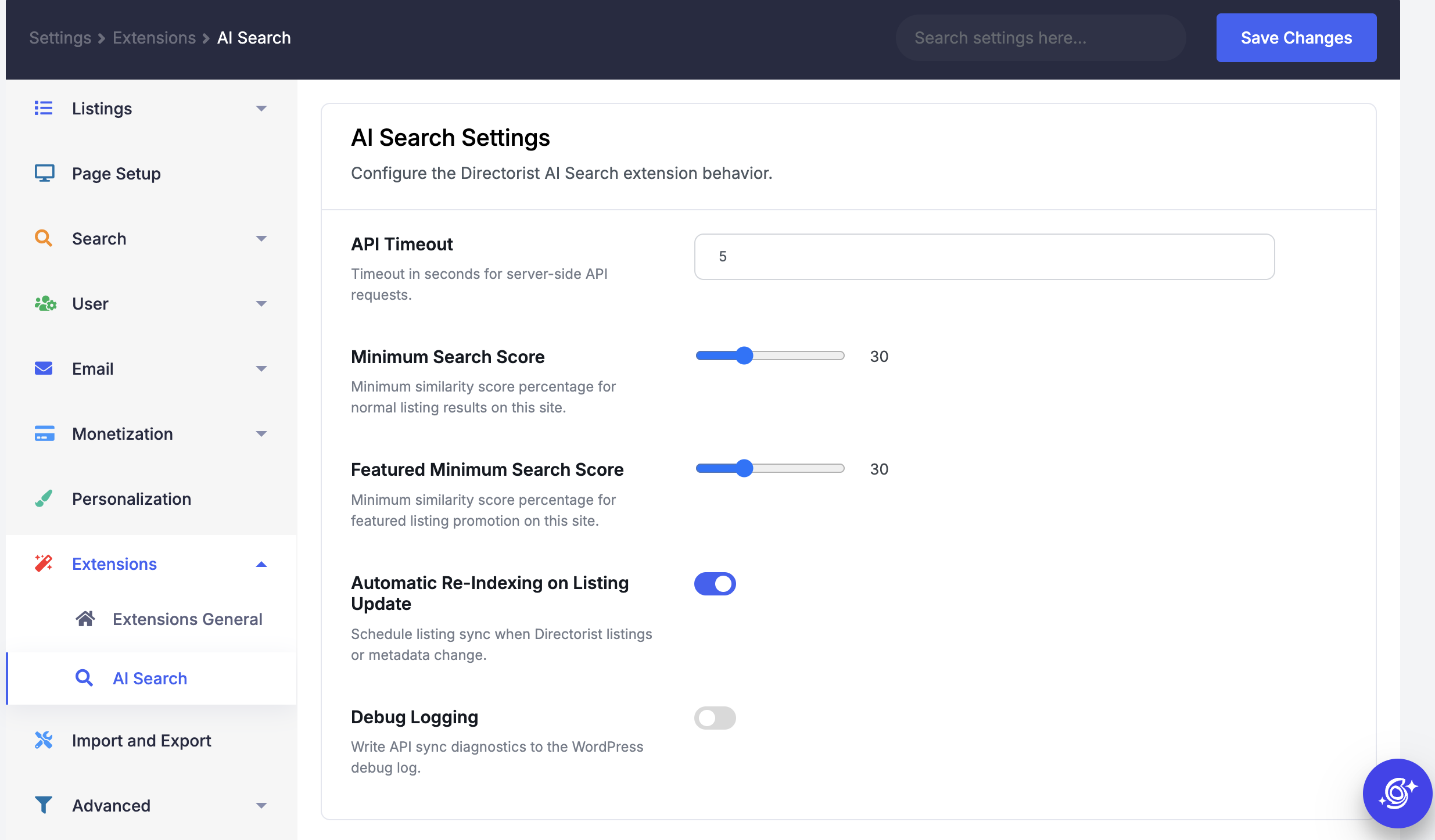
When search results include barely relevant listings, visitors lose trust fast and don't come back. The Minimum Score threshold acts as a quality gate - any listing scoring below it is automatically hidden. Raise it for tighter results, lower it for broader discovery.
Featured Score works as your monetization lever. Any listing scoring above the threshold gets automatic featured placement. Your premium clients get real visibility, renewals stay consistent, and your directory search stays trustworthy.
Individual Scoring to Understand Relevancy
Every listing gets its own relevance score for each search query - so you always know exactly why a listing ranks where it does. A score of 0.98 means a near-perfect match. A score of 0.34 means a weak connection. Nothing is hidden, nothing is guesswork.
This transparency gives you full control. If a listing ranks too low for a query it should win, adjust its semantic terms and retest. If weak listings keep appearing, raise the minimum score threshold. Every decision becomes data-driven instead of a guess.
Key Features
- Understands natural language queries
- Matches listings based on contextual meaning
- Recognizes synonyms, related phrases, and spelling variants
- Surfaces relevant listings even when query words never appear
- One-click Index All to process entire directory instantly
- Per-listing index, re-index, and delete index controls
- Bulk index and bulk re-index actions do
- Filter listings by directory, category, and AI indexing status
- Real-time indexing status
- Add custom synonyms, local slang, industry jargon
- Edit or remove any AI-generated term
- Terms editable directly from the WordPress admin panel
- Run any search query privately
- See live ranked results
- Status labels per result - Featured, Pass, Below Minimum
- Adjustable Minimum Score slider
- Adjustable Featured Score slider
- Save score settings as permanent site-wide defaults
- Full visibility of indexing progress and failure reasons
- Works with Core Directorist Search and Universal Search
- No separate search interface - enhances existing search
Key Benefits
- Smarter Search Results
- Better Listing Discovery
- Natural User Search Experience
- No More Keyword Stuffing
- Improved Search Accuracy
- Enhances Existing Search
- Better User Engagement
- Increased Listing Visibility
- Intelligent Featured Listing Boost
- Faster Discovery Across Large Directories
- Improved Multi-Directory Search
- Supports Semantic Terms
- No API Key Required
- No OpenAI or third-party AI account needed
- No per-search billing or usage costs
- Simple Setup Process
- Better User Satisfaction
- Higher Monetization Potential
- Scalable for Growing Directories
- Modern AI-Powered Experience
Frequently Asked Questions
Everything you need to know before using AI Search with Directorist.
It adds a semantic AI layer to your Directorist search system. Instead of matching only exact keywords, it understands the meaning and intent behind each search query and returns listings based on contextual relevance. It enhances both Core Directorist Search and Universal Search automatically once your listings are indexed.
No. Directorist manages the AI infrastructure on its own servers. There is no API key to configure, no OpenAI or third-party AI account required, and no per-search billing. Simply install the extension and index your listings.
Minimum Score controls how closely a listing must match a query before appearing in results. Listings scoring below this threshold are excluded. Featured Score is the threshold above which listings receive featured placement in results. Both settings can be tested using the Search Test panel and saved as site-wide settings.
No. It enhances your existing search without replacing it. The search interface visitors see remains the same. AI Search improves result quality and relevance behind the scenes, working alongside Core Search and Universal Search rather than replacing either.
Traditional search returns listings only when the search query matches words in the listing title or description. AI Search understands contextual meaning, so searching "romantic dinner" can surface rooftop restaurants, fine dining venues, and candlelight bistros even if they never used those exact words.
Semantic terms are AI-generated words and phrases associated with each listing, such as synonyms, local terminology, industry jargon, alternate spellings, and related phrases. They form the index that enables natural language matching. You can review, adjust, or add custom terms for any listing at any time.
The admin panel shows the failure status and reason for each listing. You can re-index failed listings individually using the Re-index action, or trigger a bulk re-index once the underlying issue is resolved. Only indexed listings appear in AI search results.
No. Directorist AI Search requires a live website with internet connectivity to communicate with Directorist AI infrastructure. It does not work on localhost or local development environments.