 Up to 35% Off!


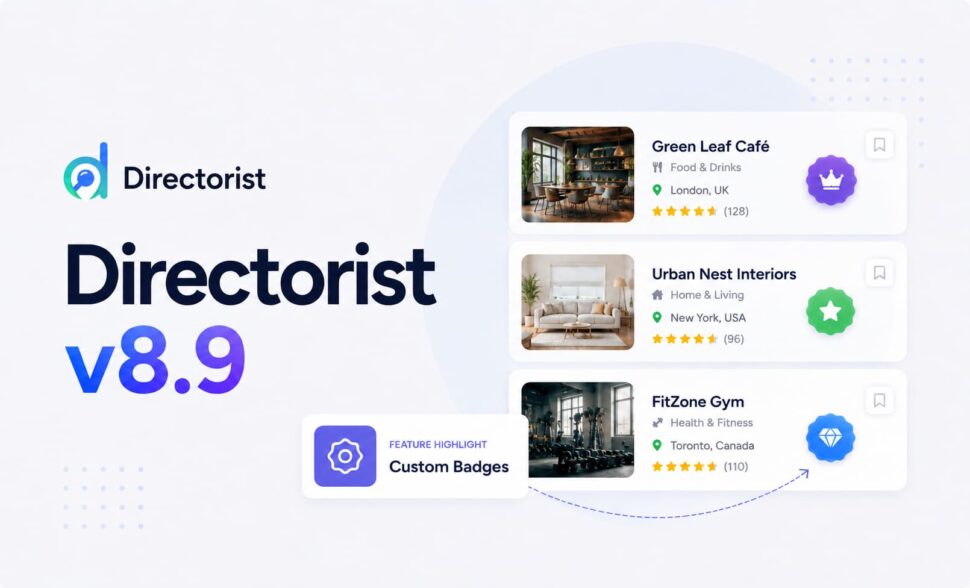
Directorist v8.9: Custom Badges Put Listing Labels Fully in Your Hands
-

- Product Updates
- 6 mins read
We ship new features to the Directorist core plugin frequently, and that plugin is free. It’s fair to ask why we put so much into something that doesn’t generate direct revenue.
Here’s the honest answer: the core plugin is the foundation of our entire ecosystem, and Directorist now powers over 25,000 active directories worldwide. As part of the WordPress open source community, we see that as a responsibility, not a bonus feature. We build for everyone who uses Directorist, regardless of whether they’ve ever purchased a pro add-on. Whether someone upgrades to our premium extensions comes second to that.
For years, Directorist listings could wear exactly three labels – New, Popular, and Featured. Useful, but fixed. If your directory needed a “Top Rated” badge, a “Trending This Week” tag, or a label for your own promotions, there was no built-in way to make it happen without custom code.
Directorist v8.9 changes that. The headline feature of this release is Custom Badges – a rule-based badge builder that lets you create as many badges as you want, define exactly when each one should appear, and style it however fits your brand. It’s the biggest addition in this release, and it’s what most of today’s post is about.
Alongside it, v8.9 also ships a pending order cancellation flow, timezone-aware Business Hours in the v2 Listings API, new map sync events for developers, and a batch of reliability fixes across orders, file uploads, and the REST API.
TL;DR
Directorist v8.9 introduces fully configurable Custom Badges with conditional rules, icons, colors, and tooltips — the main focus of this release. It also adds pending order cancellation from the user dashboard, timezone support for Business Hours in the v2 API, new map bridge lifecycle events, and several stability and bug fixes.
Custom Badges: Build Your Own Rules for Listing Labels
Badges are one of the fastest ways to tell a visitor what matters about a listing before they even click into it. Until now, that signal was limited to whatever Directorist decided in advance. With v8.9, that decision is yours.
Custom Badges let you define your own conditions — view count, listing age, rating, reviews, featured status — and Directorist automatically applies the badge to any listing that qualifies. No manual tagging, no code, no plugin add-ons. Set the rule once, and it runs itself.
Creating a Custom Badge
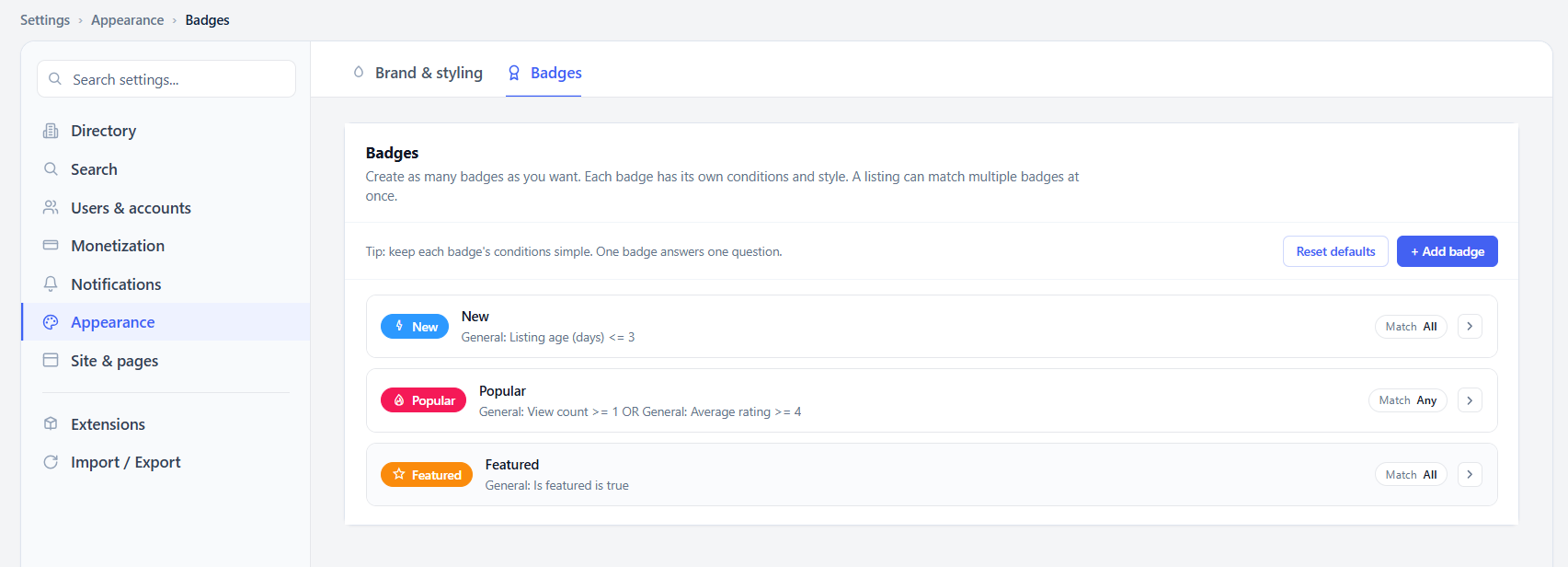
Head to Settings → Appearance → Badges. This is where every badge on your directory lives, including the default New, Popular, and Featured badges, and it’s also where you’ll click Add Badge to start a new one.
If you’re experimenting and want a clean slate, the Reset Defaults button restores the original badge setup – so there’s no risk in trying different rules before you settle on one.
Choosing a Badge Type
Every badge starts with a type:
- Text badge — a label with an optional icon (e.g., a blue “Trendy” tag).
- Icon badge — just an icon, with hover text that appears when a visitor points at it.
Give the badge an Internal name (visible only to admins) and, for text badges, a Visible label — the actual text your visitors will see. From there, set the background, text, and border colors so the badge matches your directory’s look and feel.
Setting Match Conditions
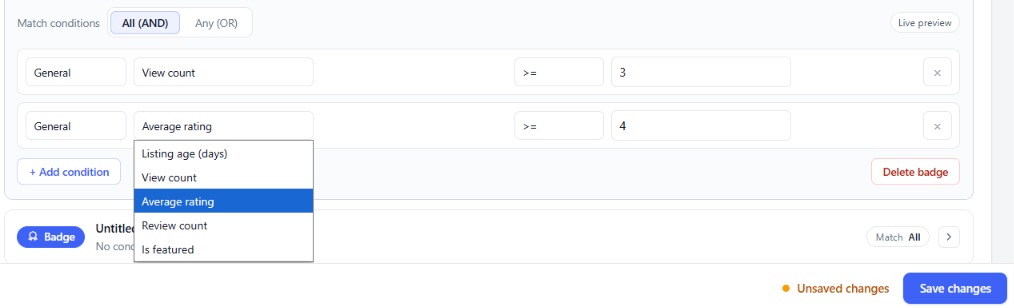
This is where a badge becomes genuinely custom. Under Match Conditions, choose whether a listing needs to satisfy All rules (AND) or just Any one of them (OR), then add conditions from fields like:
- View count
- Listing age (days)
- Average rating
- Review count
- Is featured
Stack as many conditions as you need, set an operator and value for each, and remove any rule with a single click. A “Top Rated” badge might require an average rating of 4 or higher and at least 5 reviews. A “Trending” badge might only need a high view count or a recent listing date. The logic is entirely yours to define.
Once the rules are set, click Save Changes — the badge is live immediately and starts appearing on every listing that meets its conditions.
Displaying Badges on the Single Listing Page
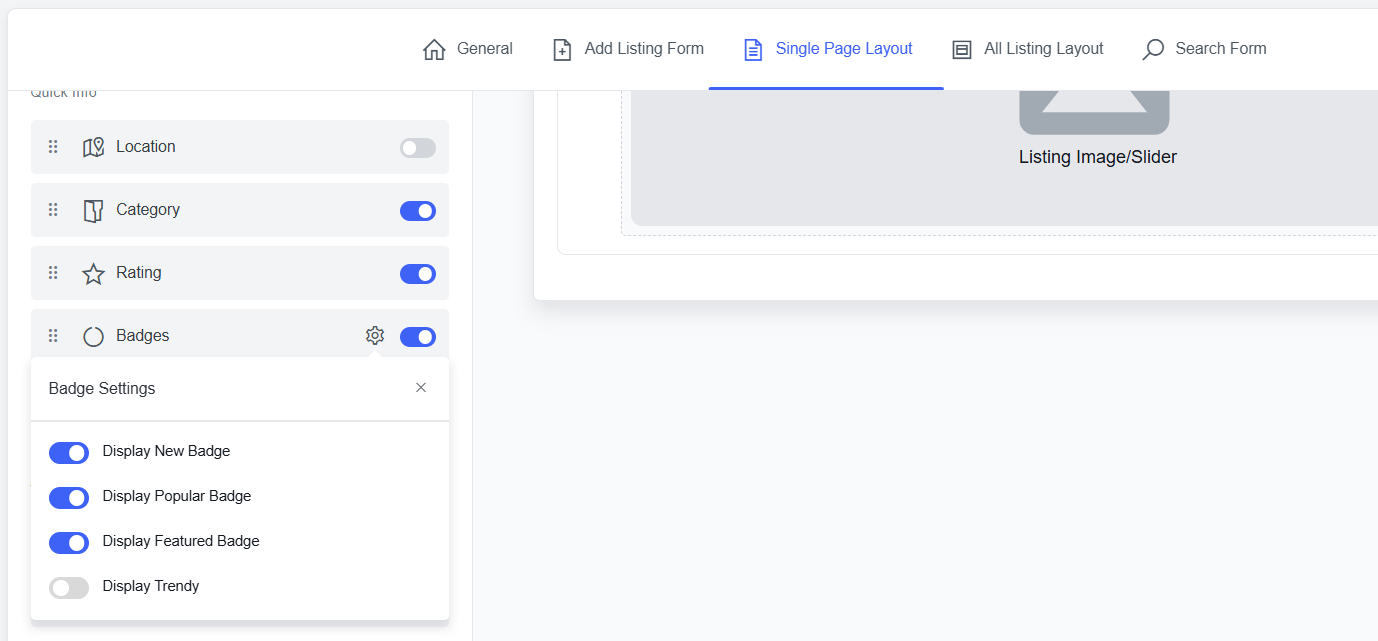
New badges don’t show up automatically everywhere — you decide where. Go to Directory Builder → Single Page Layout → Listing Header → Quick Info, and you’ll find Badges listed alongside Location, Category, and Rating.
Toggle it on, then click the gear icon to open Badge Settings, where you can switch each individual badge — New, Popular, Featured, and any custom badge you’ve built — on or off for the single listing page. Drag to reorder Badges among the other Quick Info elements however you like.
Adding Badges to the All Listing Layout
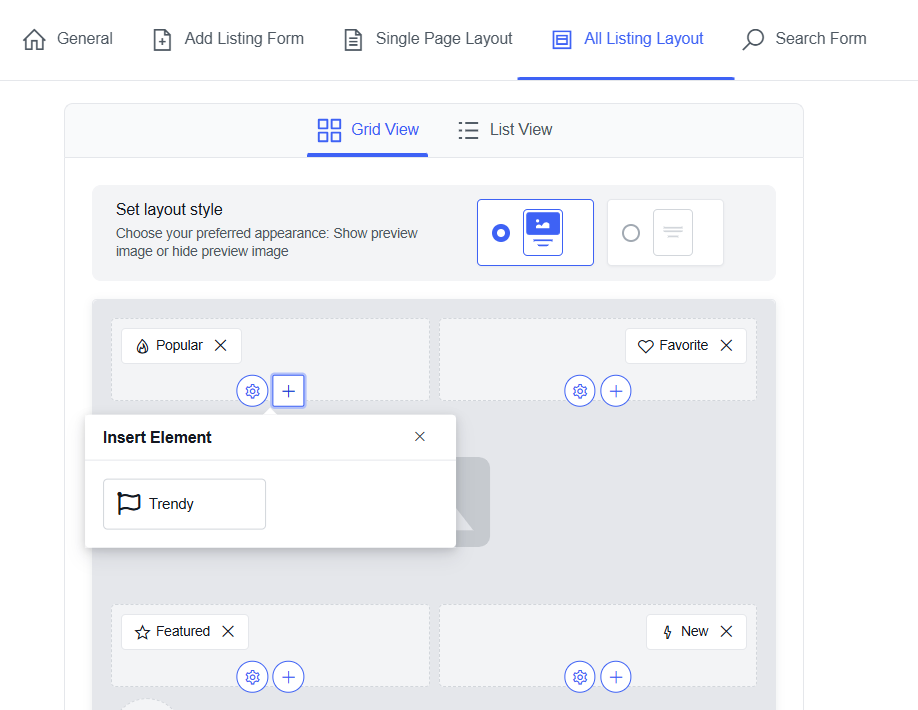
Badges aren’t limited to the single listing page. In Directory Builder → All Listing Layout, switch to Grid or List view, and you’ll see a + button on each card position (top-left, top-right, etc.). Click it to open Insert Element and add your custom badge right there.
A single position can hold up to three badges at once, so a card can show “Popular” and “Trendy” side by side without conflict. Once a position is full — or every badge you’ve created is already placed somewhere — the Insert Element popup simply shows nothing left to add.
Deleting a Badge
Outgrown a badge? Go back to Settings → Appearance → Badges, find it in the list, and click Delete Badge. It’s removed instantly and stops appearing on every listing it was previously matched to.
Why This Matters
Custom Badges turn a cosmetic detail into a real merchandising tool. A real estate directory can flag “Price Reduced” listings automatically. A restaurant directory can surface “Highly Rated” spots without an admin lifting a finger. A job board can highlight “Urgent Hiring” posts the moment they’re added. The rules run continuously in the background – set them once, and the Directorist keeps the badges accurate as listing data changes.
Also New: Pending Order Cancellation
Users can now cancel a pending order directly from their dashboard, instead of waiting on an admin or support ticket to resolve it. It’s a small change that removes friction from the checkout experience and cuts down on unnecessary back-and-forth for order management.
Also New: Timezone Support for Business Hours
The v2 Listings API now supports timezone options and validation for Business Hours, along with an “always open” setting. This matters most for multi-location or multi-timezone directories, where “open now” needs to reflect the listing’s actual local time rather than the server’s.
Also New: Map Bridge Lifecycle Events
For developers working with the Listings With Map integration, Directorist now emits lifecycle events for map ready state, viewport changes, and marker clicks. These events make it easier to keep custom map implementations in sync with listing data without relying on workarounds.
Improved
- Legacy orders API compatibility — current order, checkout, and payment endpoints have moved to v2, while v1 orders routes have been restored for backward compatibility.
- Extension settings empty state — messaging is clearer when an active extension’s settings actually live elsewhere in the settings panel.
- Dashboard listing action menu — behavior is more consistent for shorter listing tables.
Fixed
- Admin orders list and order details now display correctly for guest, missing, or deleted customer accounts.
- Required hidden fields under Conditional Logic no longer block listing submissions.
- Multiple custom File Upload fields on the same form no longer fail with invalid upload requests.
- REST API password reset PIN validation and temporary media upload authentication for Application Password requests are corrected.
Wrapping Up
Custom Badges is the feature we’d point to first in Directorist v8.9 — it takes something every directory already relies on and hands you full control over it, without touching a line of code. Pair it with the rest of this release — safer order handling, timezone-accurate Business Hours, and a steadier API — and v8.9 is a release worth updating for.
As always, back up your site before updating, then upgrade Directorist core to v8.9 from your WordPress dashboard.
Have questions or feedback? Drop them in the comments or head over to the Directorist Community.
Read More Product updates

Rezaul Karim
Rezaul Karim is a Digital Marketer and Content Strategist at wpWax, the team behind Directorist — trusted by 20,000+ directory websites worldwide. With 6+ years of experience in SEO-driven content and WordPress plugin marketing, he provides data-backed insights on building high-authority directory businesses. From optimizing search visibility to streamlining directory user experiences, Rezaul focuses on practical solutions that drive impressions and conversions. When he isn't auditing site performance or exploring the latest AI-integrated marketing tools, he is an avid reader and advocate for sustainable digital growth.


Leave a Reply
You must be logged in to post a comment.