 Up to 35% Off!


Table of Contents
- 1 Why Avoid Giving Users Dashboard Access?
- 2 What are the Benefits of Front-End Listing Submission
- 3 Common Directory Websites That Need User Submissions
- 4 Which Features You Look for in a Front-End Submission System
- 5 How the Submission Workflow Works
- 6 How to Let Users Submit Listings Without Admin Access
- 7 What are The Best Practices for Managing User-Submitted Listings
- 8 Frequently Asked Questions
- 9 Wrapping Up
How to Let Users Submit Listings Without Admin Access
-

- Tutorials Tips & Tricks
- 4 mins read
If you’re running a directory website, giving every contributor access to the WordPress dashboard can quickly become a security and management headache.
Fortunately, you can allow users to submit listings directly from the front end of your website without creating administrator accounts or giving access to the WordPress backend.
In this guide, you’ll learn how front-end listing submission works, why it’s important, and how to set it up.
Why Avoid Giving Users Dashboard Access?
Many directory owners start by creating WordPress user accounts for everyone who wants to add a listing.
This creates several problems, such as:
- Security risks
- User confusion
- Accidental site changes
- More support requests
- Difficult content moderation
Instead, front-end submission forms let users add and manage listings without ever entering the WordPress dashboard.
What are the Benefits of Front-End Listing Submission
- Better User Experience: Users can submit listings through a simple form instead of navigating the WordPress admin area.
- Increased Listing Submissions: The easier the process, the more likely users are to complete their submissions.
- Improved Security: Users never access sensitive backend settings.
- Easier Content Moderation: Site owners can review, approve, edit, or reject submissions before publishing.
Common Directory Websites That Need User Submissions
- Local business directories
- Real estate directories
- Job boards
- Restaurant directories
- Event directories
- Service provider directories
- Freelancer marketplaces
- Classified websites
Which Features You Look for in a Front-End Submission System
When choosing a directory plugin, make sure it supports:
- Custom Submission Forms: Allow users to enter Business name, Description, Images, Contact information, Website URL, Social profiles, Location details.
- Listing Approval Workflow: Choose whether listings are published automatically sent for review or approved manually
- User Dashboard: Users should be able to Edit listings, Renew listings, Upgrade listings, Track submission status.
- Paid Listing Support: Accept payments before publishing listings.
How the Submission Workflow Works
A typical process looks like this:
- User clicks “Submit Listing”
- User completes the form
- Listing enters moderation queue
- Admin reviews submission
- Listing is approved
- Listing becomes publicly visible
This workflow keeps quality high while reducing administrative work.
How to Let Users Submit Listings Without Admin Access
Assuming you already have a directory website running, you can allow users to submit listings from the front end without giving them access to your WordPress dashboard.
If you have not created your directory website yet, follow our detailed guide on how to create a directory website first. Once your directory is ready, follow these steps.
Step 1: Enable Guest Listing Submission
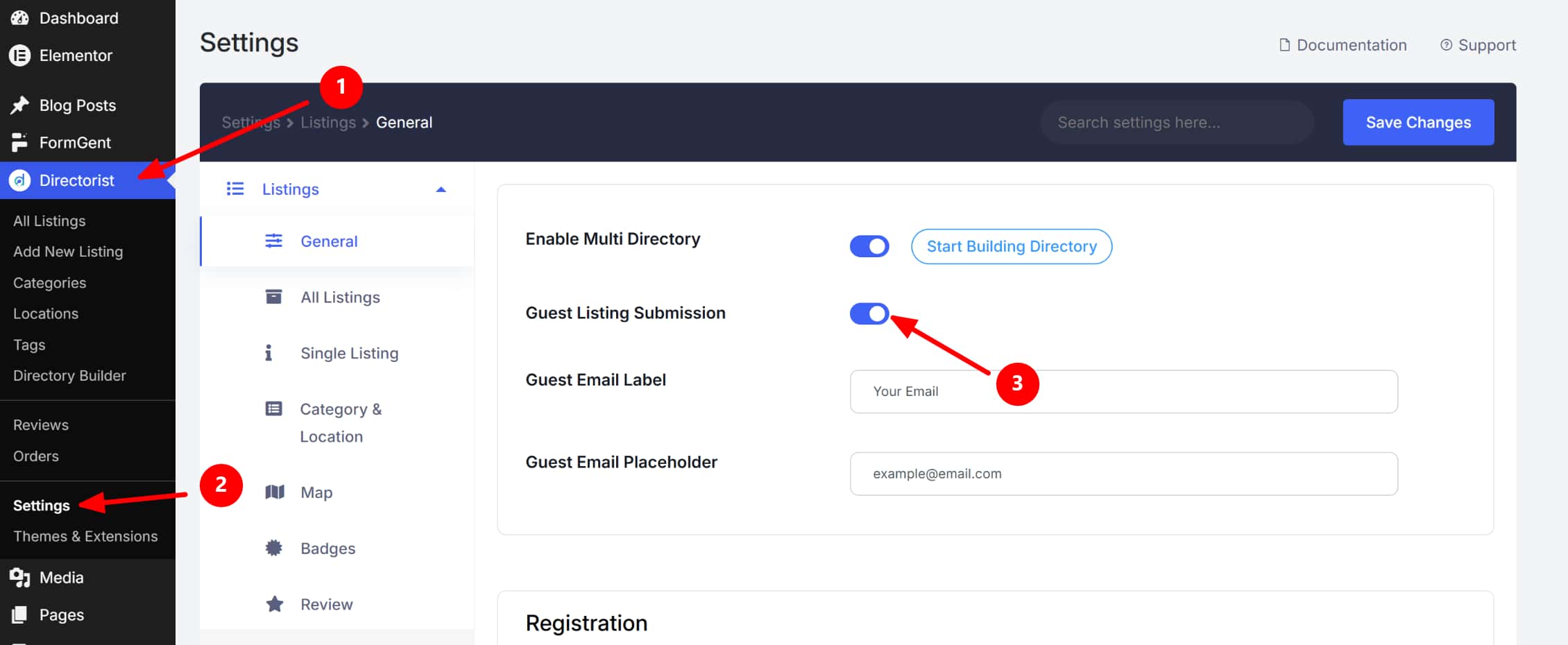
From your WordPress dashboard, go to Directorist → Settings.
Then open Listings → General and enable Guest Listing Submission.
You can also customize the guest email label and placeholder text, such as:
- Guest Email Label: Your Email
- Guest Email Placeholder: [email protected]
After making changes, click Save Changes.
Step 2: Customize the Add Listing Form
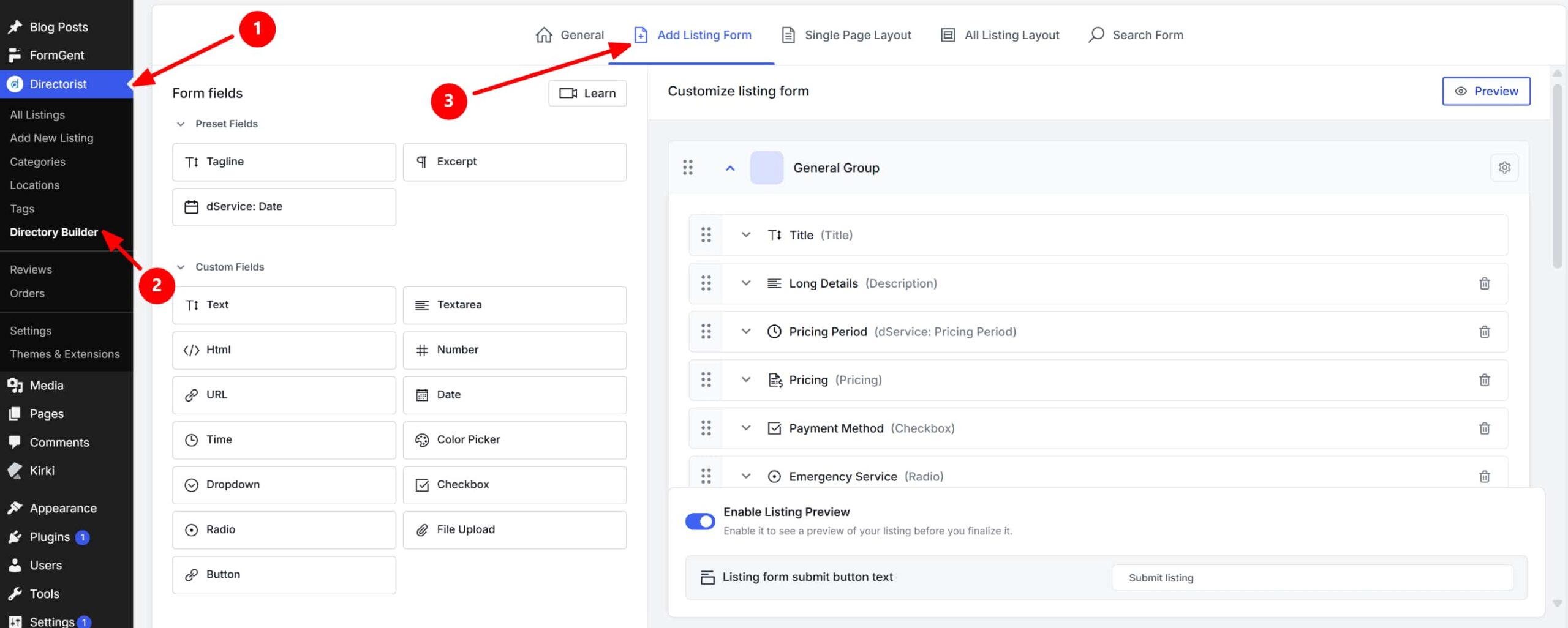
Next, go to Directorist → Directory Builder.
Open the Add Listing Form tab. Here, you can control what fields users see when submitting a listing.
You can add or customize fields such as:
- Title
- Description
- Pricing
- Payment method
- Date
- URL
- File upload
- Checkbox
- Radio button
- Dropdown
This lets you collect only the information you need while keeping the submission process simple for users.
Inside the Add Listing Form settings, you can enable Listing Preview.
This allows users to review their listing before submitting it. This improves the user experience and helps reduce mistakes before listings are sent for review. You can also customize the submit button text, for example: Submit listing
Step 3: Set Listing Approval Rules
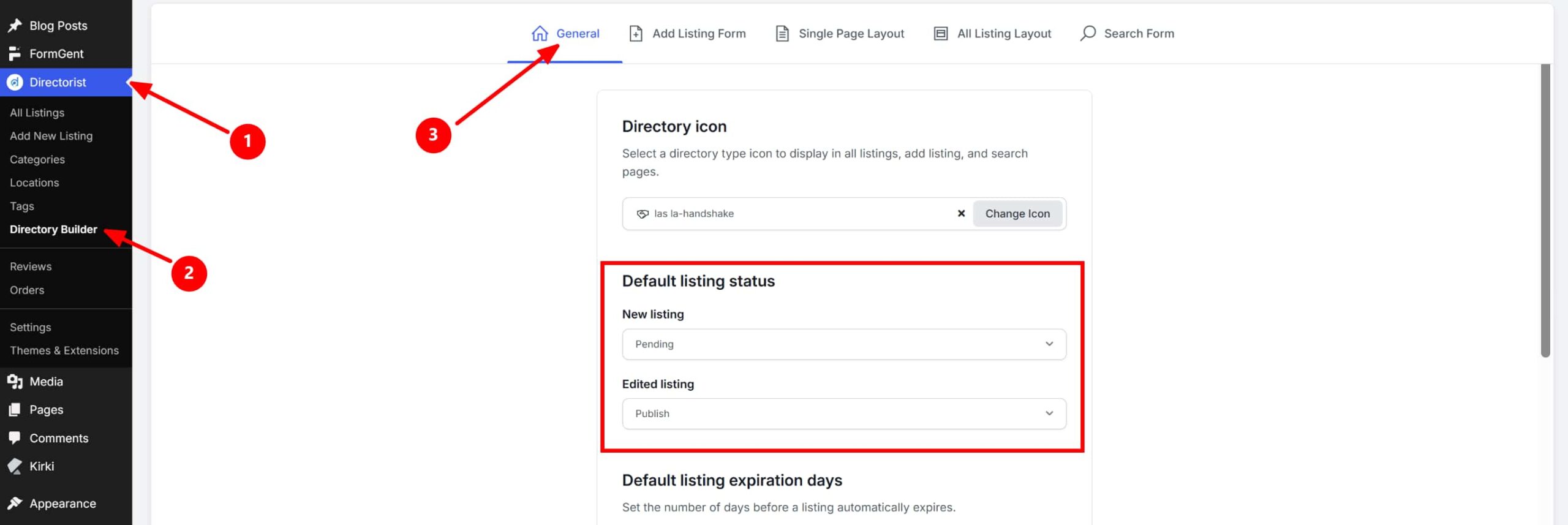
Now go to Directorist → Directory Builder → General.
Scroll to Default listing status.
Set the status for:
- New listing: Publish or Pending
- Edited listing: Publish or Pending
For better control, set new listings to Pending. This means submitted listings will not appear publicly until an admin reviews and approves them.
Step 4: Review and Publish Submitted Listings
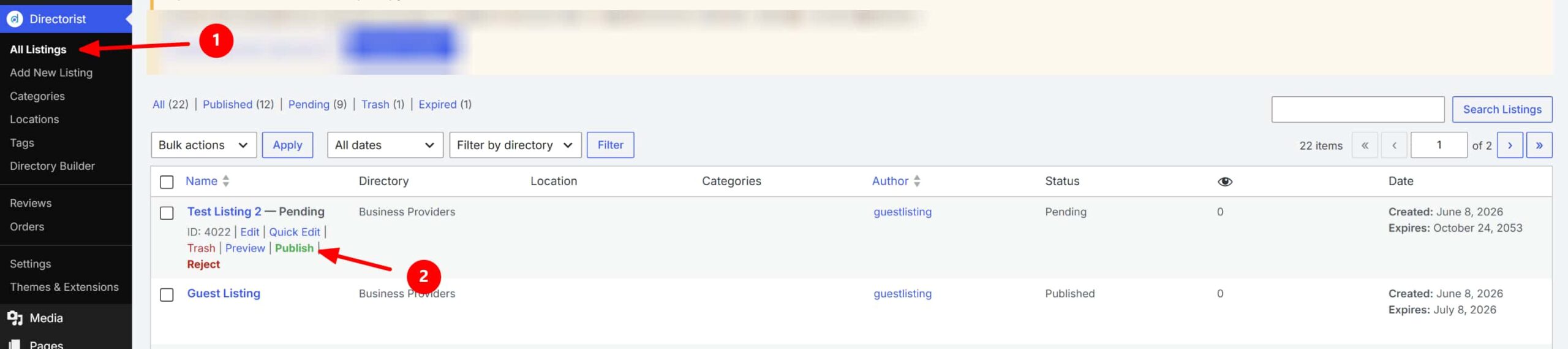
Once a user submits a listing, you can review it from the WordPress dashboard.
Go to Directorist → All Listings, check the submitted listing, make any necessary edits, and publish it when ready.
This workflow lets users submit listings easily while keeping your website secure, organized, and fully under your control.
Now, submit 2 or 3 test listing by yourself to check everything works correctly.
What are The Best Practices for Managing User-Submitted Listings
- Require Essential Fields: Avoid incomplete listings by making important fields mandatory.
- Use Moderation: Review new submissions before publishing.
- Prevent Spam: Add CAPTCHA, Email verification, User registration requirements.
- Create Listing Guidelines: Clearly explain Allowed content, Image requirements, Category selection rules.
Frequently Asked Questions
Can users edit their own listings?
Yes. Most modern directory plugins include a front-end dashboard where users can update listings.
Do users need a WordPress account?
Usually yes, but they don’t need administrator privileges.
Can I charge for submissions?
Yes. Many directory websites monetize through paid submissions, featured listings, and membership plans.
Can I approve listings before publication?
Absolutely. Manual moderation is one of the most requested directory features.
Wrapping Up
Allowing users to submit listings without admin access creates a safer, more scalable directory website. It improves the user experience, reduces support requests, and helps you grow your directory faster.
If you’re looking for a directory plugin that includes front-end submissions, moderation workflows, user dashboards, and paid listing support, [your plugin name] can help you launch a professional directory website without custom development.

Rezaul Karim
Rezaul Karim is a Digital Marketer and Content Strategist at wpWax, the team behind Directorist — trusted by 20,000+ directory websites worldwide. With 6+ years of experience in SEO-driven content and WordPress plugin marketing, he provides data-backed insights on building high-authority directory businesses. From optimizing search visibility to streamlining directory user experiences, Rezaul focuses on practical solutions that drive impressions and conversions. When he isn't auditing site performance or exploring the latest AI-integrated marketing tools, he is an avid reader and advocate for sustainable digital growth.


Leave a Reply
You must be logged in to post a comment.