





Table of Contents
- 1 What Is a Membership Business Model?
- 2 Why Membership Directories Are the Sweet Spot
- 3 How Directorist Enables Membership Business Models
- 4 Step-by-Step: Building Your First Membership Directory
- 5 Common Mistakes Directory Owners Make with Memberships
- 6 Pricing Your Membership Directory: The Strategic Framework
- 7 Why Now Is the Time to Build a Membership Directory
- 8 Start Your Membership Directory Today
Membership Business Model: How to Build a Profitable Directory Platform in 2026
-

- Membership
- 9 mins read
The subscription economy is booming. By 2026, the global subscription e-commerce market is projected to reach $904 billion—and most entrepreneurs are still building traditional one-time-purchase websites.
Here’s what they’re missing: A membership business model combined with a directory platform is one of the fastest-growing ways to generate recurring revenue online.
Think about it. Chambers of commerce charge annual memberships AND collect listing fees. Professional networks charge membership dues AND let members advertise services. Industry directories charge subscription tiers AND feature premium placements. Each model stacks revenue streams on top of each other, turning a single visitor into multiple revenue sources.
But here’s the problem: most tools force you to choose. You get a membership plugin that doesn’t handle listings, or a directory plugin that wasn’t built for memberships. Building both from scratch costs $10,000+ in custom development.
What if you could do both with one tool?
That’s where Directorist comes in. In this guide, we’ll walk you through exactly how to build a profitable membership directory—and why it’s the untapped goldmine of the online business space.
What Is a Membership Business Model?
A membership business model is one where customers pay a recurring fee (usually monthly or annual) to access exclusive benefits, content, or community. Instead of selling a product once, you create an ongoing relationship that generates predictable, repeatable revenue.
The key benefit: recurring revenue. Unlike selling a course or product one time, memberships create a stable income stream you can count on month after month. This makes your business more attractive to investors, easier to forecast growth, and less dependent on constantly acquiring new customers.
The Three Main Types of Membership Business Models
1. Subscription Access
The simplest model. Customers pay to access something they can’t get for free—like streaming services (Netflix), software (Dropbox, Adobe), or professional content. You pay monthly, you get access. Stop paying, you lose access.
2. Tiered/Freemium Offerings
You offer a free basic version and charge for premium tiers. Slack does this: free team chat, paid for advanced features. Directorist does the same—free core plugin, paid extensions for additional functionality.
3. Membership Communities
Customers pay to join a community where they get exclusive networking, resources, or status. A chamber of commerce is the classic example—members pay annual dues and get listed in the local business directory.
All three work. The real power comes when you combine them.
Why Membership Directories Are the Sweet Spot
Here’s what most people don’t realize: membership directories are the hybrid model that captures multiple revenue streams at once.
Take a professional services directory for dentists, lawyers, or consultants. You could:
- Charge annual memberships ($99–$299/year)
- Charge listing fees for basic directory inclusion ($49/year)
- Charge premium listing upgrades for featured placement ($199/year)
- Charge for additional services like lead generation, verified badges, or priority customer support
One visitor can generate three to five separate revenue streams. One person who joins as a member might also upgrade to a premium listing, then add featured placement, then subscribe to your lead generation service.
This is why membership directories generate 2–3x higher revenue per user than straight directories or straight membership sites.
The membership business model works because it creates perceived exclusivity (you’re part of a special community) while the directory monetization works because it creates real marketplace value (you get discovered by people looking for services).
Together? They’re unstoppable.
How Directorist Enables Membership Business Models
Membership directories are only profitable if the tech handles both sides seamlessly. That’s the catch most entrepreneurs face—their directory plugin doesn’t support memberships, and their membership plugin doesn’t support listings.
Directorist solves this because it was built to handle multiple use cases from the ground up.
What Makes Directorist Different
Built-in payment processing: Directorist integrates with Stripe and PayPal out of the box. Set up membership tiers, charge listing fees, collect payments for upgrades—all without installing a separate payment plugin.
Custom fields for membership tiers: Create unlimited membership levels (Starter, Professional, Enterprise). Each tier can have different listing limits, featured placement, access to reports, or priority support. Directorist’s custom fields system lets you define exactly what each membership level includes.
Flexible listing management: Members can create, edit, and manage their own listings without your intervention. That’s the killer feature. You’re not stuck manually creating directories—your members maintain the directory for you.
SEO-first architecture: Directorist ships with schema markup, clean URLs, and structured data built in. Your directory ranks in Google from day one, which drives organic traffic to your membership site.
Free to start: Install Directorist free on your WordPress site. Build your membership directory at no cost. Add premium extensions only when you’re ready to scale.
Step-by-Step: Building Your First Membership Directory
Here’s exactly how to launch a membership directory using Directorist. This assumes you already have a WordPress site running.
Step 1: Install and Activate Directorist
Download Directorist from WordPress.org and activate it. This takes two minutes. You’ll get the free core plugin with all the directory functionality you need to start. If you’re on tight budget, then start with free. The free version is packed with most of the initial features that needs to run membership site. In this case, some complex and customization require custom coding. If you want skip the coding hassle, you can try premium extensions that will help to add features on your membership site with ease.
Our recommendation is to take a plan that is packed with all extensions and this will not only give you the best value of money but also extend features support which you’ll need later when you grow.
Step 2: Configure Membership Tiers
Use Directorist’s settings to define your membership levels. Here’s an example:
Starter Membership ($99/year)
- Ability to create 3 listings
- Basic profile page
- Directory inclusion
- Community access
Professional Membership ($299/year)
- Unlimited listings
- Featured placement (shows up first in search results)
- Advanced analytics (see who viewed your profile)
- Badge indicating “Professional Member”
- Priority email support
Enterprise Membership ($999/year)
- Everything in Professional
- Custom branding options
- Dedicated account manager
- Lead generation reporting
Use Directorist’s custom fields and membership extensions to enforce these limits automatically. When someone’s membership expires, their “Featured” badge disappears..
In free plan, you need some custom work. But if you don’t want touch code but need better options then Pricing Plan is the best solution for you. It packed with multiple payment gateways also recurring payment.
To create a membership plans, you can follow this guide – Directorist Pricing Plans — Plan Creation & Full Workflow
Step 3: Set Up Payment Processing
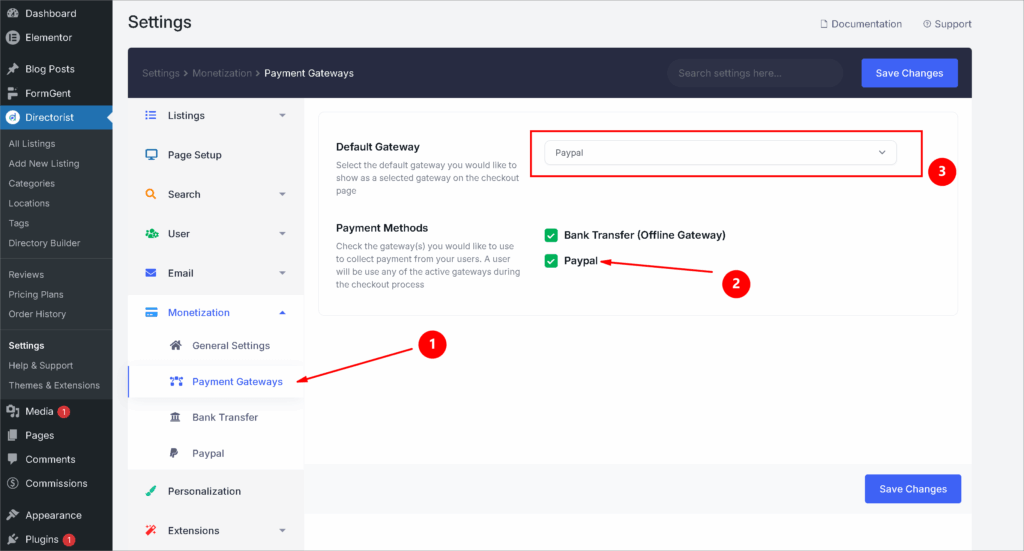
Connect your Stripe or PayPal account in Directorist’s settings. Set your membership pricing and billing cycle (monthly or annual). Turn on auto-renewal so customers are billed automatically each period.
This is where recurring revenue comes from. No invoice emails, no manual billing. Payments process automatically.
You can enjoy offline payment & PayPal for FREE! Using Stripe will require an additional extension. If you already buy any plan then you don’t need buy again it separately.
Get PayPal Payment Gateway Extension for Free
Step 4: Build Your Directory Pages
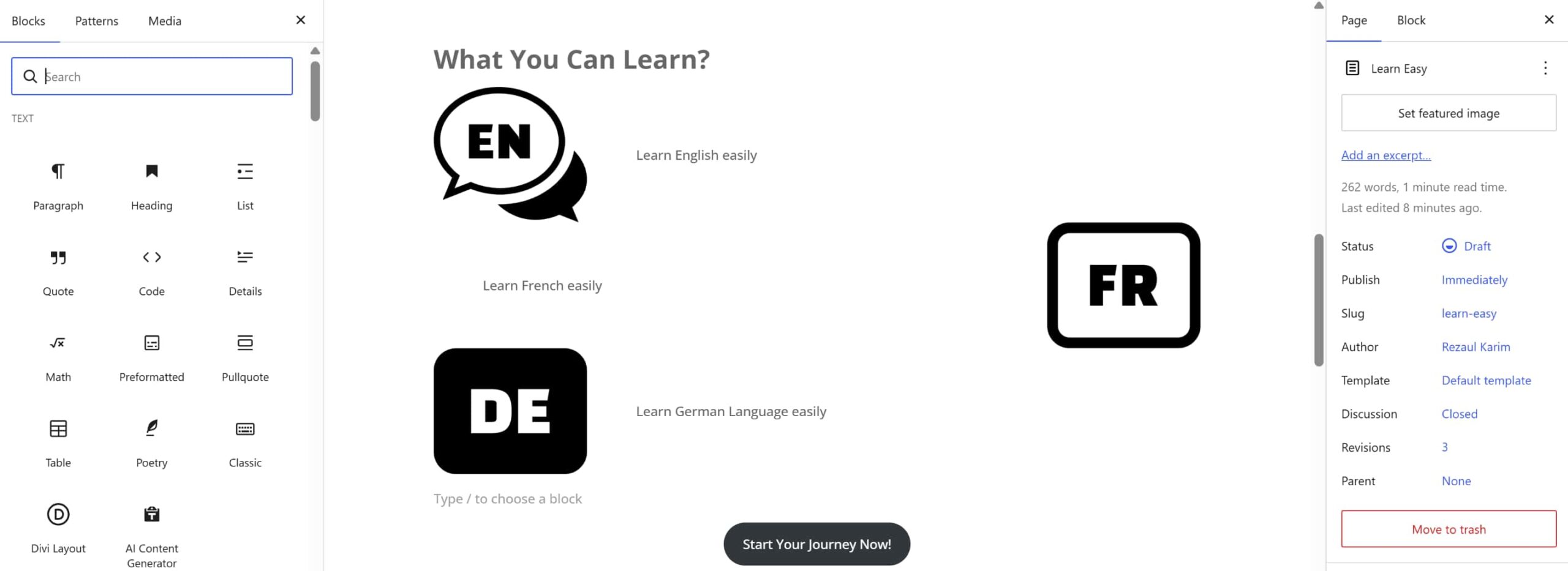
Create a front-end directory page using Directorist’s shortcodes or Gutenberg blocks. Members will see this page after they sign up. Non-members see a limited preview that encourages them to join.
Set up a basic directory design:
- Search by category, location, keyword
- Filter by membership tier (show “Professional Members” separate from “Starter”)
- Individual member profile pages
Keep it simple. You can always customize the design later.
Step 5: Launch and Drive Traffic
Publish a landing page explaining your membership benefits. Drive traffic through:
- Email outreach to relevant industry contacts
- LinkedIn networking
- Facebook groups in your niche
- Guest posts on industry blogs
- Organic search (Directorist’s SEO setup means you’ll start ranking for directory-related keywords naturally)
Tip: Start with 10–20 founding members at a discounted rate. The first members help validate your membership business model and drive organic word-of-mouth growth.
Common Mistakes Directory Owners Make with Memberships

Before you launch, avoid these pitfalls:
Mistake #1: Charging Too Low
Most first-time directory owners underprice their memberships because they’re afraid of losing members. They charge $99/year when the market will bear $299/year.
The fix: Survey your target market. Ask 10 people in your niche what they’d pay for a directory membership. Most will tell you they’d gladly pay $200–$500/year for a quality directory. Start with higher pricing and lower it if you need to. You can’t raise prices later without frustrating existing members.
Mistake #2: Building the Directory Before Validating Demand
The classic trap: spend 3 months building a beautiful directory, then launch to… nobody. No members, no revenue, no momentum.
The fix: Validate first. Launch a landing page explaining your membership business model. Collect email addresses. Talk to 20 potential members one-on-one. Get 5–10 committed to join before you spend significant time building. This takes 2–3 weeks and saves months of wasted effort.
Mistake #3: Not Maintaining Your Directory
A dead directory is worse than no directory. If members log in and see outdated, spammy, or inactive listings, they’ll cancel their membership.
The fix: Set community guidelines. Remove inactive listings every 90 days. Verify new listings before they go live. Offer an incentive for members to keep their profiles updated. Make directory quality a selling point.
Mistake #4: Forgetting the Community Angle
Directories can feel transactional—I pay, I get listed, I find customers, that’s it. But the best memberships have community.
The fix: Add community features beyond the directory. Host monthly member webinars. Create a private Slack or Facebook group. Feature member spotlights. Make members feel like they’re part of something, not just renting access to a database.
Pricing Your Membership Directory: The Strategic Framework

Membership pricing can make or break your business. Get it right, and you’re profitable. Get it wrong, and you’re stuck with too many $9/month members and high churn.
Tier Your Pricing Across Value Levels
Don’t just offer one membership level. Offer three:
Entry Level ($49–$149/year)
- Basic directory listing
- Members can find you
- Simple profile page
Mid Level ($199–$399/year)
- Featured placement (shows first in search)
- Advanced profile features
- Analytics (see who viewed you)
- Priority support
Premium Level ($599–$1,299/year)
- Everything above
- Custom branding options
- White-label option (for resellers)
- Dedicated support
Most of your revenue will come from the mid-tier. It’s expensive enough to feel premium but affordable enough for the market.
Add à la Carte Upsells
Don’t force everything into membership tiers. Offer optional upgrades:
- Featured placement for a month: $49
- Lead export (get member email): $99/month
- Verified badge (shows you’ve verified this person): $25/month
- Premium profile template: $10/month
These small upsells add 10–20% to your revenue without feeling pushy.
Test and Iterate
Your first pricing is probably wrong. Launch, measure, adjust. Track:
- Conversion rate (% of site visitors who join)
- Average revenue per member (ARPM)
- Churn rate (% who cancel each month)
- Tier breakdown (which tier is most popular?)
If conversion is above 5%, raise prices. If it’s below 2%, lower prices. If Mid tier has 60%+ of revenue, you got it right. If Premium has 0% uptake, your features don’t match what members value.
Why Now Is the Time to Build a Membership Directory
The subscription economy is maturing. Consumers are comfortable paying monthly or annual fees for online communities and platforms. Meanwhile, most of your competitors are still selling one-time products or transactional directories that don’t generate recurring revenue.
A well-built membership directory launched in 2026 can:
- Generate $50K–$200K in Year One with basic marketing
- Build a community with real stickiness (memberships renew at 60–70% rates if the value is there)
- Create a defensible business (your network effects make you harder to compete with as you grow)
- Attract investors or acquisition interest (recurring revenue businesses are worth 4–10x more than transactional ones)
And the fastest way to launch? Directorist.
With 20,000+ directory owners already using it and a 4.6-star rating on WordPress.org, Directorist is battle-tested. You can set up your first directory without writing a line of code.
Start Your Membership Directory Today
The membership business model isn’t new. But the combination of memberships + directory + payments + automation is still relatively untapped.
You have a choice:
Option A: Build a traditional directory. Hope to sell listings one-time. Spend your time chasing new customers constantly. Cap your revenue at $5–10K/year.
Option B: Build a membership directory. Create recurring revenue. Let the community maintain itself. Scale to $50K+/year with less work.
Start your free membership directory with Directorist today. Install the free plugin, build your first membership tier, and launch within a week. No credit card required. No setup fees.
The 20,000+ directory owners who chose Directorist already know: the membership business model works best when your tool is built for it from the ground up.
Ready to build your membership directory?
The membership business model is your path to recurring revenue. Don’t waste another year on transactional models. Build your membership directory now.

Rezaul Karim
Rezaul Karim is a Digital Marketer and Technical Writer dedicated to scaling online businesses. With 6+ years of experience in SEO-driven content and WordPress plugin architecture, he provides data-backed insights on building high-authority marketplaces. From optimizing search visibility to streamlining directory user experiences, Rezaul focuses on practical solutions that drive impressions and conversions. When he isn’t auditing site performance or exploring the latest AI-integrated marketing tools, he is an avid reader and advocate for sustainable digital growth.
Leave a Reply
You must be logged in to post a comment.