 Up to 35% Off!



Table of Contents
- 1 1. One-time file download
- 2 2. Hourly rate
- 3 3. Monthly recurring
- 4 4. Limited stock
- 5 5. Multi-tier pricing
- 6 A smaller option worth knowing: Extras
- 7 These aren't locked to just one
- 8 Why Digital Marketplace model matters for the directory owner
- 9 Frequent Asked Questions
- 9.1 Do I need WooCommerce to use Digital Marketplace?
- 9.2 Can a single listing use more than one pricing model at once?
- 9.3 How much commission does the site take by default?
- 9.4 When can a vendor request a payout?
- 9.5 Does the site owner have to manually approve payouts?
- 9.6 Can I limit Digital Marketplace to specific listing types?
- 9.7 What happens to a buyer's downloaded file limit?
- 10 Recap
Turn Any Directory Into a Digital Marketplace: 5 Business Models That Work
-

- Tips & Tricks
- 5 mins read
Most directories make money one way: someone pays to publish a listing, and that’s the end of the transaction. The Digital Marketplace extension changes that. It adds a Digital Download toggle to any listing, wires it into WooCommerce checkout, and lets the listing owner actually sell something through their listing, not just advertise it. The site owner takes a cut of every sale through a configurable commission rate, and vendors track their earnings and request payouts from their own dashboard.
Requires WooCommerce active, since every purchase, order, and payout runs through it.
Under the hood, it’s simpler than it sounds: one core feature (Digital Download, with a Buy Now button on the listing) and a handful of optional modifiers you can turn on depending on what’s being sold. Here are five ways directory owners are using those modifiers as distinct business models.
1. One-time file download

The most direct use of the extension: the listing owner uploads a downloadable file, a buyer pays once, and they get access to it. This is the natural fit for stock photo marketplaces, template shops, ebook directories, or any niche where the “listing” is really a product page for a single digital file.
For a directory owner, this is the simplest model to support out of the box. No hourly tracking, no subscriptions, no stock limits, just a file and a price.
2. Hourly rate

Turning on the Is Hourly? option changes how the listing’s price is billed, per hour instead of a flat fee. This fits freelancer directories, consultant marketplaces, or any service directory where the value scales with time spent rather than a fixed deliverable.
It lets a directory built around expertise (designers, tutors, consultants) charge the way those services are actually priced, without forcing every vendor into a flat-rate model that doesn’t match their work.
3. Monthly recurring

The Is Monthly? option bills on a recurring monthly basis instead of a single payment. This suits software directories, membership-style listings, or any vendor offering ongoing access rather than a one-time delivery.
For the directory owner, recurring listings mean recurring commission, not just a one-time cut when the sale happens.
4. Limited stock

The quantity option lets a vendor cap how many units of their listing are sellable, by turning on Available stock and setting a Maximum. This works for scarcity-driven listings: limited-run digital products, a fixed number of seats in a course, or any offer where “sold out” needs to be a real state, not just a suggestion.
It’s a small setting with a real effect: it stops a vendor from overselling something that was only ever meant to be available in limited numbers.
5. Multi-tier pricing

Instead of one price, a vendor can define multiple Tiers, each with its own title, price, and description, the same shape as a Basic/Pro/Premium pricing table. This fits service directories where the offer naturally splits into packages: a basic service tier, a more complete mid-tier, and a premium option with extras included.
This is the option that turns a single listing into something closer to a real product page, giving buyers a choice instead of a single take-it-or-leave-it price.
A smaller option worth knowing: Extras
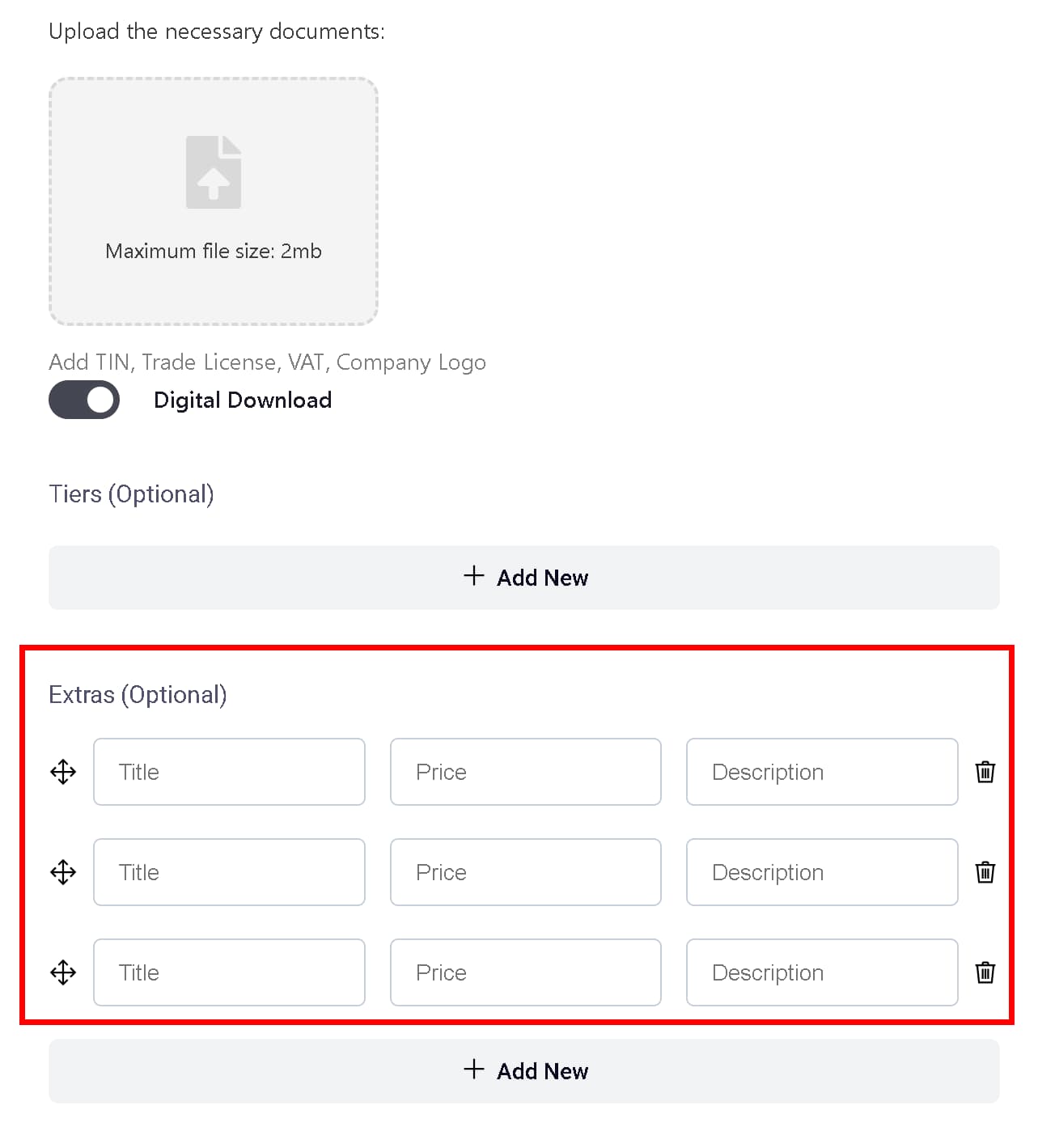
Alongside the five core models, vendors can also add optional Extras, paid add-ons with their own title and price that a buyer can attach to a purchase. It’s not a business model on its own, but it’s a real upsell mechanism worth mentioning if a directory owner is deciding how much pricing flexibility to offer vendors.
These aren’t locked to just one
None of these options are mutually exclusive. A listing can be tiered and hourly at the same time, or use limited stock alongside a monthly recurring price. The right combination depends entirely on what a specific vendor is selling, not on a fixed structure the extension forces on them.
Why Digital Marketplace model matters for the directory owner
Every one of these models runs through the same commission setting. Whether a sale is a one-time file download or a recurring monthly charge, the site owner takes a percentage automatically, no manual invoicing, no chasing vendors for a cut. That turns a directory from a one-time listing fee business into something closer to a real marketplace, with revenue that keeps coming in as long as vendors keep selling.
Frequent Asked Questions
Do I need WooCommerce to use Digital Marketplace?
Yes. Every purchase, order, and payout in this extension runs through WooCommerce, so it needs to be installed and active alongside Directorist.
Can a single listing use more than one pricing model at once?
Yes. Hourly, Monthly, Quantity, and Tiers aren’t mutually exclusive; a listing can, for example, be tiered and billed hourly at the same time.
How much commission does the site take by default?
10%, but it’s configurable from Directorist’s settings, so you can set whatever rate fits your niche.
When can a vendor request a payout?
Once their available balance meets the minimum payout amount set by the admin. That minimum defaults to $5 but is also configurable.
Does the site owner have to manually approve payouts?
Yes. A vendor’s payout request is reviewed by the admin, who marks it as paid from the WP Admin Payouts screen; it then appears in the vendor’s payout history.
Can I limit Digital Marketplace to specific listing types?
Yes. The toggle that enables digital selling lives in Directorist’s Monetization settings, so you can decide which niches on a multi-directory site actually get the sell-through-listing option.
What happens to a buyer’s downloaded file limit?
The dashboard shows how many downloads remain for a purchase, or “Unlimited” if no download limit was set on that product.
Recap
File downloads suit stock and template shops. Hourly rates suit freelancer and consultant directories. Monthly recurring suits software and membership listings. Limited stock suits scarcity-driven offers. Tiered pricing suits service directories selling packages. And commission ties all five together into ongoing revenue for the directory owner, not just a one-time listing fee.
Ready to launch your own Digital Marketplace? Start with Digital Marketplace Extension. To know how to install, Please follow the step by step process of this documentation.

Rezaul Karim
Rezaul Karim is a Digital Marketer and Content Strategist at wpWax, the team behind Directorist — trusted by 20,000+ directory websites worldwide. With 6+ years of experience in SEO-driven content and WordPress plugin marketing, he provides data-backed insights on building high-authority directory businesses. From optimizing search visibility to streamlining directory user experiences, Rezaul focuses on practical solutions that drive impressions and conversions. When he isn't auditing site performance or exploring the latest AI-integrated marketing tools, he is an avid reader and advocate for sustainable digital growth.


Leave a Reply
You must be logged in to post a comment.