 Up to 35% Off!



The Hidden SEO Power of Directorist: Are You Using its Full Potential?
-

- Directorist Product Updates
- 8 mins read
When people ask, “How SEO-friendly is Directorist?” The short answer is: very.
But the real value comes from how Directorist handles SEO under the hood.
A business directory relies on structured information such as business names, locations, categories, reviews, and attributes. Search engines depend on this structure to understand what each listing is about and how it relates to local or topic-based queries. If your directory plugin doesn’t communicate this information clearly to Google, you’ll struggle to rank no matter how good your content is.
Directorist is designed to solve that problem at its core. Its architecture, fields, schema, and taxonomy structures are intentionally built to make your directory SEO-friendly.
Below is a breakdown of exactly what makes Directorist SEO-ready plugin.
Directorist SEO capabilities: A Cut Above the Rest
You may already know that, Directorist comes with default SEO fields, including Meta Title and Meta Description for every page. It gives Directorist a stronger SEO foundation by default helping users maximize visibility without any friction.
But There’re Issues
For a while, users pointed out a few challenges when trying to optimize their directories for search engines. Applying the specific schema markup often required customization, and our earlier taxonomy structure that’s built separately from WordPress’ native system, sometimes created complications with URLs, category hierarchy, and overall crawlability. Our users wanted to unlock the full SEO potential of their websites.
And We Fixed Those
We took that feedback seriously and made meaningful improvements. One of the biggest upgrades was the introduction of directory-specific schema types tailored for JobPosting, Events, LocalBusinesses, Service and more. Users can flexibly apply them across all directories at once or separately for multi-directory platforms.
By adding these targeted schema markups, search engines can now understand your directory content more quickly and more accurately. At the same time, we aligned our taxonomy structure with WordPress’s default one, resulting in cleaner permalinks, better URL consistency, and improved indexing behavior across the board.
The Result
The combination of structured data and ready-to-use SEO fields makes Directorist highly search-engine friendly right out of the box. If you’re unaware of these changes in Directorist, take a look at our Changelog of recent major releases.
And it doesn’t stop there. Directorist integrates effortlessly with all major WordPress SEO plugins, allowing you to optimize your listings using the tools you already trust, whether that’s Yoast, Rank Math, or AIOSEO.
This means you can comfortably fine-tune your meta tags, improve content quality, monitor keyword usage, and even take advantage of instant indexing features without any extra setup or learning curve.
While you’re making improvements for traditional search engines using Directorist, you’re also preparing your directory for the future. Directorist’s structured approach ensures that modern AI-driven engines can understand, classify, and suggest your content more accurately.
TL;DR
Users now get a directory system that is not only fully aligned with today’s SEO best practices but also performs well in emerging AI-powered discovery platforms. In other words, you’re not just improving SEO, you’re automatically strengthening your AEO (Answer Engine Optimization) and GEO (Local Search Optimization) with Directorist.
Why Directorist Is the Most SEO-Ready Directory Plugin Today
Let’s dive a little deeper into Directorist’s journey towards becoming the most SEO-ready directory plugin in 2025. It started a long time ago but we locked the final tweaks in the v8.5 release. Here are the major SEO features in Directorist that gives users freedom and flexibility to enhance their site visibility on search engines.
Pre-Built SEO Fields for Directory Pages
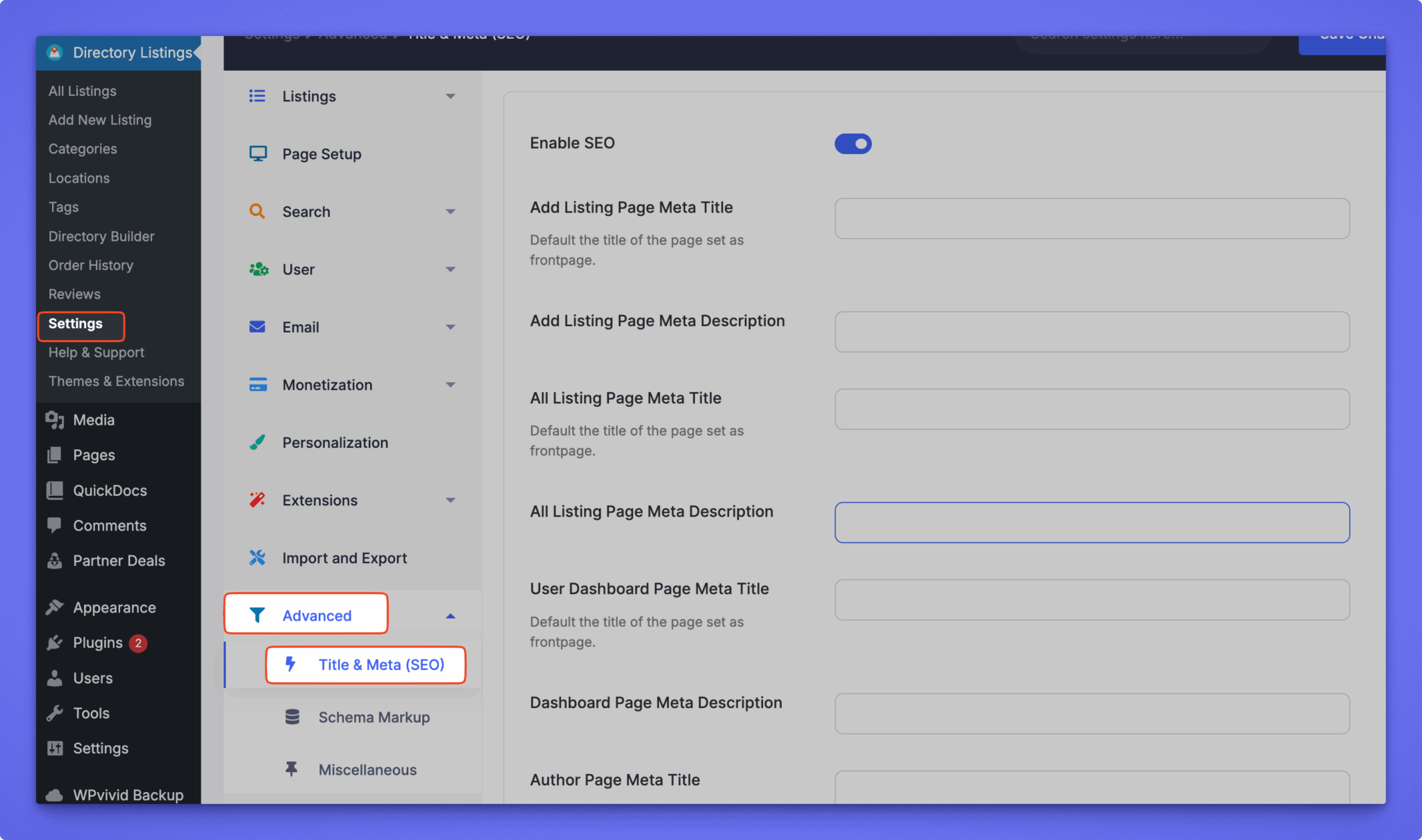
Directorist comes with pre-built SEO fields for its key pages so that you can control how your directory’s listing pages appear in search results. You can set Meta Title and Meta Descriptions directly from the plugin settings without editing those pages or using any external plugins. Following pages fall under this option:
- Add Listing
- All Listing
- User Dashboard
- Author Page
- Category Page
- Single Category
- All Locations
- Single Location
- Restriction Page
- Login Page
- Search Home
- Search Result
That means you can optimize the pages that drive discovery and organic traffic without having to edit individual pages one-by-one.
Read Documentation: Search Engine Optimization
Directory Specific Schema Markup Support
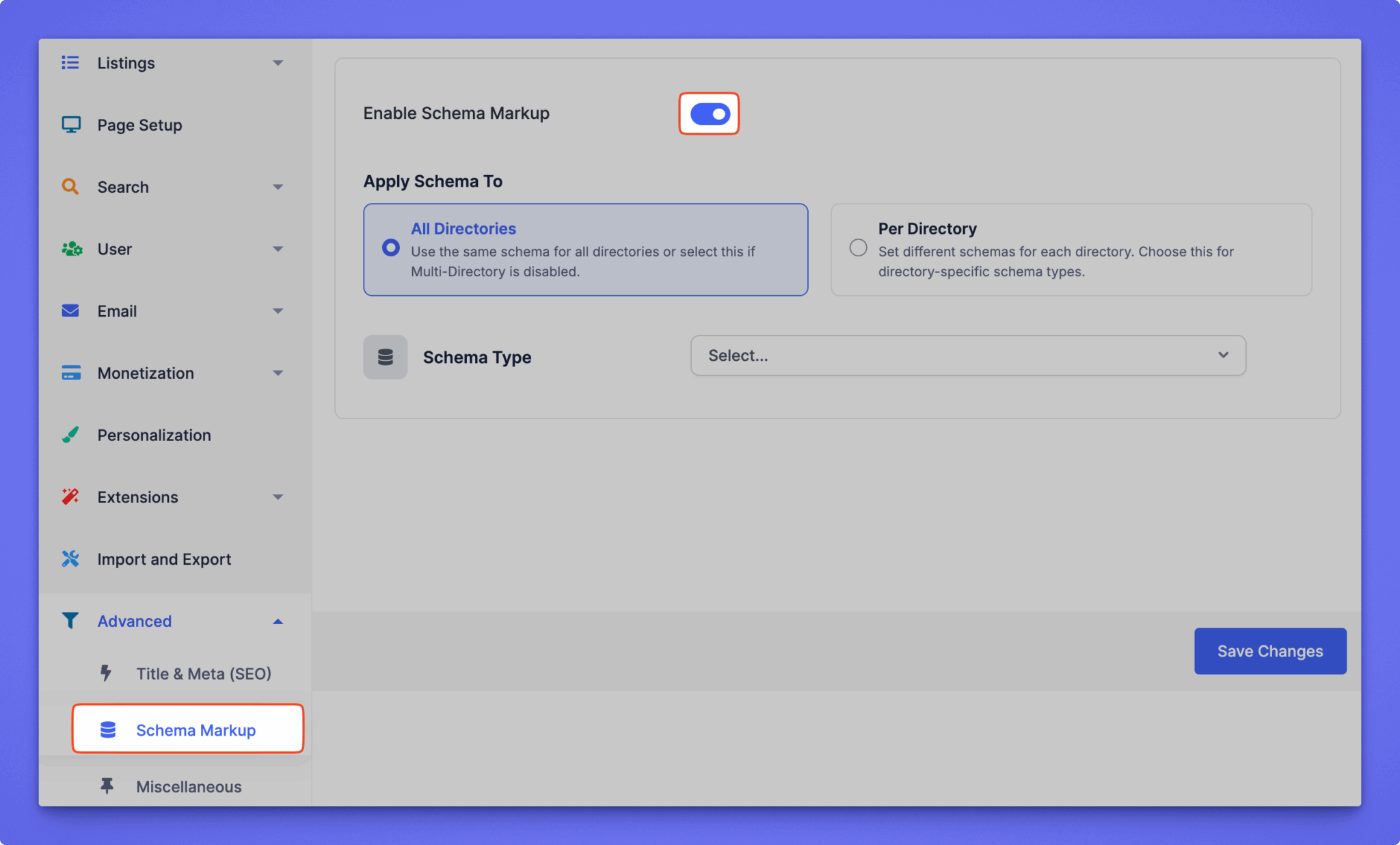
Schema markup is essential for helping search engines and AI-driven answer engines understand your directory content quickly and accurately. Directorist now includes dedicated, directory-specific schema types that include the following schemas:
- BusinessEvent
- ApartmentComplex
- Event
- Festival
- JobPosting
- LocalBusiness
- MarketingAgency
- Organization
- ProfessionalService
- RealEstateAgent
- Service
We rolled out this feature in v8.4.1 for all users and eventually users started to get a more personalized outcome of their directory SEO. Schema markup makes things far easier for search engines to interpret your content, leading to better context, richer search appearances, and improved chances of showing up in AI suggestions as well.
Read Documentation: Schema Markup
Optimized Taxonomy Structure & Migration Updates
Directorist now supports WordPress’s default taxonomy structure alongside the existing taxonomy system. It enables users to get a cleaner, more standardized taxonomy structure for categories, tags, and locations – making it easier for search engines to understand how your directory content is organized.
The improved migration process delivered in our v8.5 major release, also results in better crawlability, more consistent URLs, and a clearer internal structure overall. These enhancements help your directory strengthen topical relevance on search engines. With stronger taxonomy siloing in place, your directory is better positioned to build topical authority and rank for a wider range of relevant keywords.
Fully Compatible With Leading WordPress SEO Plugins
Directorist is built to work seamlessly with all major SEO plugins including Yoast, Rank Math, and AIOSEO. You can keep using the tools you already know and trust to elevate your directory’s visibility on search engines. Get access to powerful features such as on-page SEO scores, content readability checks, one-click instant indexing, schema, and smart internal-linking suggestions without any conflicts or extra configuration.
The biggest advantage here is comfort and continuity. You don’t have to change your SEO workflow or switch to new tools just because you’re using Directorist. Directorist fits into your existing setup and makes your directory pages just as easy to optimize as any regular WordPress page.
In short, Directorist takes care of the directory-specific SEO foundations while your favorite SEO plugin helps you improve content quality, analyze performance, and manage indexing – giving you the best of both disciplines with zero friction.
Why Your Directory Needs the Best SEO Features

If you look at any competitive search result today, one pattern becomes obvious: directories dominate the top of Google.
- Search for a local business in the USA and you’ll likely see Yelp before the business’s own website.
- Search for any software, and platforms like G2, Capterra or SoftwareSuggest outrank the product’s official homepage.
- Look for hotels or destinations and you’ll find Tripadvisor, Hotels.com, Expedia, and similar portals taking the top positions.
- Even when searching for service providers, Trustpilot results often appear before the actual company.
- And if you check for digital agencies, Clutch and GoodFirms usually sit comfortably above individual agency sites.
This happens for a reason: directories are designed to enhance listing visibility, helping users discover the best businesses, products, and services quickly. But that only works if the directory itself ranks. If your platform isn’t showing up in search results, your listings won’t either – making the entire directory far less valuable and less trusted.
To compete in modern search results, your directory needs a strong SEO foundation. When your directory ranks at the top for queries related to your listings, you instantly increase traffic, credibility, and engagement. More visibility leads to more authority, higher authority leads to better rankings, and better rankings bring even more traffic. It’s a growth cycle that every successful directory relies on.
This isn’t just about boosting your own website—it’s about serving the businesses that rely on you. Many of them pay to showcase their listings on your platform, expecting real visibility, clicks, and customer reach. To meet those expectations and retain their trust, your directory must be optimized to perform at the highest level. And that’s exactly what Directorist enables you to do.
Frequently Asked Questions
-
Which WordPress directory plugin is best for SEO?
Directorist is one of the most SEO-friendly directory plugins for WordPress thanks to its built-in Meta Title and Meta Description fields for directory pages, improved taxonomy structure, and dedicated schema markup for various directory types.
-
Does Directorist work well with Yoast SEO?
Yes. Directorist is fully compatible with Yoast SEO, allowing you to analyze content, manage sitemaps, optimize breadcrumbs, and improve overall readability. You can use Yoast tools on your listing pages just like any other WordPress content, ensuring smooth optimization and easy indexing.
-
How do I optimize my Directorist listings without installing extra SEO plugins?
Directorist offers several built-in SEO features:
1. Meta Title & Description fields for key directory pages
2. Directory-specific schema markup
3. Optimized taxonomy structure for categories and tags
4. Clean permalinks and improved crawlability
5. You can use optimized title and content for each listings
6. Add internal and external links in your listings using various form fieldsUsing clear titles, high-quality descriptions, and relevant categories/locations can significantly improve your listing visibility even without additional SEO plugins.
-
Does Directorist support Rank Math?
Absolutely. Directorist works effortlessly with Rank Math, including features like Setting focus keyword, IndexNow, schema validation, AI content writing, and on-page content scoring. You can continue using Rank Math’s advanced features.
-
Is Directorist good for modern AI Engines, AEO, and GEO?
Yes. Directorist supports structured data that not only helps traditional search engines but also enables AI engines, and generative AI platforms to understand your listings instantly. This makes your directory better positioned for AEO (Answer Engine Optimization) and GEO (Generative Engine Optimization).
In a Nutshell
You might wonder why this topic needed a dedicated explanation when there’s already plenty of content about Directorist across our documentation, blog, and YouTube tutorials. The reason is simple: SEO is the lifeline of any directory, yet it’s the area where most directory owners unknowingly struggle.
Our goal with this guide is to help you get the absolute best performance out of your directory – so your listings rank higher, your users stay happy, and your business grows sustainably. And here’s the exciting part: more improvements are on the way.
With the upcoming Directorist AI Pro, you’ll get smarter, faster, and more search-engine-friendly listing pages. It’s capable of reducing unnecessary scripts, avoiding heavy elements that slow down crawling, and ensuring no technical barriers block search engines or answer engines from accessing and understanding your content.
The result? A cleaner technical SEO foundation, improved visibility, and a directory that’s future-ready.

S. M. Navid Anjum
Digital Marketing enthusiast who loves to write technical reviews and trendy contents. Currently working with WordPress Plugin Marketing and growth. Open to collaboration and co-marketing opportunities with any SaaS and plugins.


Leave a Reply
You must be logged in to post a comment.