

Table of Contents
- 1 What is an AI Tools Directory?
- 2 AI Tools Directory vs. Digital Product Marketplace - The Contrast
- 3 Building an AI Tools Directory for Free - Step by Step Guide
- 4 Benefits of Creating an AI Tools Directory
- 5 Monetizing Your AI Tools Directory
- 6 Frequently Asked Questions (FAQ)
- 6.1 What is an AI tools directory?
- 6.2 Who uses AI tools directories?
- 6.3 Why are AI tools directories popular?
- 6.4 How does an AI tools directory make money?
- 6.5 Can anyone submit their AI tool to a directory?
- 6.6 Is it expensive to build an AI tools directory?
- 6.7 How long does it take for an AI tools directory to get traffic?
- 6.8 Is building an AI tools directory still worth it?
- 7 What Comes Next
Building an AI Tools Directory Using WordPress – Idea, Potential and Execution Blueprint
There’re millions of AI tools available on the internet to ease your task and solve the challenges you face everyday. Yet, finding the right tool can be stressful as you keep signing up for one, going through a learning curve only to find that it’s not stable enough to handle everything without relying on a few more tools and integrations.
These frustrations often lead to users writing bad reviews filled with rage and disappointment, permanently damaging the reputation of the product. An AI tools directory can be the game changer in such a scenario convincing users to pick the right option based on real users’ reviews.
I know what you’re thinking; there’re already too many platforms like this. What’s the point in building something that already exists?
You’re absolutely right.
The market is gradually getting saturated. However, the end of innovation never ends and AI has made product development, pivoting and scaling so easy that everyday founders are launching thousands of new products. Especially due to vibe coding – the key to become short term successful in a highly competitive market.
When it comes to real problem solutions with customization, fixing issues that AI-powered products cannot, users stick to the trusted ones only. At the end, the powerful, stable and customer-centric ones survive and the ones that were born from a short span of prompt engineering fades away.
But how do you differentiate them? Platforms like There’s An AI For That uses AI to help you find the right AI tool for your needs. Great initiative, no doubt. But isn’t it better to find real user reviews of a product quickly instead of relying on AI to find the right AI tool?
A well-crafted AI tools directory website can benefit both developers and non-tech users by helping them discover the best AI tools for their needs, including specialized solutions like an AI paper writer. If you’re already building an AI tools directory, then you’ve come to the right place.
In this comprehensive, step-by-step guide, we will take you through the process of creating an AI tools directory similar to AIXPLORIA, but differentiated by unique use cases and applications. But before that, let me explain how an AI tools directory works. This is to make your concept clear so that you don’t start your journey from the wrong end.
What is an AI Tools Directory?
An AI tools directory is exactly something TIAAFT (There’s An AI For That) or AIxploria has – but more robust. It not only contains product name, features, inside screenshots and performance metrics but also real user reviews, potential buyers’ questions answered by the developer or owner, links to its social pages as well as a comparison option with similar tools.
You can say it’s the ProductHunt only for best AI tools. It doesn’t go the distance to cover launching and everything but does its core task right – the discovery and trust building. Neither it’s an AppSumo lookalike that curates thousands of deals but its functionalities can be extended to enable the purchasing options.
Overall, AI tools directory stands out for discovery, comparison and reviews – the decisive factors that influence an user to spend their bucks on something invisible yet powerful enough to turn your daily struggles into smooth, automated workflows.
AI Tools Directory vs. Digital Product Marketplace – The Contrast
As already mentioned, an AI tools directory is not a platform like AppSumo – a vast marketplace full of various tools for grab. Or Gumroad where any digital products, even skills can be sold. It’s something close to Capterra or G2 but specifically built for AI tools. Below is a clear picture of distinctions between AI tools directory and digital product marketplace.
| Comparison Factor | AI Tools Directory | Digital Product Marketplace |
| Key Focus / Objective | Discovery + Referral | Selling + Promotion |
| Driven By | User driven | Platform driven |
| Listing Process | Anyone can list | Only product owner and platform admins can list |
| Monetization Options | Featured Listing, Claim Listing, Membership, Ads, Affiliate commission, Paid Promotion. | Commission from Direct Sales, Referral Bonus, Affiliate Commission, Paid Promotion. |
| Product Inclusion Policy | Flexible, includes most listings unless violates platform terms. | Selective, not all products get listed for selling. Criteria needs to be met. |
| Expected Outcome | Product discovery, user review collections, backlink, referral sales, lead generation, authority building etc. | Quick revenue generation, New customer acquisition, Lead Generation, user review (platform users only). |
In short, a directory is broad, attracts more users base, improves authority and builds trust for products. It may not impact direct revenue but develops a long-term loyalty of the product among users.
On the other hand, a digital product marketplace helps the tools developer earn quick cash, acquire new customers base and generate leads but that may not impact trust building and establishing loyalty in the long term as most platforms remove listings after the sales campaign ends.

Building an AI Tools Directory for Free – Step by Step Guide
Picture a website that not only provides you great deals on AI tools listed but also educates you on real world usability from real end users. You can build such a platform from scratch by following our guide and unleashing your inner creativity.
Building an AI Tools Directory Requirements:
The foundation of an AI tools directory begins with the appropriate establishment. The decision of the right tools at the beginning simplifies the construction process, increases speed and scalability. The following is an outline checklist to help you begin with.
a. Domain Name & Hosting Plan
Select a concise and straightforward domain name. Provide a trusted hosting site that is capable of supporting WordPress and provides acceptable performance.
b. WordPress Installation
Install WordPress in your webhosting. One- click WordPress set up is supported by most hosting providers.
c. Directory Plugin
Install directory plugin to control listings, submissions and categories. In this tutorial, we are working with the Directorist which is a versatile system that has been developed to create customized style directory websites.
d. WordPress Theme
Select a directory-compatible theme which is compatible with your plugin. In this tutorial, we are going to use dClassified which is set to integrate with Directorist.
Directorist is used to deal with the core directory capabilities, including listings, submissions and monetization, and dClassified to deal with the design and layout of the directory website of the AI tools.
Now let’s move to the practical part of building your AI tools directory.
In this section, you will set up the theme and plugin that power the website. With the basics ready, the first step is installing the theme and directory plugin.
Step -1: Install Directory Plugin & Theme
Start by installing the directory plugin first. Go to Plugins → Add New in your WordPress dashboard. Search for Directorist, then install and activate it. After activation, Directorist will launch a quick setup wizard to help you configure the basic directory settings.

Next, set up the design of your AI tools directory. Go to Appearance → Themes → Add New and upload dClassified. Install and activate the theme to apply a directory-ready layout.
You can enjoy the exact layout as Demo. For this, you have to use wpWax Demo Importer. Note that, this will require some additional extensions and take backup of your website as a pre-cautions.

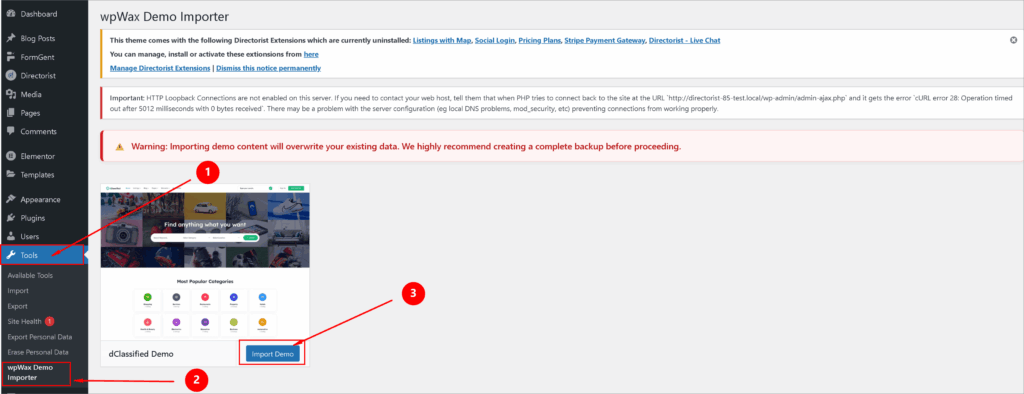
At this stage, Directorist manages listings, submissions, and directory logic, while dClassified controls the design and overall site layout.
Configure Core Directory Features
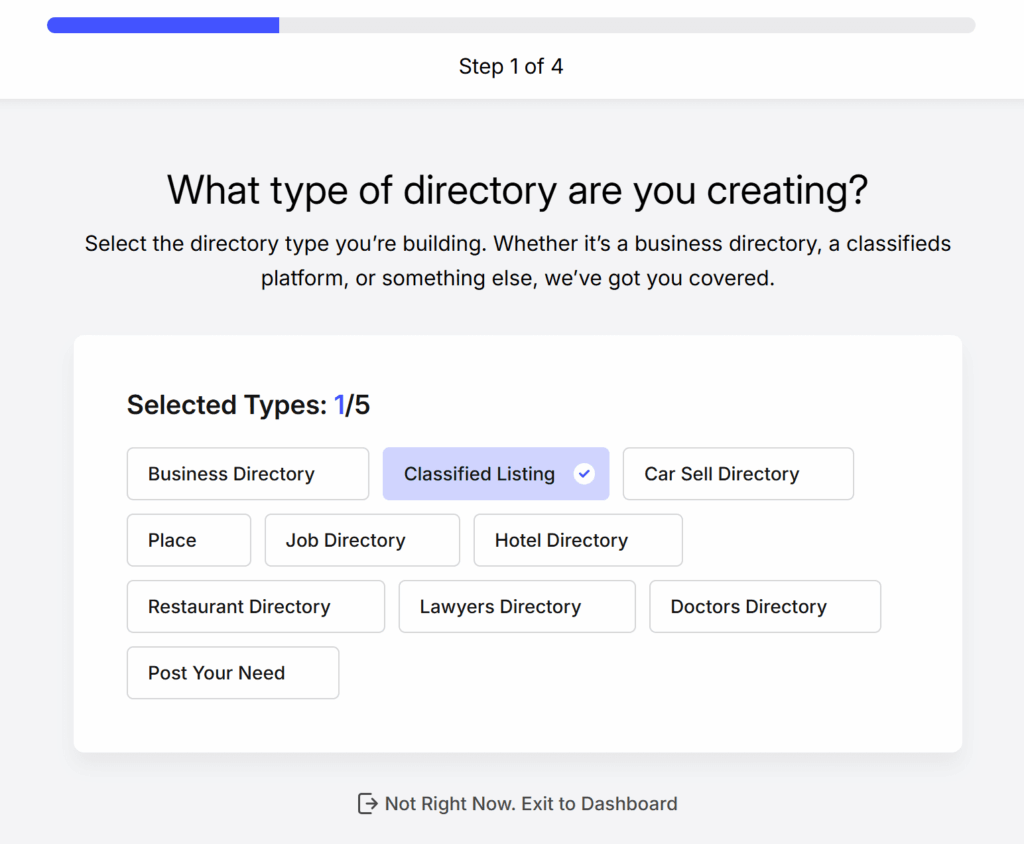
Directorist includes essential directory features out of the box. These cover most needs for an AI tools directory, including:
- Tool listings and categories
- Frontend submission forms
- User dashboards
- Search and filtering options
This allows you to launch quickly without extra plugins.
Enable Optional Directorist Extensions
To extend functionality, go to Directorist → Extensions. Directorist offers multiple extensions that integrate seamlessly with the core plugin. For an AI tools directory, useful extensions include:
- Directorist Advanced Review – allows detailed, criteria-based reviews to build trust in listings
- Directorist Analytics – provides insights and reports to track and grow directory performance
- Directorist Search Alert – enables unified search across all directories for faster discovery
- Directorist Announcement – lets admins share updates, news, and promotions with users
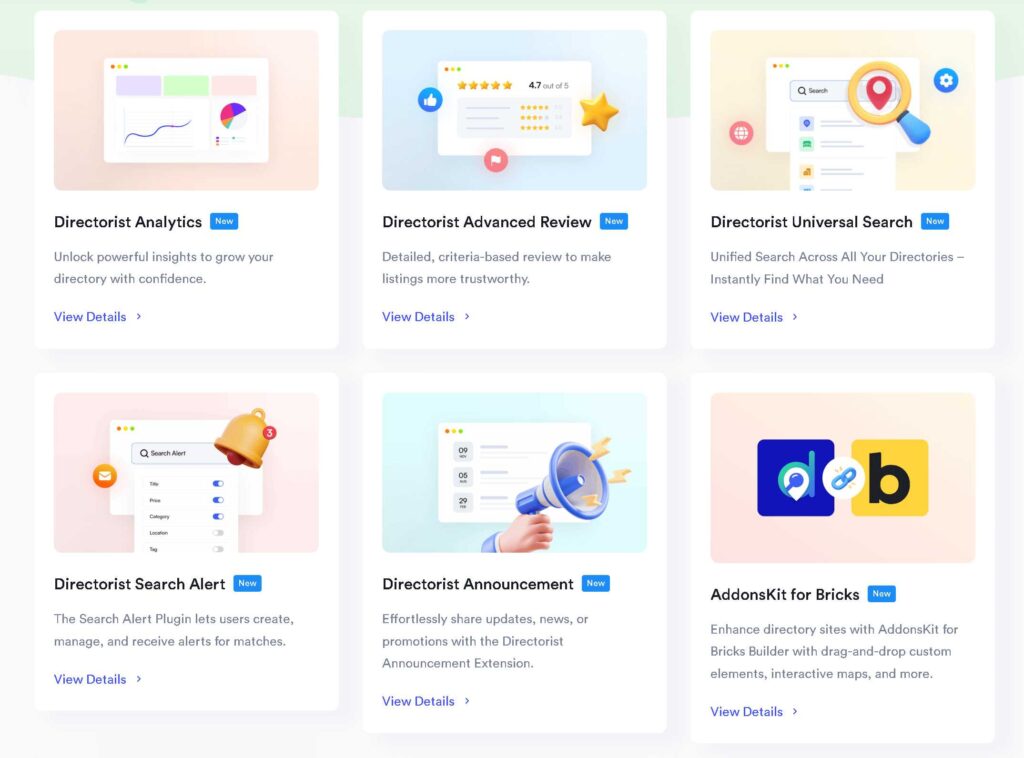
These extensions help improve user experience while keeping the directory easy to manage.
With dClassified handling design and Directorist powering directory features, your AI tools directory is now ready to grow with more listings, categories, and monetization options.
Extend More Functionalities Of Your Directory With Premium Extenstions
Step-2: Set Up AI Tools Categories
Next, create categories to organize your AI tools and improve navigation. Go to Directorist → Listings → Categories in your WordPress dashboard. You can add as many custom categories as needed.

Start by entering a category name. Add a short description if required and upload a category image for better visual clarity. You can also create parent and child categories to build a clear hierarchy for different AI use cases.
Once everything is set, click Add Category to save it.
Step-3: Build Your AI Directory Homepage
Now it’s time to create the homepage of your AI tools directory. dClassified works smoothly with the WordPress block editor and Elementor, so you can build pages using blocks without any coding.
Go to Pages → Add New and name the page as you like “Home”. Start by adding a clear headline that explains what your AI directory is about. This helps users understand the value right away.

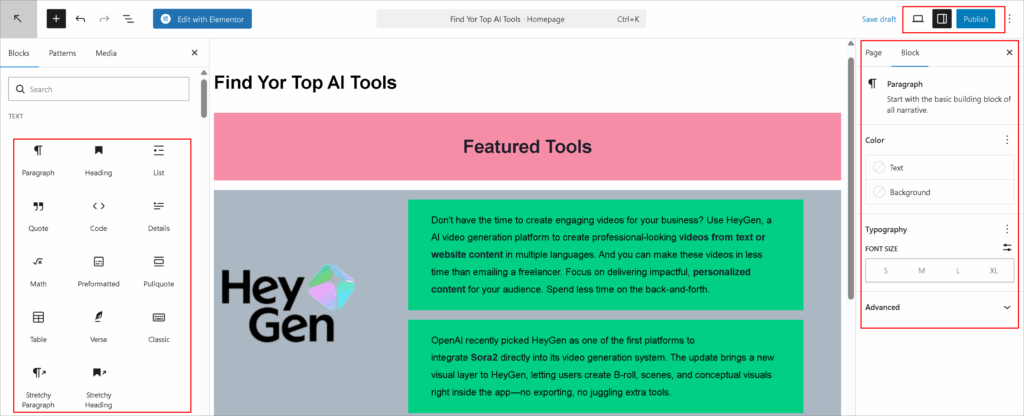
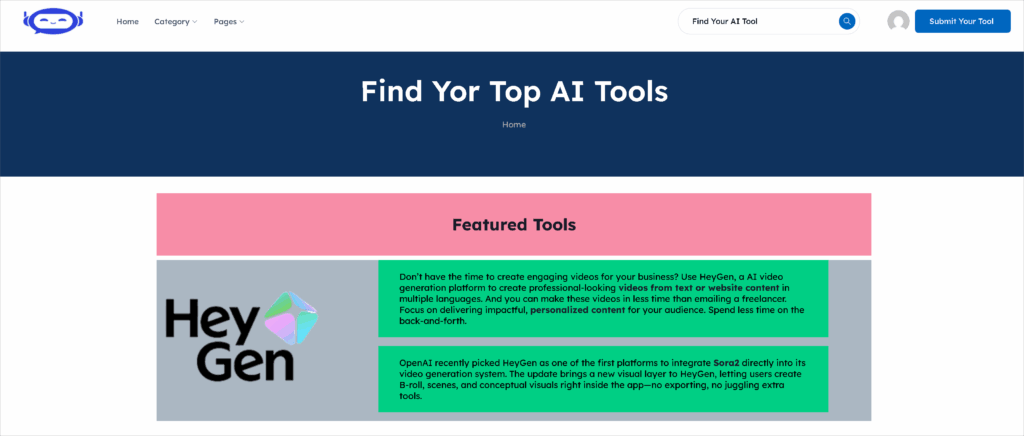
To setup your Hompage, You can use default blocks and Directorist blocks. click the Plus (+) icon to add blocks. Search for Directorist blocks and insert the ones you need. For example, you can add:
- Listing Search Form to help users find AI tools quickly
- Listing Categories to display AI tool categories on the homepage
You can customize each block using the settings panel on the right. Adjust layout, spacing, and display options to match your design. Once finished, publish the page and set it as your homepage.
Once you finish building the page, click Publish. Then go to Dashboard → Settings → Reading and select this page as your homepage from the dropdown list.
After setting the homepage, you can adjust its design by going to Appearance → Customize. From there, you can change colors, fonts, header styles, and other visual settings to match your AI tools directory branding.
Step-4: Add AI tools to the directory
Now it’s time to add your AI tool to the directory. There are two ways to do this: from the front end as a user, or from the dashboard as an admin.
Create AI Tool Submission Form For User
To create a submission form, follow the process: Directorist→ Directory Builder→ Add Listing Form. Use the “Form Fields” to customize the form.
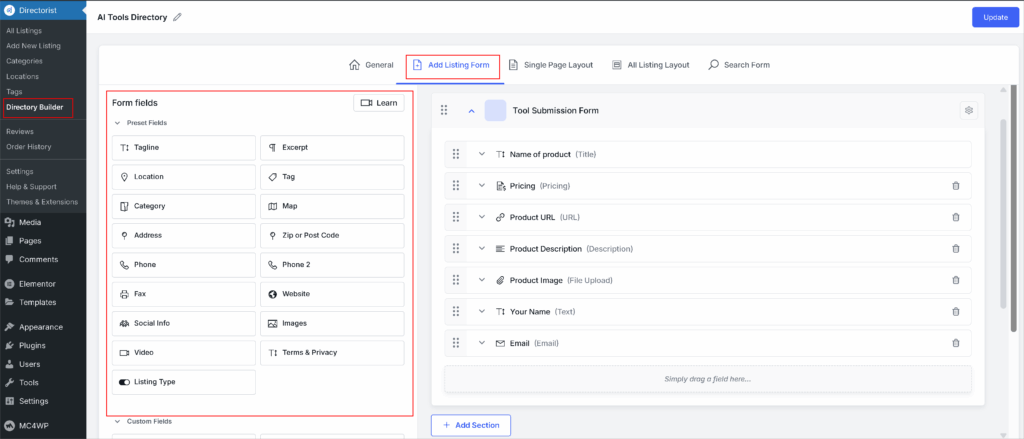
If moderation is enabled, review and approve the listing from Dashboard → Directorist → Listings. Once approved, the AI tool will appear in your directory, ready for users to discover.
Add Listing Manually
You can add listings from the dashboard. To add listings manually Dashboard → Directorist → Add New Listing → Publish

Step-5: Set Up Monetization Features For Directory Business
Directorist offers multiple ways to earn revenue from your AI tools directory. No matter the type or size of your directory, you can monetize it easily using built-in features and extensions. You may use one method or combine several to increase overall earnings.

Directorist supports the following monetization options:
- Featured Listings (Free Feature)
- Pricing Plans (Extension)
- Claim Listing (Extension)
- Reservation / Appointment (Extension)
You can enable all of these options or choose only the ones that fit your business model. Using multiple monetization methods helps maximize revenue from both new and existing listings.
You can check how all the monetization methods work by following the documentation section.
Benefits of Creating an AI Tools Directory
An AI tools directory is a curated platform that helps users discover, compare, and choose AI software by use case, category, or industry. For builders and founders, it offers long-term traffic, authority, and monetization—without creating products themselves.
1. Growing Demand for AI Tool Discovery
The number of AI tools is increasing rapidly, making discovery difficult for users. Search engines often return scattered results, while directories present tools in a structured, easy-to-browse format. This demand creates a clear opportunity for curated AI directories to become trusted discovery hubs.
2. Built-In Audience of High-Intent Users
Visitors to AI tools directories are not browsing casually. They are actively searching for solutions to specific problems. This means:
- Higher engagement rates
- Better conversion potential
- Strong value for founders listing their tools
High-intent traffic makes directories more attractive to both users and AI founders.
3. Long-Term Organic Traffic Potential
AI tools directories naturally target evergreen search queries such as:
- “Best AI tools for marketing”
- “AI tools for developers”
- “AI tools for content creation”
Category pages and listings continue to rank over time, allowing traffic to compound instead of resetting like social or ad campaigns.
4. Authority and Niche Positioning
A focused AI directory quickly establishes authority in a specific niche. Instead of competing with large media sites, directory owners can dominate narrow segments by curating tools around:
- A single industry
- A specific use case
- A defined audience
As listings grow, so does topical authority and trust.
5. Founder-to-Founder Network Effects
AI founders naturally promote their own listings. This creates:
- Free marketing and backlinks
- Social sharing and referrals
- Organic growth driven by contributors
Over time, the directory benefits from a self-sustaining growth loop.
6. Scalable and Low-Overhead Model
An AI tools directory scales through listings, not inventory. New tools can be added without increasing production costs. Expansion happens by adding categories, features, or regions—making it a lean and scalable business model.
Monetizing Your AI Tools Directory
An AI tools directory can be monetized in multiple ways without harming user experience. The key is offering visibility and value to AI founders while keeping discovery useful for visitors.
1. Paid Tool Submissions
Founders pay to submit their tools for review or faster approval. This works well when paired with a free option, creating a freemium model that encourages upgrades without blocking participation.
2. Featured and Sponsored Listings
Featured listings give tools higher visibility on:
- Category pages
- Homepage sections
- Search results within the directory
These placements are often sold as time-based or recurring options and deliver clear ROI for founders.
3. Subscription Plans for AI Founders
Recurring subscriptions provide predictable revenue. Founder plans may include:
- Ongoing listing visibility
- Listing updates and edits
- Priority support or placement
Subscriptions are especially effective once the directory has consistent traffic.
4. Affiliate Partnerships with AI Tools
Directories can earn commissions by linking to paid AI tools. Affiliate monetization works best on:
- Comparison pages
- “Best tools” roundups
- Use-case-specific listings
This method remains passive and scales with traffic.
5. Advertising and Banner Placements
Once traffic grows, targeted advertising becomes viable. Ads perform best when:
- Shown only to relevant audiences
- Placed within related categories
- Kept minimal to protect trust
Relevance is more important than volume.
6. Lead Generation and Data Access
Directories can offer premium access to:
- Buyer leads
- Market insights
- Usage trends
This model appeals to founders seeking data-driven growth opportunities.
7. Upsells and Value-Added Services
Additional services increase revenue without new traffic, such as:
- Listing optimization
- Sponsored blog features
- Product launch announcements
These upsells are optional but highly profitable.
Frequently Asked Questions (FAQ)
What is an AI tools directory?
An AI tools directory is a website that lists AI tools in one place. It organizes tools by use case, industry, or feature. This helps users find and compare tools quickly.
Who uses AI tools directories?
AI founders use them to promote their free ai tools or paid ai tools. Marketers and developers use them to find solutions. Businesses and users use them to compare AI software.
Why are AI tools directories popular?
The AI market is crowded. Directories make discovery simple and structured. Users prefer clear categories and curated lists.
How does an AI tools directory make money?
Most directories earn through paid listings. They also use featured placements and subscriptions for best ai tools. Other options include affiliate links and ads.
Can anyone submit their AI tool to a directory?
Most directories allow public submissions. Each tool is reviewed before approval. This keeps the listings relevant and useful.
Is it expensive to build an AI tools directory?
Costs depend on the platform you use. Many directories are built without custom code. This lowers setup and maintenance costs.
How long does it take for an AI tools directory to get traffic?
Traffic grows over time. SEO and niche focus matter most. Well-structured directories gain steady organic visits.
Is building an AI tools directory still worth it?
Yes, the AI market is still growing. New tools launch every day. Organized discovery platforms remain in high demand.
What Comes Next
AI tools are growing fast, and finding the right tool is becoming harder every day. AI tools directories solve this problem by bringing discovery, comparison, and access into one structured platform. They help users find relevant tools quickly and give founders a clear channel to reach high-intent audiences.
For builders, an AI tools directory is more than content. It is a scalable platform that can grow traffic, authority, and revenue over time. Successful directories focus on simple execution—clear categories, easy submissions, SEO-friendly listings, and fair monetization.
You do not need to build everything from scratch. A flexible directory framework makes it easier to launch and scale without heavy development. Solutions like Directorist support this model by handling structure, submissions, and growth in one place. The demand already exists, competition is still open, and starting now creates a strong long-term advantage.


Editorial Staff
Directorist Editorial Staff is a team of WordPress geeks that provides quality content for WordPress users. Primarily the team works for all the ingredients needed for establishing a directory listing website in WordPress. Moreover, you will get numerous web content related to the WordPress blog, Digital marketing stuff, social post, text documentation, visual guides, and so on.


Leave a Reply
You must be logged in to post a comment.