

Table of Contents
- 1 Understanding Directory Websites
- 2 Is a Directory Website Still Profitable?
- 3 How Directory Websites Make Money
- 4 Planning Your Directory Website
- 5 Essential Features of a Modern Directory Website
- 5.1 1. Detailed Listing Profiles
- 5.2 2. Advanced Search & Filters
- 5.3 3. Reviews & Ratings
- 5.4 4. User Dashboards
- 5.5 5. Frontend Submission For Business Owners
- 5.6 6. Monetization Infrastructure
- 5.7 7. Proper Categorization
- 5.8 8. Map Integration
- 5.9 9. Communication & Engagement Tools
- 5.10 10. Mobile Responsiveness
- 5.11 11. Security & Moderation
- 6 Choosing the Right Platform
- 7 How to Create a Directory Website
- 8 Install A Theme
- 9 Step-5: Create categories, tags, and locations for your directory website
- 10 How To Add Listings and Populating Data on Your Directory Website
- 11 Step-6: How to Monetization Your Directory Website
- 12 How to Grow and Scale Your Directory Business
- 13 Common Mistakes to Avoid while Building A Directory Website
- 14 It's Your Turn
- 15 Frequently Asked Questions
- 15.1 What is a WordPress directory plugin and how does it work?
- 15.2 How is a business directory plugin WordPress solution different from a standard listing plugin?
- 15.3 Is there a reliable WordPress directory plugin free version available?
- 15.4 What features should be included in the best WordPress directory plugin?
- 15.5 How do I evaluate a business directory plugin demo before purchasing?
- 15.6 Can a WordPress directory theme replace a directory plugin?
- 15.7 How can I monetize a business directory?
- 15.8 What technical considerations should I review before choosing a WordPress directory plugin?
- 15.9 What is the best WordPress directory plugin for beginners?
- 15.10 How do I create a business directory using a business directory plugin WordPress solution?
- 15.11 Do I need a separate WordPress directory theme, or will a plugin work with any theme?
- 15.12 Is there a Business directory plugin demo I can test before buying?
- 15.13 Can I build a directory website using only WordPress plugins free tools?
Ultimate Guide to Create a Directory Website
-

- Tutorials Directorist Tips & Tricks
- 25 mins read
Launching a directory website requires a clear sequence of steps. At its core, the process involves:
- Identifying a profitable niche
- Structuring categories and listing types
- Designing intuitive search functionality
- Implementing a monetization framework
- Testing and preparing for launch
Years ago, building a directory platform was a technically intensive endeavor. It needed custom development, database setup, backend logic, and strong knowledge of programming environments. For most entrepreneurs, the complexity alone was enough to discourage the idea.
Today, the landscape looks very different.
Modern no-code and low-code tools make it much easier to create a directory website. What used to take months to develop can now be done in just days. If you’re refining content and advanced features, it might take a few weeks.
You don’t need to be a software engineer or don’t need to wrestle with intricate programming syntax.
What you need is structure. And a clear blueprint.
This guide takes you through the full lifecycle of creating a directory website. You’ll learn about planning, setting up, monetizing, and achieving sustainable growth.
We’ll move methodically: Planning → Building → Monetizing → Growing.
Let’s get started.
Looking to build a directory on a tight budget? Check out our guide on creating a directory website for almost free – how to create a directory website for free.
And If you want to launch a local or industry-focused platform, check out our guide on creating a business directory website – how to create a business directory website.
Understanding Directory Websites

What Is a Directory Website?
A directory website is an online platform where users can search and find listings. These listings can include businesses, professionals, websites, or products. They are organized by categories, topics, or locations. This makes it easy for users to filter and discover what they need.
Users no longer flip through phone books or scan many websites. They now use a central platform. Here, listings are organized and easy to search. Plus, they often include reviews, ratings, and contact details.
Read this to know more: What Is a Directory Website? Nuts & Bolts of a Web Directory
How a Directory Website Works?
At a foundational level, a directory website operates on three pillars:
- Structured Listings – Each entry contains standardized data such as name, description, location, and contact details.
- Categorization – Listings are grouped into logical categories and subcategories.
- Search & Filtering – Users can narrow results by location, price, rating, or other attributes.
More advanced directories may also include:
- User dashboards
- Review systems
- Booking functionality
- Monetization tools
The architecture is methodical. And when implemented correctly, it becomes highly scalable. You will learn in detail on the core set up section.
Types of Directory Websites
Not all directories are created equal. The structure may be similar, but the business model and audience differ significantly.
Below are the most common types.
- Business Directories – Lists local or industry-specific businesses. Often monetized through paid listings or featured placements. (e.g., Yelp, Yellow Pages).
- Real Estate Directories – Organizes properties by city, price, and property type. May include booking tours or contact forms.
- Job Board – Connects employers and job seekers. Usually monetized via paid job postings.
- Classified Directory – Allows users to post items for sale. Often includes status indicators such as “sold” or “available.”
- Service Marketplace – Matches customers with professionals such as plumbers, designers, or consultants. Sometimes it integrates booking systems.
- Niche Directory – Targets a very specific audience — for example, vegan restaurants, pet groomers, or tech startups. These directories often outperform broad ones because of focused demand.
Choosing the right type matters. But more importantly, understanding the niche demand and economic potential behind each type matters even more.
There are different types directory websites worldwide, You can explore more from here – Top 10 Different Types of WordPress Directory Websites
Is a Directory Website Still Profitable?
The answer is Yes!
According to Verified Market Research’s data – “The size of the Global and U.S. Online Directory and Review Platforms market was recorded at USD 28,713.02 million in 2022, and it is projected to attain USD 50,910.25 million by 2030, growing at a CAGR of 7.45%”
Online discovery continues to grow. Consumers search before they make a final decision. Businesses compete for visibility to attract potential customer. And successful online directory platforms like Yelp (Business Directory), Zillow (real estate), Booking.com (travel), Angi (home services), Crunchbase (startups), and HappyCow (niche food) that aggregate trusted information retain value and make profit.
How Directory Websites Make Money

A directory without a revenue model is just a catalog. Below are the primary monetization strategies.
- Paid Listings
- Featured Listings
- Subscription Model
- Commission Model
- Advertising
We will discuss these monetization models in the monetization section. You can also check out our specific guide on – How To Make Money from your Business Directory
Planning Your Directory Website
There is a proverb “A man without a goal is like a ship without a rudder”.
Building without planning can be expensive. Before you purchase a domain or install a single plugin, you need strategic clarity. A directory website is not just a technical structure. It is a business framework. The planning phase determines whether your platform becomes an asset—or just another abandoned project.
Let’s break this down methodically.
1. Choosing a Profitable Niche
The niche you select will influence:
- Your audience
- Your competition
- Your monetization potential
- Your marketing strategy
A broad directory sounds appealing. In reality, focus wins.
If you’re planning to build a local business-focused platform, see our detailed breakdown on how to create a business directory website.
To find out your profitable niche, this resource may help you on: How to Choose a Niche for a Business Directory Website
2. Market Validation
Start by asking simple but powerful questions:
- Are people actively searching for this type of information?
- Do businesses in this niche already pay for visibility?
- Are there existing directories serving this market?
Use search trends, keyword research, and competitor analysis to gauge demand. If users are already searching for listings in your niche, that’s a promising signal.
3. Competition Analysis
Competition is not a deterrent. It’s validation.
However, you must assess:
- How strong are existing platforms?
- Are they niche-specific or broad?
- Where are their weaknesses?
Often, large directories overlook micro-markets. A hyper-local or industry-focused directory can outperform a general one by serving a more defined audience.
4. Local vs. Global Focus
Local directories are easier to launch. They require:
- Fewer listings
- Targeted SEO
- Clear geographic structure
Global directories offer scale but require stronger differentiation and marketing.
Start narrow. Expand strategically.
Essential Features of a Modern Directory Website

A modern directory website must include essential features such as advanced search filters (by category and location), frontend listing submission, user rating systems, and monetization options, such as sponsored listings. To create a directory website that is functional and profitable, the following features are essential.
1. Detailed Listing Profiles
Each listing profile should include proper, detailed information. It must provide meaningful, structured information, including business or service name, description, contact details (phone, email, physical address, website), operating hours, and appropriate images or videos that allow users to evaluate options quickly.
2. Advanced Search & Filters
Search is the backbone of any directory. The filtering experience should be fast and precise, which allows users to find listings easily. Users should be able to narrow results by category, location, price range, ratings, or keywords.
3. Reviews & Ratings
Trust drives decisions. A modern directory must include a review system. A basic star rating system is helpful, but structured feedback with multiple criteria is more powerful.
4. User Dashboards
A functional directory offers a user dashboard to both visitors and listing owners. This dashboard gives listing owners access to manage listings, edit information, track inquiries, and view performance metrics. On the other side, Registered users can track submitted listings, save favorites, and access reviews.
A clear dashboard system improves retention and reduces administrative overhead.
5. Frontend Submission For Business Owners
The frontend submission feature lets business owners easily submit their listings. This also helps increase the directory’s listing count.
6. Monetization Infrastructure
To generate revenue, monetization features such as featured listings, ad banners, or paid membership should be available.
7. Proper Categorization
Structured categorization is a major factor for organizing and giving a seamless experience on a directory website.
8. Map Integration
Map integration makes it easy to find a product or service nearby for the product or service finder.
9. Communication & Engagement Tools
Communication features increase engagement and reduce bounce rates. A modern directory website should include multiple communication tools, such as direct messaging, contact forms, and feedback management, to facilitate interaction between users and listing owners.
10. Mobile Responsiveness
A large number of visitors access directory websites on their mobile devices. Thus, the directory website design should be optimized for mobile devices to ensure fluent accessibility for the users.
11. Security & Moderation
To keep the directory website safe from spam and other security threats, proper security measures must be implemented. Protect your platform with Submission moderation, SSL encryption, report and flag systems, or review moderation workflows.
These mentioned features are essential for creating any type of directory website. By the time understanding this, you’re ready to move into the implementation phase.
To get a comprehensive idea on features of a directory website, you can read: Must-Have Features For A Quality Directory Website
Choosing the Right Platform
Choose a platform considering your flexibility, scalability, and long-term cost. There are three options from which you may choose.
1. WordPress
WordPress offers flexibility, ownership, and a vast ecosystem of extensions.
Pros:
- Full customization
- Control over hosting
- Expandable monetization
- Scalability with proper configuration
Cons:
- Additional extensions may rise cost
It is particularly effective for entrepreneurs who want control without building software from scratch.
2. SaaS Builders
Software-as-a-Service platforms simplify setup but limit customization.
Pros:
- Easy setup
- Managed hosting
Cons:
- Recurring subscription fees
- Feature restrictions
- Limited scalability
Good for experimentation. Less ideal for long-term ownership.
3. Custom Development
Building from scratch provides maximum flexibility—but at significant cost.
This approach requires:
- Development expertise
- Ongoing maintenance
- Higher initial investment
For most small and medium business founders, it’s unnecessary in the early stages.
📌 Check this guide to take precise decision: WordPress or Custom Development: Which Is Best For Business Directory Websites?
We hope that this primary discussion will help you to get a clear picture on what is a directory website, how it works and features. The next steps we will deep down into more technical steps to build your directory website, organize and monetize.
How to Create a Directory Website

Step 1: Register a Domain
Your domain name is the address people use to find your website online.
Examples include:
- www.yourdirectory.com
- www.cityserviceshub.com
Pick a domain name that is:
- Short and memorable
- Easy to spell
- Relevant to your niche
If you need ideas, try using a domain name generator tool.
You can purchase a domain from providers like Namecheap, GoDaddy or other registrars. A .com domain usually costs about $10 to $15 per year. You can also pick different extensions, such as .com, .net, or .org.
If your directory is for a local area, consider choosing a country code domain, like .co.uk. This helps both clients and search engines see that your business is local.
Remember, your domain can also be used to create a professional email address, not just for your website.
📌Note: Most hosting providers include free domain registration for the first year when you buy a hosting package. Check for these offers before buying a domain on its own.
Step:2 Choose a Hosting Provider
Hosting is what makes your directory website accessible online. Choose hosting that best fits your requirements and goals. If you start with huge business listings that contain lots of multimedia, you’ll need more storage. Whatever the storage size is, always consider reliability, scalability, security, and pricing to get the best value for your money.
There are multiple types of hosting available:
- Shared Hosting: A single server hosts multiple websites. Affordable and suitable for beginners. Typically ranges from $40–$80 per year.
- Managed or Cloud Hosting: Better performance and scalability. Recommended as traffic grows.
- Dedicated Hosting: Higher cost. Designed for large-scale or high-traffic platforms.
If you’re just starting out, shared hosting is sufficient. As your directory expands and traffic increases, upgrading becomes a logical next step.
Nowadays, there are many hosting providers worldwide. Try to choose from renowned options such as Hostinger, GoDaddy, SiteGround, HostGator, or HostPapa.
Check our following featured guide on hosting:
- WordPress Hosting Guidance for Making Faster & Safer Directory Listing Websites
- 5+ WordPress Hosting Services for Directory Websites in 2026
📌 Domain and hosting are the only mandatory upfront costs. Everything else can begin with free tools. If your budget is tight, do not worry! You can start your directory business with some amazing free tools. Check out our guide on: How to Create a directory website FREE
Step-3: Install WordPress
After setting up the domain and hosting, it’s time to configure the CMS (Content Management System). It manages Pages, Listings, Categories, and Content structure. As a CMS, we’ll use WordPress. Why?
According to W3Tech, WordPress powers 42.6% of all websites. WordPress balances accessibility with control. It enables rapid deployment while maintaining extensibility. You can begin free with core functionality and gradually integrate advanced features—such as monetization systems, analytics, booking capabilities, or multilingual support—without replatforming.
Want to know why we’re using WordPress for a directory website? Read this: Why Should You Use WordPress for Your Business Directory Website
Another piece of good news is that most hosting providers offer one-click WordPress installation. If not, follow your host’s installation guide or WordPress official guide.
Quick Tip After installation:
- Set your permalink structure to “Post Name” (WP Dashboard > Settings > Permalinks > Select “Post Name”)
- Configure timezone and general settings
- Enable SSL
- Remove default content (optional)
Step-4: Install and Activate a Directory Plugin
To format a directory structure, a directory plugin is essential. You’ll find a couple of WordPress directory plugins in the WordPress.org plugin directory. You can choose any of them, but we will use Directorist. Why?
- Easy to use, with a free version that includes lots of features to start a directory website.
- Free WordPress directory theme to give a professional look, also available niche-based themes to create a niche-based directory business website.
- Highly customizable and seamless integrations with popular drag-and-drop page builders like Gutenberg and Elementor.
- Premium extensions are available for scaling business functions.
- Has a dedicated support team with 20k+ active installations with 4.7 out of 5 star rating on WordPress.org.
Supposing that you have your WordPress site up and running, now, navigate to the WP Admin Dashboard > Plugins > Add New. Now search for the keyword ‘directorist’. Then, click on the “Install Now” button.
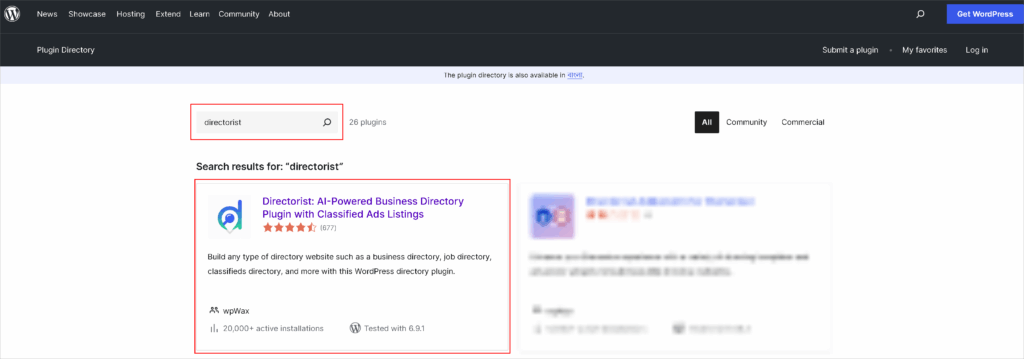
After that, simply click on the ‘Activate’ button.

Now, you will see the following menu item on your WordPress dashboard.

After activation, you should see a setup wizard that you can configure (recommended) or skip to configure later.
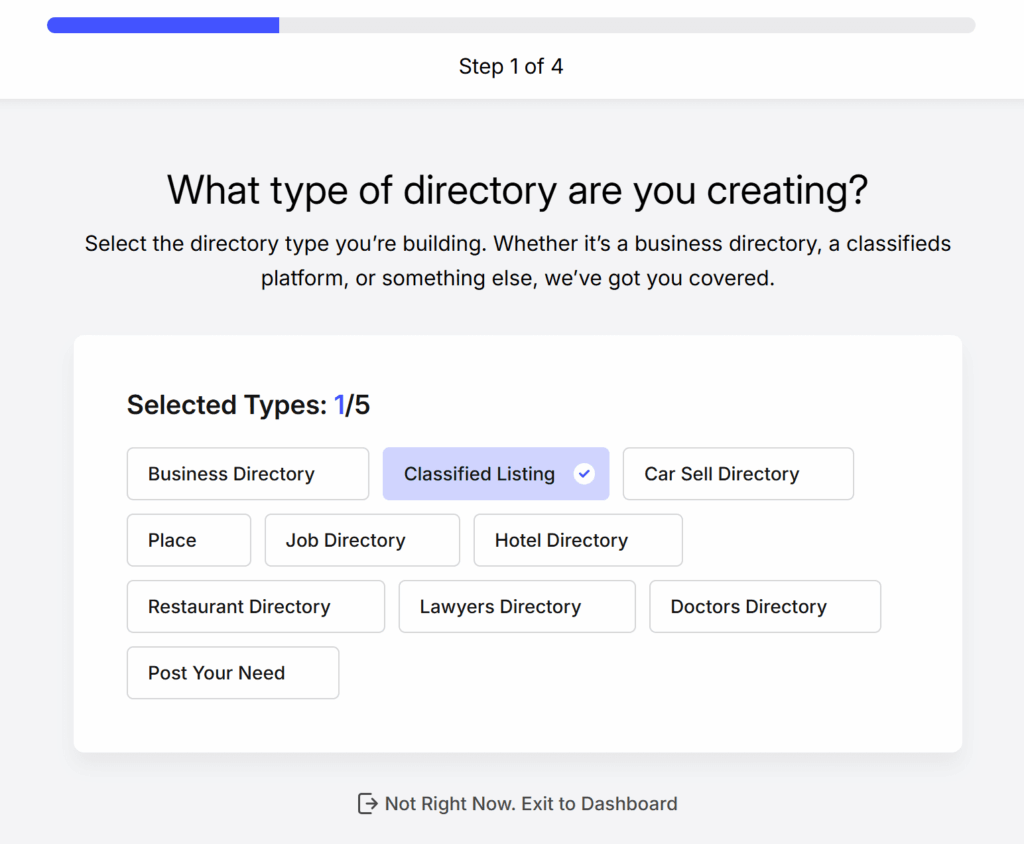
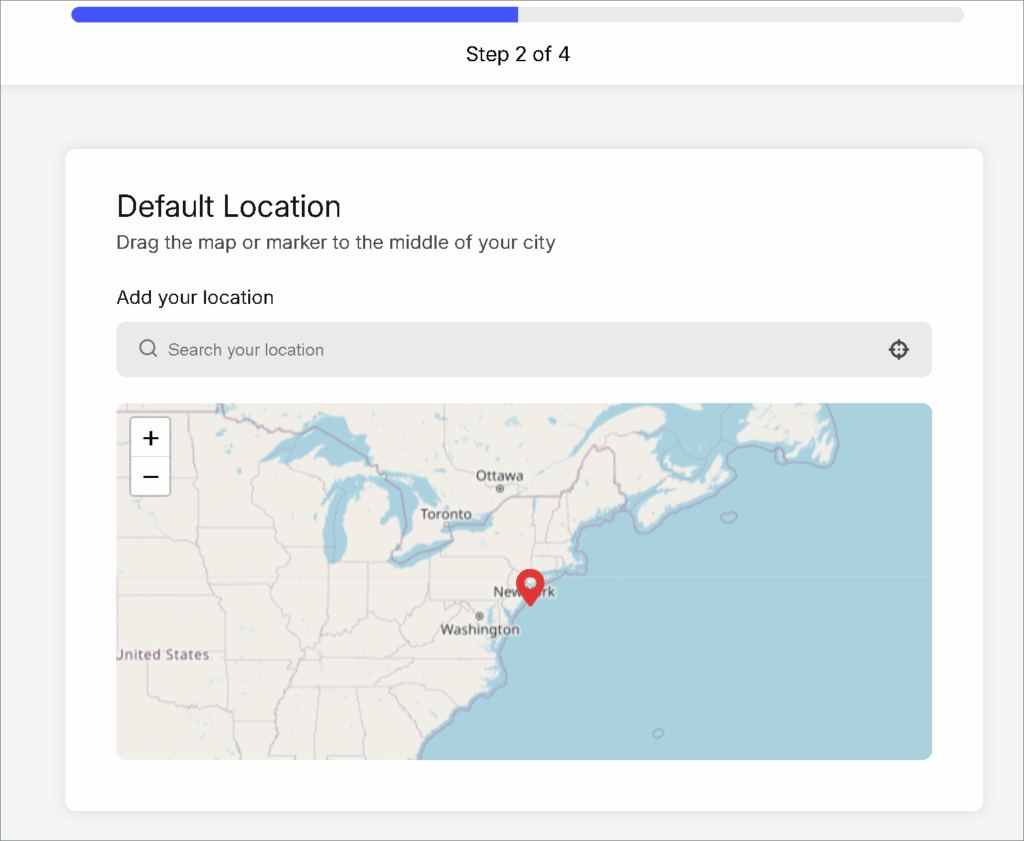
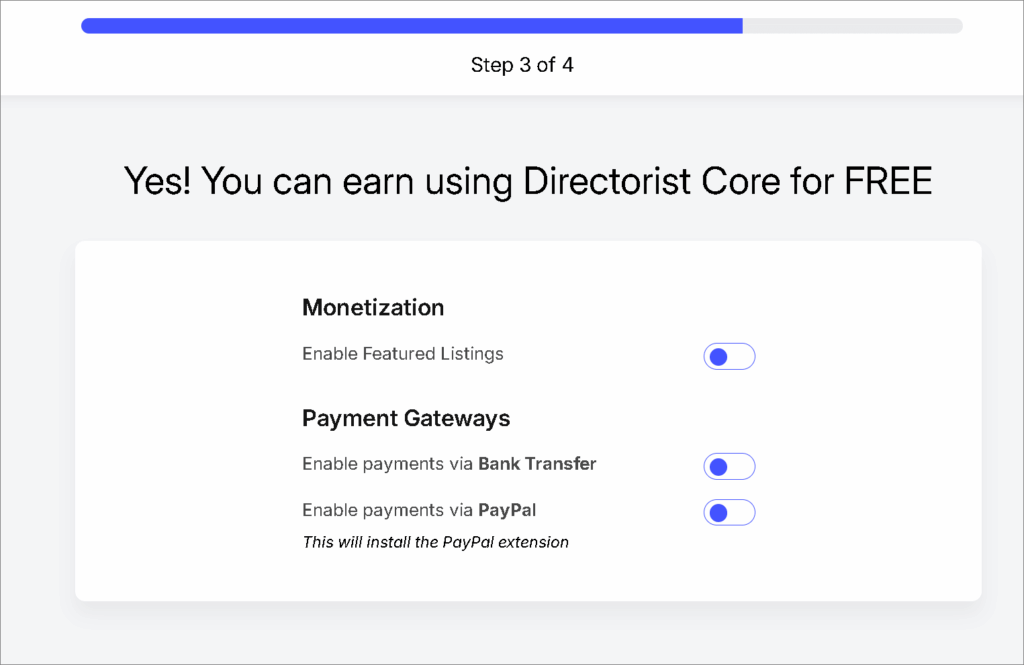
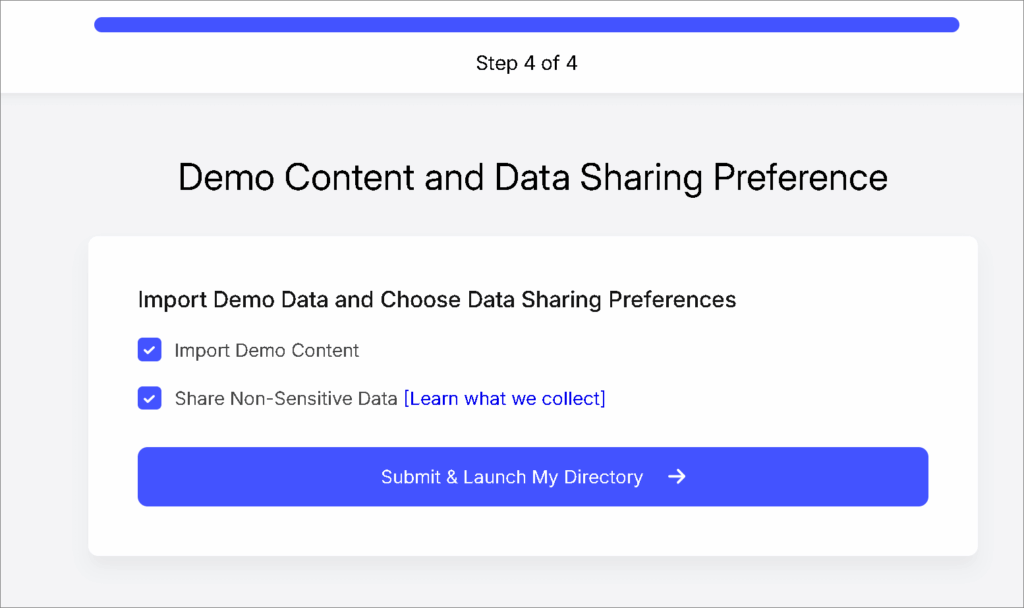
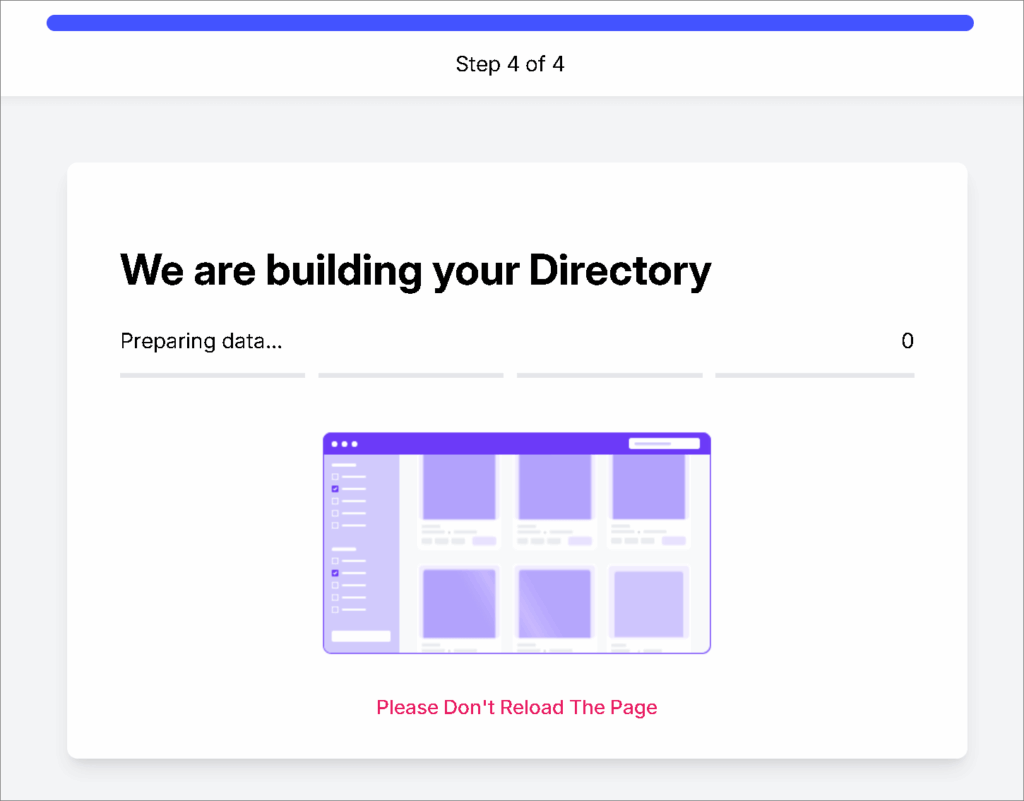
In the Setup wizard, you can set core settings such as directory type, location, monetization features, and demo content import. This process will save your time and help to create the directory website faster.
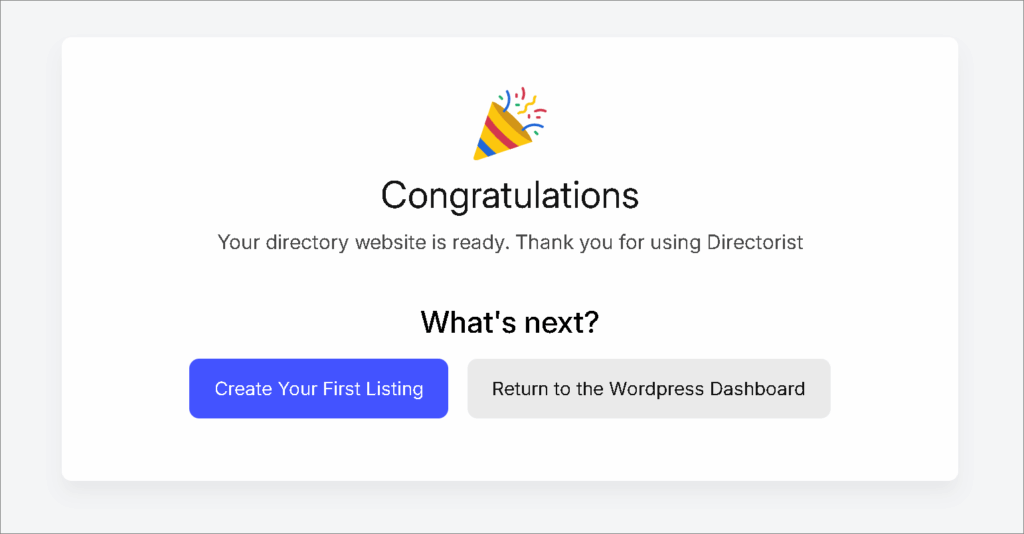
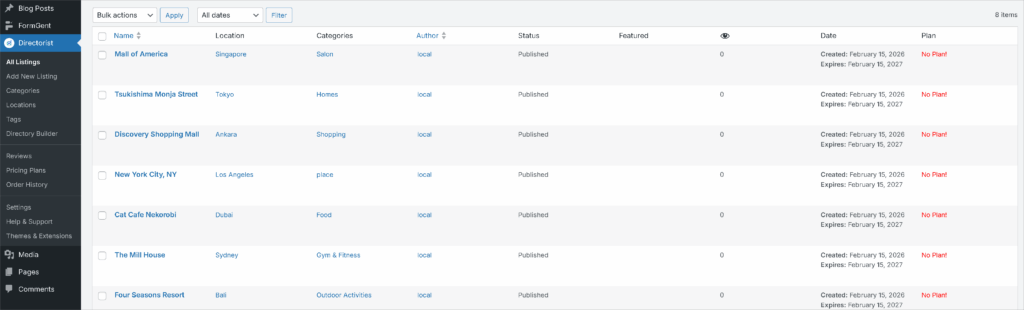
Here you’ll see the demo listings. You can edit or delete them.
Install A Theme
To achieve a professional appearance, using a WordPress directory theme is a quick and effective choice. Any popular WordPress theme can be utilized with Directorist.
We suggest selecting a niche-based directory theme. Directorist offers a couple of niche based WordPress directory themes that are easy to design and create job directory, event directory, real estate directory, doctor directory or any others type of customized directory website.
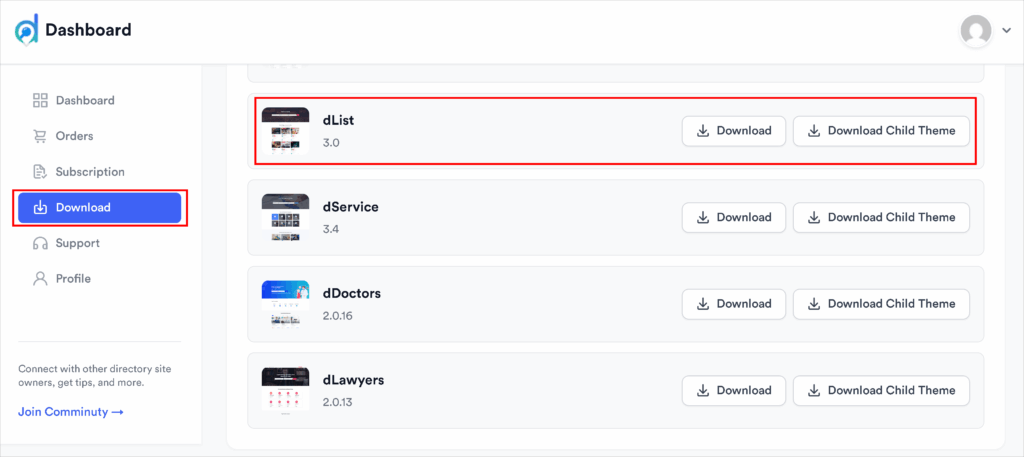
Download the ZIP file of your preferred theme from your user dashboard to your local storage.
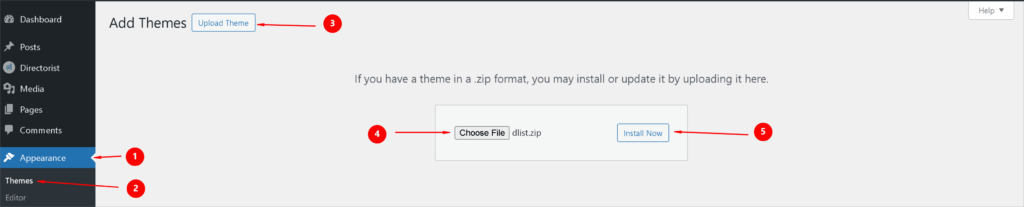
Next, go to the WP Admin Dashboard > Appearance > Themes > Add New > Upload Theme> Install Now.
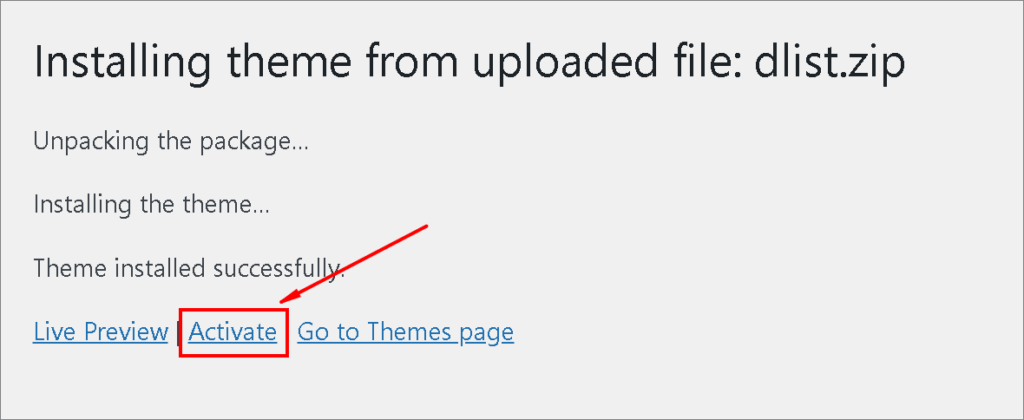
Finally, activate the theme.
You will then need to install some essential plugins. We advise installing and activating all of them to access all the features.
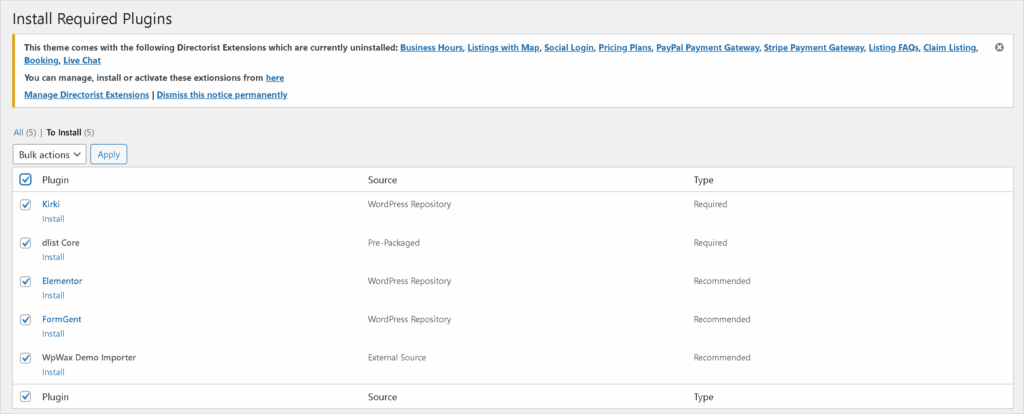
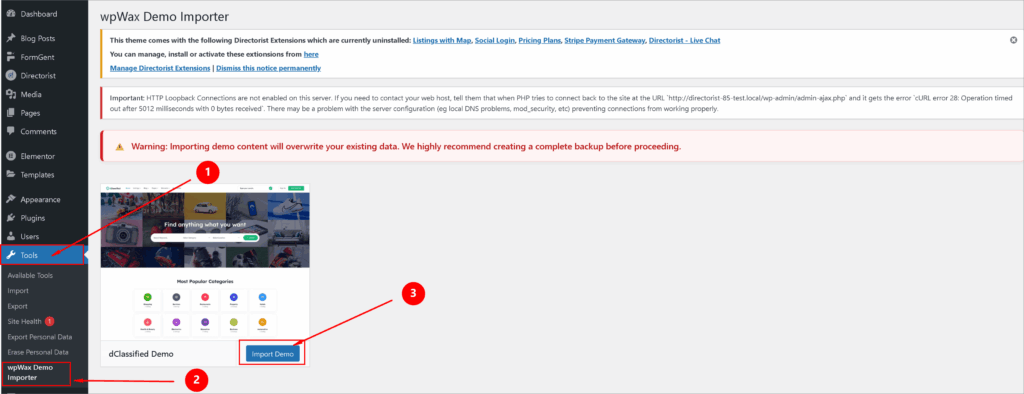
You can use the “wpWax Demo Importer” to save time and achieve the exact design you saw in the demo. Before using the importer, ensure you have a complete backup of any important data, as importing demo content will replace your existing data.
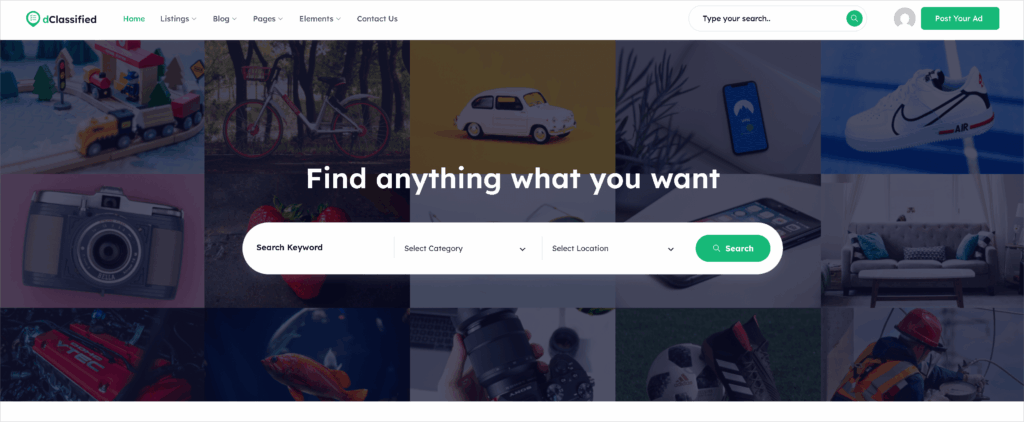
After setting up the plugin and theme, here is the preview.
You may need some tweaks like customize menu, update image or logo, change brand color etc.
Create a menu item from WP Dashboard > Appearance > Menu > Create a new menu.
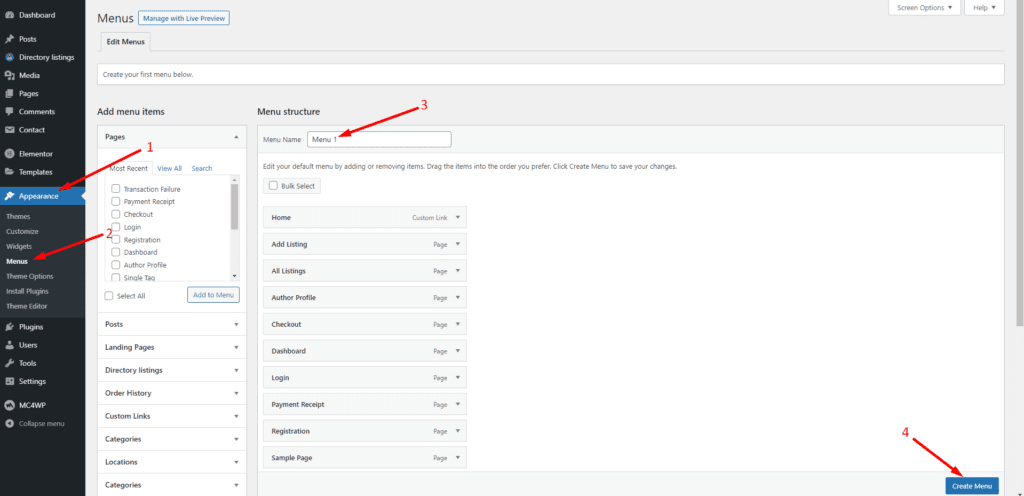
You can also edit or delete the existing menu.
You will get more advanced options from Theme options. To access the theme options: WP Dashboard > Appearance > Theme Options.
Structured taxonomy improves discoverability. Navigate to your directory settings and define:
- Categories – Primary classification (e.g., Restaurants, Dentists, Real Estate).
- Tags – Supplementary labels to refine searches.
- Locations – Geographic organisation (City, State, Region).
Well-organised categories enhance user experience, SEO structure and filtering efficiency. Avoid excessive complexity. Start with essential classifications.
➡️How to Create a category on your directory website
To create a category, access the WordPress admin dashboard and head to Directorist > Categories.
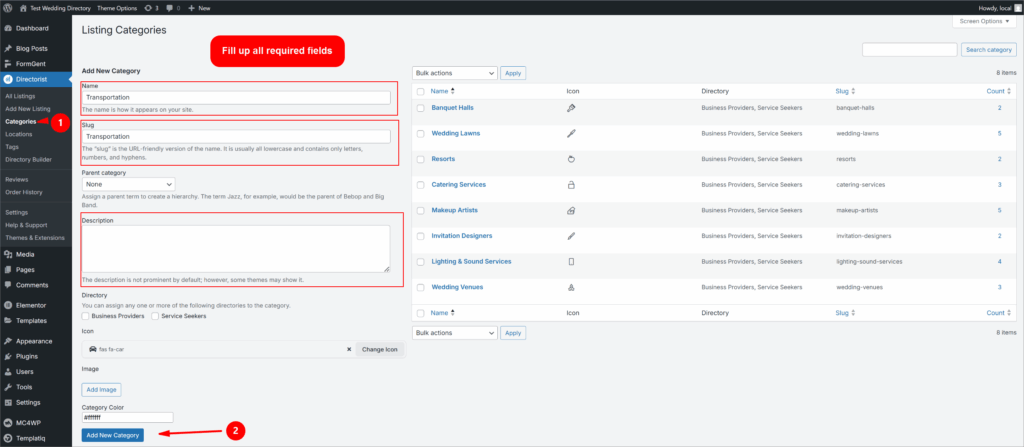
You can now find all the necessary fields to create a category, which include category name, slug, description, icon, and image.
After you finish inputting data, click on the “Add New Category” button.
Great! You have created a category successfully.
📌 Tip: Do not create too many category unless it required. Too much category may confused the visitors and give a bad experience on finding their listings.
➡️How to Add Tags on your directory website
You can add a tag following the same way, you add a category for your directory listings. A tag is a substitute for categories and allows for another sorting method in WordPress. To add a listing, choose the Tags option from the Directory Listings menu: Directorist > Tags.
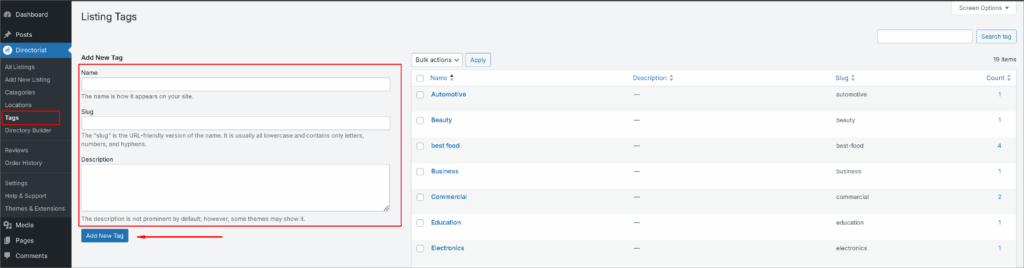
Type the tag name along with any other details. Then click on the “Add New Tag” button to create a tag.
➡️How to Add a location on your directory website
Select the Locations option from the Directory Listings menu to add a location: Directorist > Locations.
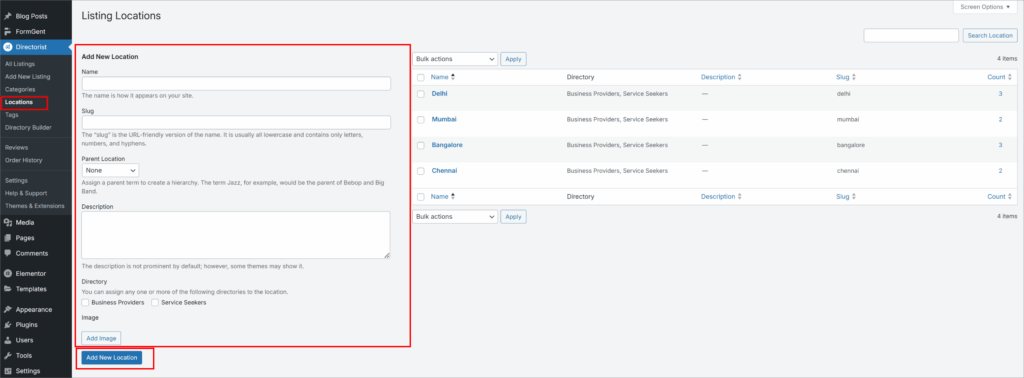
Just like adding categories and tags, you will have options to add a location. Enter the location name, slug, description, and image. When you’re done, click the “Add New Location” button to create a new location.
How To Add Listings and Populating Data on Your Directory Website
You can add listings following multiple methods. You can collect the business listings through a submission form or can manually add them. There are also options to add bulk listings by uploading .csv files. Let’s deep down how to do it.
1. Add Listing Manually from WP Dashboard
This step is primarily designed for directory owners. Enter the first 100 to 200 listings on your own. This will give the site a lively, credible, and worthwhile impression.
You can manually add a business listing from WP Admin Dashboard > Directorist > Add New Listings

After filled up all the required information, click the “Publish” button.
2. Create a Front End Submission Form
You can add listing through a submission form that will used to collect business data from the business owners. This will increase the listing amount on your directory and reduce your work pressure. Here we’ll show how to create a submission from to add listings on directory.
To generate a submission form, follow these outlined steps: WP Dashboard → Directorist → Directory Builder → Add Listing Form. Utilize the ‘Form Fields’ to adjust the form according to your preferences. If moderation is active, you are required to review and confirm the listing through Dashboard → Directorist → Listings. Once you have approved it, the listings will be featured in your directory, accessible for users to find.
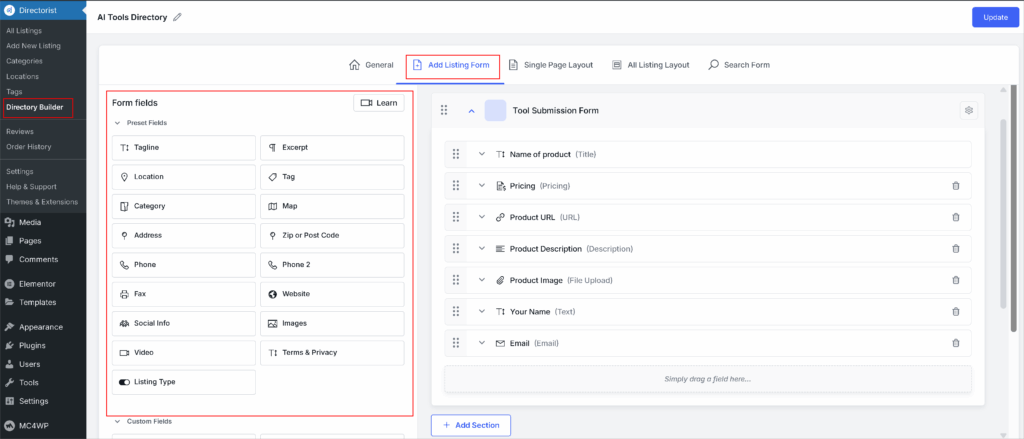
See the following video to understand how submission form works.
📌Tip: Keep the form simple and easy. Do not use too much fields. Irrelevant fields decrease the submission rate from the business owners.
3. Use CSV Imports
Utilize CSV files for bulk data importation if the information has been gathered from publicly available, legally scrapable sources (such as name, address, and phone). Upload the CSV file following WP Dashboard > Directorist > Settings > Import & Export > Listings > Run Importer> Upload CSV > Column Mapping > Import.
📌 Helpful Guide – How to Get Data for Your Directory Website
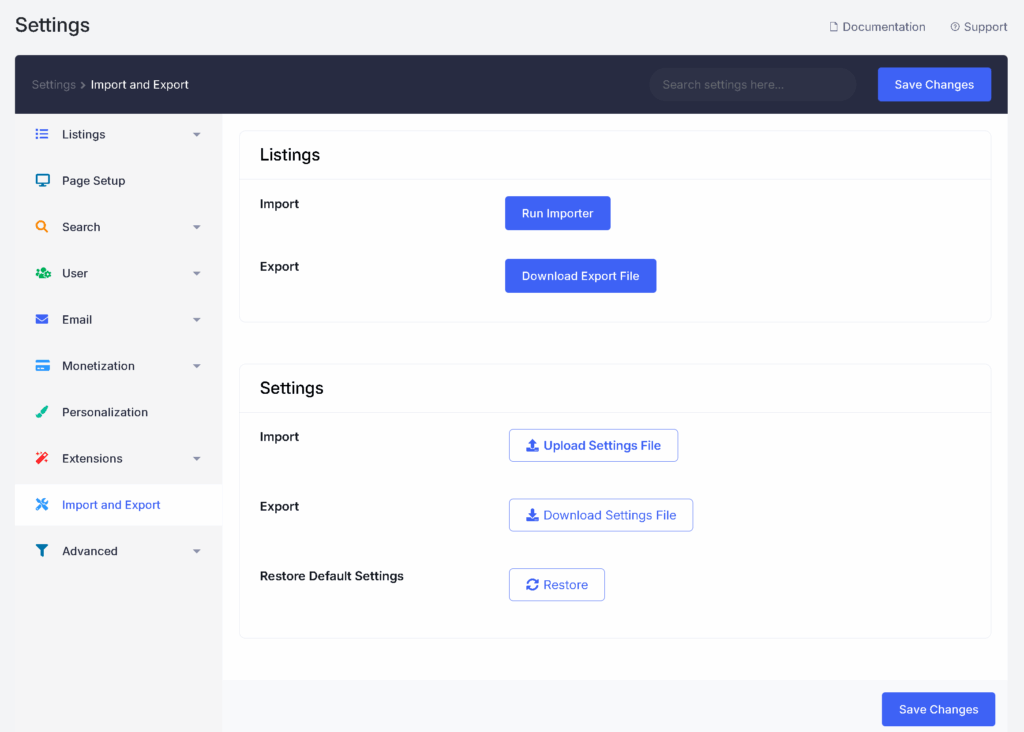
Click the “Run Importer” and Upload CSV File
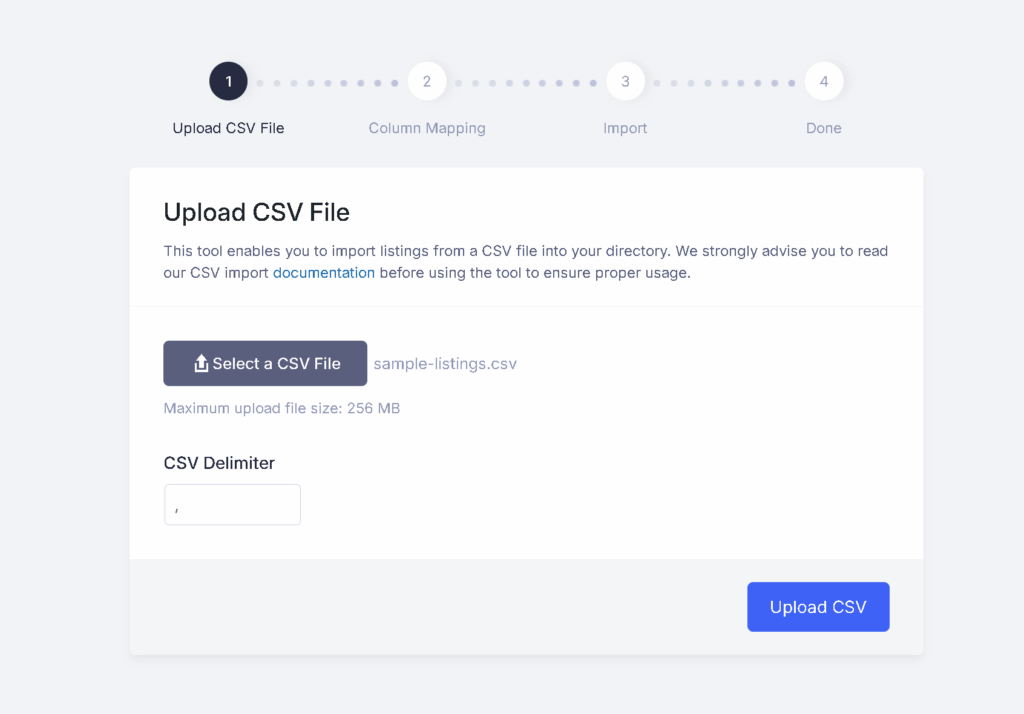
In this “Column Mapping” section you have the to control of Directorist fields to map it against your CSV file columns.
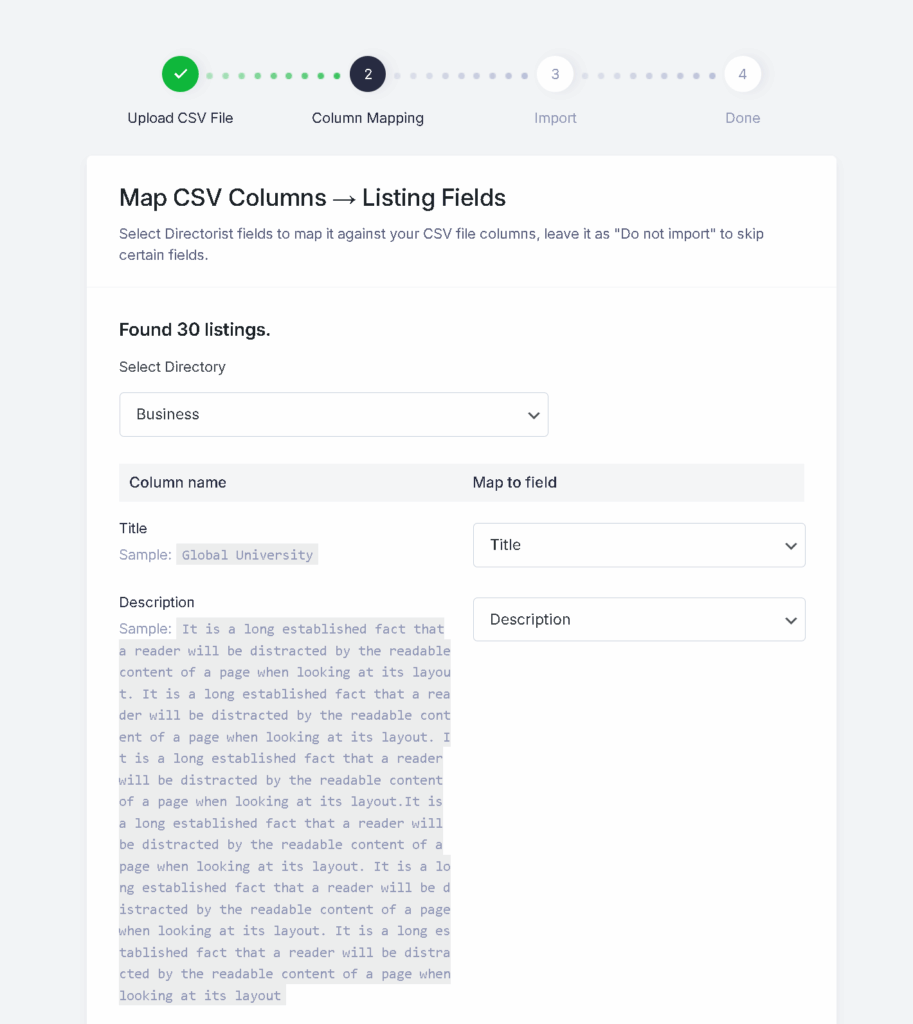
After successfully imported, the following listings will be added on your directory website.
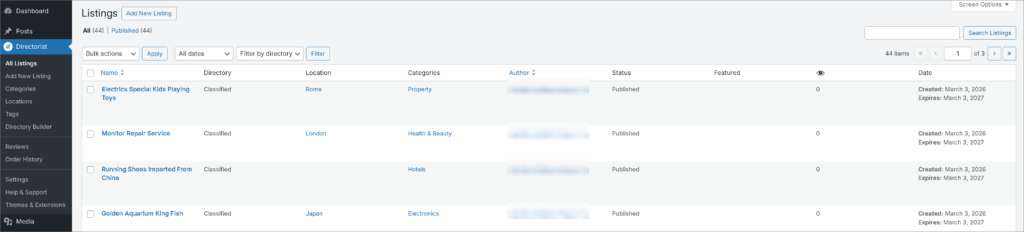
💡Pro Tip: You can change the page layout & listing layout with more customization options. See the video to know how to do this.
Step-6: How to Monetization Your Directory Website

A directory without revenue is simply a catalog. Monetization is not a switch you flip at the end. It is an important decision that should be considered from day one. Monetization is not a switch you flip at the end. A directory that solves real discovery problems and offers measurable visibility will always have revenue potential. In this phase, we shift from building infrastructure to generating income. The key is designing revenue streams that align with your niche and audience behavior. Let’s break it down.
1. Pricing Models Explained
Before charging anyone, define your monetization philosophy.
Ask yourself:
- Who benefits most from visibility on your platform?
- Are the listing owners businesses or individuals?
- Is your directory high-traffic or niche-focused?
Your pricing structure must reflect value—not arbitrary numbers.
Common pricing frameworks include:
- One-time listing fees
- Recurring subscription plans
- Tiered membership levels
- Featured placement upgrades
Clarity beats complexity. Keep your pricing understandable.
With Directorist, you can start monetization with the FREE “Featured Listing” option. Follow the screenshot for activating the option, or skip if you already activated on the “Setup Wizard.”

After you scale, include the Directorist Pricing Plan extension to create customized pricing plans that suit your business best. To know how to create a pricing plan, read this step-by-step guide. If you want to use WooCommerce, you can also use the WooCommerce Pricing Plans.
2. Free vs. Paid Listings
Offering free listings can accelerate growth. It reduces friction and encourages early adoption. However, free models alone are rarely sustainable. You can follow a balanced approach like this:
- Free basic listing for attract new business owners.
- Offer Paid premium listing to highlight listings.
- Paid featured upgrade to access more customization.
This “freemium” structure attracts volume while preserving monetization potential. The free tier builds inventory, and the premium tier builds revenue.
3. Subscription Revenue Model
Recurring subscriptions provide predictable income. Instead of charging once, you charge monthly or annually for:
- Premium visibility
- Additional listing fields
- Enhanced exposure
- Analytics access
Subscription models create long-term stability. They also increase customer lifetime value. But they require clear value differentiation between tiers.
4. Selling Featured Listings
Featured listings are often the simplest monetization model. Businesses pay for priority placement in:
- Search results
- Category pages
- Homepage sections
This increases visibility and click-through rates. The psychological driver is exposure. The operational requirement is limited.
Featured listings are particularly effective in competitive niches such as real estate, local services, and job boards.
📌 With Directorist, you can monetize your directory website with a featured listing option for free by following these easy steps.
5. Payment Gateway Setup
Once pricing is defined, you must enable payment processing.
Most directory platforms support integrations such as:
- PayPal
- Stripe
- Authorize.net
- Offline payment methods
Choose a gateway based on:
- Geographic audience
- Transaction fees
- Currency support
- Ease of integration
Test transactions thoroughly before launch. Nothing damages credibility faster than failed payments.
Directorist supports both online and offline payment systems. You can use popular online payment gateways like PayPal and Stripe with the following extensions.
- PayPal Payment Gateway (Free) – Accept payments via PayPal from listing submitters
- Authorize.net Payment Gateway – Accept card payments via Authorize.net on your directory
- Stripe Payment Gateway – Process payments in 135+ currencies with Stripe
6. Additional Revenue Opportunities
Once your directory gains traction, you can expand monetization channels:
- Display advertising banners
- Sponsored placements
- Promotional email campaigns
- Commission-based transactions
- Digital product listings
Diversification reduces dependency on a single income stream. You can check some of the following extensions that can help you on implement different monetization strategy.
- Claim Listing – Let business owners claim and manage their listings
- Mark as Sold – Allow sellers to flag their listing as sold
- Directorist Coupon – Offer discount coupons to boost listing conversions
- Digital Marketplace – Turn your directory into a digital product storefront
📌 Tip: A common strategy you can follow. First launch with free listings. Build inventory and traffic. Introduce premium features gradually. This phased approach reduces friction while preserving future revenue potential. Avoid underpricing simply to attract users or overpricing by just guessing. Sustainable pricing ensures long-term viability. Research similar directories in your niche. Evaluate their data, like pricing tiers, included features, traffic volume, and value proposition. Remember: businesses pay for visibility that converts.
How to Grow and Scale Your Directory Business

Launching your directory is an achievement. Scaling it is the real challenge. At this stage, your focus shifts from structure to traction. From setup to expansion. Growth is not accidental. It is systematic, data-driven, and sustained by strategic refinement. Let’s explore how to scale intelligently.
1. SEO for Directory Websites
Search visibility is the primary growth engine for most directories.
Unlike traditional websites, directories benefit from scalable SEO architecture. Every listing, category, and location page can become an entry point for search engines.
To strengthen visibility:
- Create clean URL structures (e.g., /category/city/)
- Optimize category and location pages with unique content
- Implement structured data (schema)
- Ensure fast loading speeds
- Avoid duplicate listing content
- Use a popular SEO plugin like Yoast or Rank Math.
Focus on long-tail queries such as:
- “Best plumbers in Austin”
- “Remote marketing jobs”
- “Affordable apartments in Denver”
Directory SEO thrives on specificity.
For a deeper breakdown, read our complete guide on SEO for Directory Websites. You can also check out The Hidden SEO Power of Directorist: Are You Using its Full Potential?
2. Getting More Listings On Your Directory Website
A directory without listings has no value. In the early phase, proactive outreach is essential. We have discussed some method in the earlier section. Here are some more effective methods include:
- Contacting local businesses directly
- Offering free early access
- Importing publicly available data (where permitted)
- Partnering with niche associations
- Incentivizing early adopters
Momentum matters. Once you reach critical mass, organic submissions increase naturally.
For a step-by-step acquisition strategy, see How to Get Data for Your Directory Website or 10 Tips To Attract Businesses On Online Directory Website
3. Marketing Strategies
Growth requires distribution. Consider multiple channels as follows:
➡️ Content Marketing
Publish niche-focused blog posts that attract organic traffic. Example: industry-specific guides or local resource pages. To know how to do content marketing for your directory business, follow the help resources:
- Crafting Compelling Content for Online Directory Listings
- Marketing and Content Ideas to Keep People Coming Back to an Online Directory Website
➡️Email Marketing
Collect user emails and send curated listings, announcements, or promotions for your directory business. You can follow these strategies to set up your email marketing and grow.
- Maximize Your Directory Listing Business with Email Marketing Automation: A Step-by-Step Guide
- Email Marketing Best Practices for Your Directory Business That Drive Results
➡️Social Media Marketing
Highlight new listings and success stories on social media platforms like Facebook, Instagram, LinkedIn, X.
Follow this guide for social media marketing for your directory website: Social Media Marketing for Directory Business: Maximizing Your Online Presence
📌 Pro Tip: You can add Social Media Login option easily on your directory website, following these simple steps – How to Add Social Media Login to Your Directory Website
➡️Paid Advertising
Promote premium listings or attract business owners through targeted ads on Google, Facebook, LinkedIn and other platforms.
4. Scaling to Thousands of Listings
As listings grow, complexity increases. You must address:
- Database performance
- Hosting scalability
- Moderation workflows
- Spam control
- Content quality standards
High-volume directories require operational discipline. Automate where possible. Standardize processes.
For performance optimization tips, read Directorist Speed Optimization: How We Did It
5. Automation & Management
Manual oversight does not scale. Implement systems for:
- Automated email notifications
- Listing approval workflows
- Recurring billing
- Engagement alerts
- Performance tracking
Analytics become indispensable here. With data you’ll have the clear insights of your directory business:
- Which listings receive the most views
- Which categories convert best
- Where users drop off
Scaling without data is guesswork. Scaling with data is precision.
For deeper insights, explore Directorist Analytics: Access the Clarity Your Directory Lacks
6. Retention & Engagement
Acquisition is expensive. Retention is strategic. Encourage ongoing engagement by:
- Allowing users to save favourites
- Enabling search alerts
- Sending periodic updates
- Offering promotional incentives
The more engaged users are, the more valuable your platform becomes.
7. Expanding Vertically or Geographically
Once your niche gains traction, expansion opportunities emerge:
- Add new cities
- Introduce subcategories
- Launch multi-directory
- Offer complementary services
Expansion should be validated—not impulsive. Review demand before broadening scope.
For expansion strategy, see How to Create a Multi Directory Website with a WordPress Multi Directory Plugin for Free
Growth is iterative. A directory becomes powerful when its ecosystem is self-sustaining—where users submit listings, businesses upgrade for visibility, and traffic grows organically. By following these strategies, you can grow a sustainable directory business that earns a good profit.
Common Mistakes to Avoid while Building A Directory Website

Many directories fail—not because of technical flaws—but because of strategic missteps. Avoiding the following mistakes can save you time, capital, and momentum. Here are some mistakes that are often repeated by the directory websited owners.
- Choosing the Wrong Niche or too broad
- Launching Without a Monetization Plan
- Poor User Experience
- Weak SEO Structure
- Overcomplicating the Initial Build
- Ignoring Moderation & Security
- Failing to Engage Listing Owners
- Scaling Too Quickly
A directory website is not just a technical project—it is an evolving digital asset. Strategic clarity, disciplined execution, and continuous refinement determine long-term success.
If you need guidance, review our article on Mistakes to Avoid While Building Your Online Directory
It’s Your Turn
Creating a directory website is no longer a technical hurdle. This article will help you build a directory website. You can turn it into a recurring revenue asset. It will generate consistent traffic, attract local businesses, and provide predictable income through listings, subscriptions, and featured placements. Remember, success doesn’t come from rushing the build. It comes from clarity in planning, disciplined execution, and consistent optimization. A directory website rewards those who treat it as a long-term business — not just a website project.
If you want to launch a professional directory website, consider Directorist. It’s a popular business directory plugin with over 20,000 active installations. It provides all you need to start and grow your online directory business. You get advanced search, structured listings, monetization tools, and scalable extensions.
To stay ahead, follow us on Facebook, YouTube, and LinkedIn for insights, updates, and practical growth strategies.
You can also join our community of directory founders and entrepreneurs. Connect with other business owners, exchange ideas, and learn from real-world experiences.
Have a question or facing a challenge?
Leave a comment below or reach out to our support team. We’re here to help you build, grow, and scale with confidence. If you found this guide helpful and believe others could benefit from this roadmap, share this post with your network.
Let’s grow your directory business — together.

Frequently Asked Questions
What is a WordPress directory plugin and how does it work?
A WordPress directory plugin helps site owners build listing-based websites easily. It lets admins create custom post types, set listing categories, add search filters, and design submission forms. They can also choose monetization models. These plugins work with themes and other tools. They support features like frontend submissions, payment gateways, maps, and advanced filtering.
How is a business directory plugin WordPress solution different from a standard listing plugin?
A WordPress business directory plugin is made for listing businesses. It includes company profiles, contact info, operating hours, reviews, and location details. General directory plugins manage various content types like events, properties, and services. However, business-focused solutions often add specific fields for industries. They also include monetization tools for paid listings or featured placements.
Is there a reliable WordPress directory plugin free version available?
Yes, Directorist offer a free version of a WordPress directory plugin. This free version offer all the key features include basic listings, categories, and easy search options. It also offers some premium features free like payment integrations, claim listings, custom fields. However, advanced features like advanced automation, claim listings, or advanced analytics usually require premium extensions.
What features should be included in the best WordPress directory plugin?
A high-quality WordPress directory plugin should include customizable listing fields, advanced search and filtering, frontend submission forms, monetization options, map integration, responsive design compatibility, scalability for large datasets, and integration support with popular themes and page builders.
How do I evaluate a business directory plugin demo before purchasing?
When reviewing a business directory plugin demo, examine search performance, frontend submission flow, listing customization options, payment workflows, user dashboard capabilities, and mobile responsiveness. Also test filter accuracy, page speed, and compatibility with common WordPress themes and caching solutions.
Can a WordPress directory theme replace a directory plugin?
A WordPress directory theme provides pre-designed layouts tailored for listing websites. However, themes primarily control design, while plugins handle functionality. For long-term flexibility and scalability, use a dedicated WordPress directory plugin. Pair it with a compatible theme.
How can I monetize a business directory?
Monetization methods include paid listing submissions, subscription-based plans, featured listing upgrades, claim listing fees, banner advertising, and affiliate partnerships. You can easily make money from your directory website with Directorist. It supports recurring billing and flexible monetization options.
What technical considerations should I review before choosing a WordPress directory plugin?
Evaluate database structure, performance under large listing volumes, compatibility with page builders, REST API support, multilingual capabilities, and integration with payment gateways. Also review update frequency, documentation quality, and developer support responsiveness to ensure long-term sustainability.
What is the best WordPress directory plugin for beginners?
The best WordPress directory plugin for beginners should be easy to set up. It needs to be customizable and work with most themes. Look for features like drag-and-drop form builders, frontend submission, monetization options, and advanced search filters. A beginner-friendly plugin should provide clear documentation and demo content. This helps speed up launch time. Some tools provide both free and premium versions so you can start small and upgrade later. If you want a scalable option that works for local listings, service directories, or niche marketplaces, solutions like Directorist are often recommended because they balance usability with advanced features.
How do I create a business directory using a business directory plugin WordPress solution?
To build a business directory plugin WordPress website, first install WordPress and choose a reliable hosting provider. Then install a directory plugin from the dashboard. Configure listing categories, submission forms, pricing plans, and search filters. Add essential pages like “Submit Listing,” “All Listings,” and “Pricing.” Customize design using a compatible WordPress directory theme. Finally, test the submission and approval workflow before launch. Many plugins also support payment gateways, allowing you to monetize featured listings or subscription plans.
Do I need a separate WordPress directory theme, or will a plugin work with any theme?
Most modern directory plugins work with standard WordPress themes. A dedicated WordPress directory theme usually comes with pre-designed layouts. It includes listing grids and optimized search pages that fit directory sites. A directory-specific theme can save you time if you want a quick setup and less customization. If you have a brand design, a flexible plugin that works with page builders offers more creative control. The best approach depends on your design needs and technical skills.
Is there a Business directory plugin demo I can test before buying?
Yes, most reputable plugins provide a Business directory plugin demo on their website. A demo lets you check out the user dashboard. You can also explore search filters, submission forms, and monetization setup before you decide. Testing a demo helps you evaluate usability, design flexibility, and performance. It also shows if the plugin suits your niche, like real estate, restaurants, events, or service providers, before you spend time and money.
Can I build a directory website using only WordPress plugins free tools?
You can create a basic directory using free WordPress plugins. You’ll need a free directory plugin, an SEO plugin, a caching plugin, and a security plugin. As your website grows, you might need premium add-ons. These can include advanced search filters, payment integrations, or custom layouts. Starting free is a practical way to validate your business idea. When you see traction, upgrading to premium features can boost user experience and revenue. Plus, you won’t need to rebuild your site.

Rezaul Karim
Rezaul Karim is a passionate Digital Marketer driven by curiosity and creativity in the ever-evolving world of online marketing. With over 6 years of hands-on experience in Content Writing, Copywriting, SEO, and Social Media Marketing, he brings a strategic edge to crafting content that engages and converts. Always eager to explore new trends and tools, Rezaul thrives on finding smarter ways to connect brands with their audiences. Outside of work, he enjoys diving into books or recharging in nature.

Leave a Reply
You must be logged in to post a comment.