



Table of Contents
- 1 What "free" means in Directorist
- 2 What you get for free
- 2.1 Directory structure and multi-directory support
- 2.2 Unlimited listings and unlimited custom fields
- 2.3 Advanced form builder
- 2.4 Directorist AI
- 2.5 CSV bulk importer
- 2.6 Frontend listing submission and user dashboards
- 2.7 Search with filters, geolocation, and radius search
- 2.8 Maps (Google Maps and OpenStreetMap)
- 2.9 Essential listing views (grid and list)
- 2.10 Rating and reviews
- 2.11 Schema markup
- 2.12 WordPress default Taxonomy, SEO-friendly URLs and plugin compatibility
- 2.13 Page Builder support
- 2.14 Multilingual support and RTL compatibility
- 2.15 Admin approval workflow
- 2.16 Private directories
- 2.17 Free Directory themes
- 3 Where the Directorist free version stops
- 3.1 Premium niche themes and Demo Import
- 3.2 Accepting various payments for listings
- 3.3 Booking functionality
- 3.4 Claim Listings
- 3.5 Ads manager
- 3.6 Advanced analytics
- 3.7 Advanced Reviews
- 3.8 Bricks Builder and Oxygen Builder support
- 3.9 Live Chat with users
- 3.10 Business hours
- 3.11 Visually Stunning listing layouts
- 3.12 Social login
- 3.13 Email marketing integrations
- 3.14 Job board / job manager
- 3.15 Digital marketplace
- 3.16 Community, Gamification and Coupon
- 3.17 Mobile app
- 4 A practical way to decide
- 5 One thing worth saying directly
- 6 The Bottom Line
- 7 Common Queries about Directorist Free vs Pro
- 7.1 If my pro plan expires, what happens to my listings?
- 7.2 If I upgrade from free to a paid plan, will it break my existing directory setup?
- 7.3 Do I need multiple Directorist Free and Pro plugin to keep my directory running?
- 7.4 Is the free version eligible for customer support?
- 7.5 Does the lifetime plan exclude anything?
- 7.6 Is there a free version or demo of the Directorist mobile App?
Is the Free Version of Directorist Enough? Here’s What You Actually Get
-

- Directorist Extensions
- 13 mins read
Most “free vs. paid” articles are written to make you feel like you’re missing out. This one isn’t. The goal here is simpler: tell you exactly what the Directorist free version includes, where it stops, and how to figure out which side of that line you actually need to be on.
If you already have the Directorist free version installed and you’re wondering whether upgrading is worth it – or if you’re evaluating the plugin before you start – this is the clearest answer you’ll find.
What “free” means in Directorist
Directorist free version is available on WordPress.org and has over 20,000 active installs with a 4.7/5 rating. It is not a trial, and it does not expire. You can install it, build a real directory, and run it indefinitely without ever paying anything.
The paid plans – currently starting around $100+/year for a single site unlock premium extensions and niche themes that sit on top of that core. Directorist free version is the foundation. Extensions are optional rooms you add when you need them.
This structure is different from most competitors. Most WordPress directory plugins gate core monetization features behind individual premium add-ons priced separately. Some requires WooCommerce to process payments.
Directorist free version includes more in its core than either of those does and adds payment processing capability without a third-party dependency once you’re ready to charge for listings. Even the PayPal payment integration extension is free, though requires separate plugin to configure.
What you get for free
Here is everything included in the Directorist core plugin at no cost:
Directory structure and multi-directory support
You can create multiple directory types on a single WordPress install from day one. A restaurant directory, a services directory, and a real estate directory can all coexist under one site, each with its own fields and layout. This is free.
Unlimited listings and unlimited custom fields
There is no cap on how many listings your directory can hold. You can add unlimited custom fields to listing forms – choosing from 14 field types – and use those same fields as search filters. Even the newly launched Button and Custom HTML fields launched in Directorist v8.7 are included in the free plan.
Advanced form builder
A drag-and-drop form builder lets you customize listing submission forms, search forms, and listing card layouts without code. You can assign different fields to different directory types so a restaurant listing form only shows restaurant-relevant fields. This is free.
Directorist AI
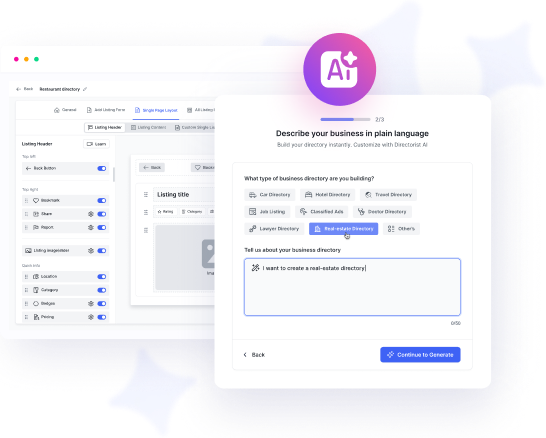
The AI-powered directory builder constructs your directory’s field structure for you. Tell it what kind of directory you are building, and it names your fields, puts them in a logical sequence, and sets up both the frontend submission form (what listing owners fill in) and the single listing display layout (what visitors see).
This matters most when you are working with a mix of preset and custom fields and trying to figure out the right order and layout without going back and forth. It builds the structure – you do not have to configure it field by field from scratch. This is free but for limited builds.
Directorist AI pro on the other hand is an upcoming pro feature which’ll enable users to design their directory and listing layouts through ‘vibe-coding’ but don’t confuse it with the AI-powered builder.
CSV bulk importer
You can import thousands of listings at once from a CSV file. The importer lets you map CSV columns to Directorist fields. This is free.
Frontend listing submission and user dashboards
Listing owners can submit, edit, and manage their listings from the frontend of your site without accessing the WordPress admin panel. Their dashboard is included. This is free.
What’s not included in the dashboard is the advanced analytics.
Search with filters, geolocation, and radius search
The advanced search system includes 14 filters, custom field filtering, geolocation, nearby listings, and radius search. This is free.
If you need an Universal Search system across multiple directories, then you’ll require the pro extension.
Maps (Google Maps and OpenStreetMap)
Both mapping providers are supported out of the box. OpenStreetMap requires no API key. This is free. Google Maps require API key but integrating it to your Directorist is free, requires no pro extension.
Essential listing views (grid and list)
Users can browse your directory in all essential views – grid and list, no paid plan is required for that. Only Listing with Map is a pro extension.
Rating and reviews
A star-based rating system with detailed review writing option, admin approval all are included in the Directorist free version. If you need Advanced Review, then you’ll require the pro extension.
Schema markup
Every listing automatically gets structured data that helps search engines understand and surface your content. You can set your directory to relevant schema to signal search engines what the listings are about without purchasing a pro add-on. This is a free feature.
WordPress default Taxonomy, SEO-friendly URLs and plugin compatibility
Directorist generates clean URL structures by default and works with Yoast SEO and Rank Math and all other popular SEO plugins to give your directory maximum exposure. Custom meta titles and descriptions are configurable per directory page from Directorist setting. All SEO friendly features are entirely free.
Page Builder support
Directorist is compatible with all popular page builders. 25+ Elementor widgets are available which can be accessed via the free AddonsKit for Elementor plugin and it also comes with 15+ Gutenberg blocks for advanced compatibility to WordPress native builder. For Divi, you can use Shortcodes now but advanced integration is on the way. You can build and customize your directory pages using your favorite page builders.
Multilingual support and RTL compatibility
Directorist is fully translatable via WPML, Loco Translate, Polylang, and Poedit. RTL languages are fully supported. WPML integration requires a separate extension but that’s also free.
Admin approval workflow
You can hold every new listing submission for review before it goes live, approve or reject from the dashboard, and email listing owners with feedback. This is free.
Private directories
If you want to restrict a directory so only logged-in or invited users can view it, you can simply enable it from your Directorist free version plugin settings. No pro add-on required to access this feature.
Free Directory themes
Two of the 14 niche-specific Directorist themes; OneListing and Pixetiq are included at no cost. They install like any WordPress themes, works seamlessly with Directorist and Elementor page builder. This is free.
Where the Directorist free version stops
Directorist free version is designed to get you to a fully functional, publicly browsable directory. The extensions and themes pick up from where the business side of the directory starts – specifically, charging for listings and expanding capabilities as your directory grows.
Here is where you will need a paid plan or individual extension:
Premium niche themes and Demo Import
12 of the 14 niche Directorist themes are premium. They come with different layouts suited to the niche, compatible with Elementor page builder and most importantly with demo data and templates so that you don’t need to start from scratch.
One of the key advantage of getting the bundle plan is; you get access to all Directorist themes, try and test various layout and designs to decide which one you need. For more determined users, standalone themes are also available as options to purchase and build on. Each Directorist themes come with essential pro extensions so that you don’t require making further payments to activate them.
Accepting various payments for listings
The Stripe, Authorize.net and WooCommerce payment gateways, Directorist pricing plans for paid/free listing tiers, and the full monetization infrastructure require premium extensions. Directorist free version lets you accept and manage listings, set featured listings and charge via PayPal or bank transfers.
Charging listing owners under subscription plans or accepting payments via various payment gateways is a premium feature. This is the most common feature that motivates free users to upgrade.
Booking functionality
If you want listing owners to accept appointments or reservations directly through their listing, the Directorist Bookings extension is required. If lets you book various listings – rentals, events or appointments and accept payment online. You can integrate Google Calendar with the built in calendar to streamline your entire booking process.
In the Directorist free version, you can set booking information such as contact number, email, link to another booking portal or even a FormGent form to collect bookings in your listings but if you want to turn the entire listing ecosystem into booking, Directorist booking extension does it most conveniently. And it’s a premium extension.
Claim Listings
If you want businesses to claim existing listings on your directory (common for directories seeded with imported data), the Claim Listings extension is required. This is another powerful monetization feature and to enable it within your directory, you require the pro extension.
Ads manager
Display and manage banner or listing ads within your directory – giving you a second revenue stream alongside paid listings. Utilize various ads format; banner, HTML and Google AdSense. You control placement and rotation from the admin panel. The premium ads manager extension handles everything.
Advanced analytics
The Directorist Analytics extension, which gives both admins and listing owners detailed data on views, clicks, and engagement over time, is a premium extension. The basic listing owner dashboard showing views is included free; the deeper analytics layer is not. It comes with data such as impressions, keywords, completion rate etc valuable metrics.
Advanced Reviews
The standard star-rating system with text based review is free. The Advanced Review extension unlocks a more advanced, multi-criteria rating and review system that offers more clarity to end users. Collecting and displaying reviews with ratings is free but more structured reviews require premium extension.
Bricks Builder and Oxygen Builder support
Elementor, Gutenberg and Divi are covered free. Bricks and Oxygen require premium extensions for advanced integration.
Live Chat with users
You can enable any live chat tool on your WordPress site to chat with visitors and one of the options it Directorist Live Chat extension. It lets you chat from within your WordPress dashboard and connect with the audience.
Instead of live, real-time chat, if you want to turn on the async chat system that works within WordPress dashboard as well, consider using HelpGent Integration. It also connects you with the audience using the HelpGent plugin and let’s the tool take care of the conversation.
Business hours
Let listing owners set their opening hours by day, including split shifts and temporary closures. Visitors see whether a business is currently open or closed directly on the listing. Useful for any directory where operating hours are relevant – restaurants, clinics, shops, service providers. Requires Business hours premium extension to handle this dynamically.
Visually Stunning listing layouts
Directorist free version includes grid and list views. Premium extensions unlock additional display formats: a listing slider and carousel, and a full image gallery view per listing. These are useful when visual content such as photography, venue imagery, product shots etc. is central to how your listings get browsed. Requires multiple premium extensions to achieve that.
Social login
Let users register and log in using Google, Facebook, or other social accounts instead of creating a separate WordPress account. Reduces friction at sign-up, which matters for directories that rely on user-generated reviews or saved listings. Requires the Social Login premium extension.
Email marketing integrations
Connect your directory to Mailchimp to automatically add listing owners or registered users to your email lists. Useful for sending renewal reminders, newsletter updates, or promotional campaigns without manually exporting contacts.
Job board / job manager
Extend your directory into a job board, allowing employers to post vacancies and job seekers to apply directly. Works as an overlay on your existing directory, so a business listed in your directory can also post jobs. The premium job manager extension ads job-specific fields to your directory, reducing your efforts in customization.
Digital marketplace
Allow digital product listing owners to sell their items on your directory platform – downloads, templates, files and courses, directly through their listing. Turns your directory into a transactional marketplace rather than a purely informational one. Requires Digital Marketplace extension and WooCommerce.
Community, Gamification and Coupon
Advanced WordPress users who use plugins like BuddyPress to manage community, GamiPress for gamification and enables coupon features in their directory for more engagement requires separate extensions; BuddyPress Integration, Gamipress Integration and Directorist Coupon.
None of them are essential for directory websites but having features that can enhance your platform’s capabilities and give your users more reason to convert is certainly something worth giving a try.
Mobile app
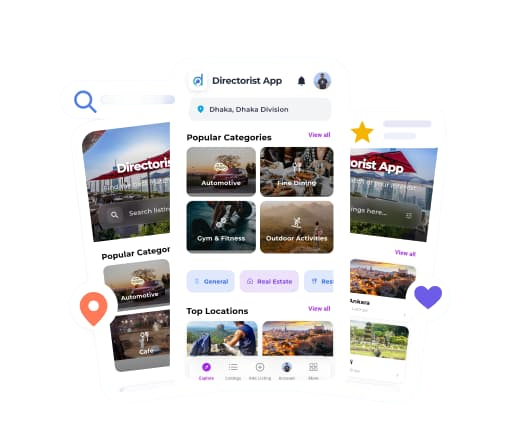
The Directorist Android and iOS apps for reaching a broader audience, launching a directory platform dedicatedly for mobile users and offering minimal listing updates for directory owners on the go – is not included with the Directorist free version or the bundle. It’s a separate add-on that users can utilize to turn their directory platform more mobile-centric.
A practical way to decide
If you can build and launch your directory, collect listings, and figure out whether your niche has real traction – all without charging anyone – the free version covers everything you need to get there.
The point at which the free version genuinely stops serving you is when you are ready to start earning big from the directory and automate your revenue stream without much manual task. Payment gateways, Directorist pricing plans, and claim listings are the main extensions that most free users end up needing first, and these features require a paid plan or multiple add-ons.
Rather than buying individual extensions, the annual bundle covers all 30+ extensions and all premium themes. At that price point, it is usually more economical than picking extensions individually – especially once you factor in that you are likely to want more than one over time.
There is also a lifetime deal starting around $300 for a single site (no annual renewal), which is worth considering if you plan to run the directory long-term. Within 3 years you’re saving on recurring subscriptions already and continue earning while accessing priority support and all future upgrades.
One thing worth saying directly
Directorist’s free tier includes capabilities that other directory plugins charge for. Multi-directory, unlimited listings, the AI-powered directory builder, bulk CSV import, frontend submission, search with radius filtering – these are free. Competitors who appear cheaper at first glance often charge for one or more of these at the extension level.
If you have been comparing plugins based on the free tier alone, Directorist’s free version is meaningfully more capable than most alternatives in the same category.
The Bottom Line
Directorist free version is the right starting point for almost everyone. It gives you everything you need to build, structure, and launch a real directory. If you are validating a niche, building an MVP, or launching a free directory for a community, the free version is likely all you need.
When you are ready to charge listing owners, add booking functionality, or expand the listing owner experience with analytics and advanced features, that is the right moment to look at a paid plan – not before.
Take a look at what each Directorist plan includes before you decide.
Full cost comparison across all options →
Common Queries about Directorist Free vs Pro
Here are some common queries Directorist free version or pro users often asks in our support, various communities and WordPress forums. The comprehensive answers have been included alongside the questions below.
If my pro plan expires, what happens to my listings?
Your listings stay live. Nothing is deleted, hidden, or locked when a paid plan lapses. What you lose is access to the premium extensions themselves – so features like payment gateways, bookings, or advanced analytics may stop functioning until you renew. The directory itself and all the content inside it remains intact inside the Directorist free version.
If I upgrade from free to a paid plan, will it break my existing directory setup?
No. Upgrading installs additional extensions on top of your existing setup – it does not replace or reconfigure anything you have already built. Your fields, categories, listings, and layouts remain exactly as they are. You activate whichever new extensions you want, and those add functionality without touching what is already working.
Do I need multiple Directorist Free and Pro plugin to keep my directory running?
No. One installation of the Directorist free version plugin runs everything – including multiple directories on the same site. There is no separate “runtime” plugin required. Extensions are add-ons to that single core install, not separate plugins you need to keep active in parallel. If you deactivate an extension, the feature it provides stops working, but the core directory continues running normally.
Is the free version eligible for customer support?
Free users have access to the support forum on WordPress.org, where the Directorist team responds to questions. Priority support – direct, faster responses from the support team is included with pro plans. If you are building something straightforward, the public forum is usually sufficient. If you are on a deadline or building something more complex, the priority support that comes with a paid plan is worth factoring into your decision.
Does the lifetime plan exclude anything?
The lifetime deal gives you access to all current extensions and premium themes, plus all future updates, with a one-time payment and no annual renewal. The main thing to verify before purchasing is the site licence limit – lifetime plans are typically available for single-site, 5-sites, or 20-site tiers at different price points. If you are building directories for multiple clients, confirm which tier covers your use case before buying.
Is there a free version or demo of the Directorist mobile App?
We offer custom-built Android and iOS app for your directory that’s built around your listings, your branding, and your structure. There is no pre-made app, no demo, and no free version to try before ordering. Once you place an order, the app is built specifically for your directory. This is a separate service and is not included within Directorist pricing plans.
Still have questions the article didn’t answer – about the Directorist free version, Directorist pricing, Directorist free vs. pro breakdown, or Directorist themes? Reach out via our Contact Form and select the Pre-sales option. We’ll get back to you promptly. No pressure, no rush – just the right answers so you can choose the plan that actually fits what you’re building.

S. M. Navid Anjum
Digital Marketing enthusiast who loves to write technical reviews and trendy contents. Currently working with WordPress Plugin Marketing and growth. Open to collaboration and co-marketing opportunities with any SaaS and plugins.


Leave a Reply
You must be logged in to post a comment.