Holiday Revenue Starts Now. Save Up to 30%!

Build now. Be Ready for year-end demand.

OFFER ENDS IN

  • 00DAYS
  • 00HRS
  • 00MIN
  • 00SEC
Get Holiday-Ready →
Skip to content
  • Why Directorist
    Explore
    All Features Everything the plugin can do Solutions Directories you can build Integrations Plugins that work with Directorist Try Demo Click through real demo directories
    See the proof
    Comparison How we stack up against others Client Showcase Real sites built with Directorist
    Directorist AI
    Build your directory with AI

    Describe the directory you want and let AI build it for you.

    Try Directorist AI
  • Products
    Extensions

    Add powerful features

    Themes

    Ready-to-launch designs

    Templates

    Build pages faster

    Mobile App

    Native app for your directory

  • Resources
    Get help
    Documentation Product guides and how-tos Support Centre Get help from our team Contact Us Sales and general questions
    Learn
    Directorist Academy Courses on directory building Blog Tips, trends and growth ideas What's New Latest releases and fixes
    Company
    About Us Roadmap
    Hire us
    Custom Work, Handled

    Need a new build, custom feature, integration, fix, or ongoing maintenance? Tell us.

    See How It Works View Our Work
  • Pricing
  • Hire Us
Sign In Try For Free
Directorist
  • Why Directorist
    Explore
    All Features Everything the plugin can do Solutions Directories you can build Integrations Plugins that work with Directorist Try Demo Click through real demo directories
    See the proof
    Comparison How we stack up against others Client Showcase Real sites built with Directorist
    Directorist AI
    Build your directory with AI

    Describe the directory you want and let AI build it for you.

    Try Directorist AI
  • Products
    Extensions

    Add powerful features

    Themes

    Ready-to-launch designs

    Templates

    Build pages faster

    Mobile App

    Native app for your directory

  • Resources
    Get help
    Documentation Product guides and how-tos Support Centre Get help from our team Contact Us Sales and general questions
    Learn
    Directorist Academy Courses on directory building Blog Tips, trends and growth ideas What's New Latest releases and fixes
    Company
    About Us Roadmap
    Hire us
    Custom Work, Handled

    Need a new build, custom feature, integration, fix, or ongoing maintenance? Tell us.

    See How It Works View Our Work
  • Pricing
  • Hire Us
Sign In Get Directorist

Directorist Core

  • Directorist Settings
    • Directorist Settings Panel (General)
    • Directorist Settings Panel (Search)
    • Directorist Settings Panel (Users & Accounts)
    • Directorist Settings Panel (Monetization)
    • Directorist Settings Panel (Notifications)
    • Directorist Settings Panel (Site & pages)
    • Directorist Settings Panel (Extensions)
    • Directorist Settings Panel (Appearance)
    • Directorist Settings Panel (Import / Export)
  • Listings Management
    • Listing Rejection Flow
    • Adding a Listing
    • General Listing Settings
    • Guest Listing Submission
    • All Listing Settings
    • Single Listing Settings
    • Category & Location
    • Map Setting
    • Badges Setting
    • Review Setting
  • Directory Builder
    • Overview
    • Multiple Directories
    • Create with AI
    • General tab
    • Add Listing Form
    • Conditional Logic
    • Single Page Layout
    • FormGent Integration
    • All Listing Layout
    • Search Form
  • Monetization
    • Monetization Overview
    • Configurations
    • Managing Orders
  • Search and Filter Settings
    • Nearby Sort
    • Search Page
    • Advanced Filter Widget
    • Search Result Page
    • Advanced Search and Filter
  • Customization
    • Customize Appearance
    • Email Customization
    • Registration and Login
    • Author Page
  • Advanced Settings
    • Maintenance
    • Schema Markup
    • Search Engine Optimization (SEO)
  • Shortcodes Library
    • Using Shortcodes in WordPress
    • Directorist Shortcodes
    • Add Listing Form
    • All Listings Page
    • Single Category Page
    • Single Location Page
    • Tags Page
    • All Locations Page
    • Search Listings
    • Payment & Checkout Page
    • All Categories Page
    • Search Results
    • Login and Registration
    • User Dashboard
    • Author Profile
    • Search Results
  • Getting Started
    • Plugin Dashboard
    • Getting Started
    • Installation & Activation
    • Directorist Setup Wizard
    • Directorist Membership (Themes & Extensions)
    • Setting Up the Required Pages
    • Managing Categories
    • Managing Location
    • Manage Tags
    • Terms and Conditions Setup
    • Import and Export

Extensions

  • Installation
  • Activate/Renew License
  • Directorist Pay Per Lead
  • Directorist Gutenberg Integration
  • M-Pesa Payment Gateway
  • Mark as Sold
  • Directorist Ads Manager
  • Setting Up Directorist Live Chat
  • Directorist Coupons
  • Directorist – BuddyPress Integration
  • Setting Up Directory Linking
  • Job Manager
  • AddonsKit for Bricks
  • Mailchimp Integration
  • Directorist Announcement
  • Directorist Notifications Pro
  • Directorist Analytics
  • Directorist AI Search
  • Multi Directory Linking
  • Listing Importer
  • WooCommerce Pricing Plans
  • Business Hours
  • Universal Search
  • Search Alert
  • Advanced Review
  • PayPal Payment Gateway
  • Stripe Payment Gateway
  • Configuring the Authorize.net Payment Gateway
  • Listings Slider & Carousel Listing
  • WPML – Translation Guide
  • Listings with Map
  • Digital Marketplace
  • Job Manager
  • Claim Listing
  • Coupon
  • Image Gallery
  • Listing FAQs
  • Compare Listings
  • Directorist Mobile App 2.0
  • Booking
    • Installation & Configuration
    • Google Calendar Integration
    • Service Booking
    • Rental System
    • Event Booking
  • Pricing Plans
    • Directorist Pricing Plans Shortcode Guide
    • Migration Guide
    • Plan Creation and Full Workflow
    • Multiple Pricing Plans: Setup & How It Works
  • Divi Integration
    • Designing Single Listing Page with Divi
    • Designing All Listing Page with Divi
    • Getting Started with Divi Integration Extension
  • Elementor Integration
    • Getting Started with Directorist Elementor Integration

Themes

  • Getting Started with Theme
  • Quick Installation & Demo Import
  • Full Theme Setup & Customization

Tutorials

  • How to Build and Grow an Investors Directory
  • How to Make Money from Your Business Directory
  • How to Use Data to Build a Smarter and More Profitable Directory 
  • How to Build a Free University Directory
  • How to Translate Your Directory Theme and Plugin with Poedit
  • How to Create a Medical Directory Website
  • How to Make Your Directorist Website Multilingual

Developers Doc

  • Template Override
  • Action Hooks
  • Filter Hooks
  • API Reference
View Categories
  • Home
  • Docs
  • Directorist Core
  • Search and Filter Settings
  • Search Page

Search Page

The Search Listing Settings control how the search section appears and functions on your directory’s search results page. In Directorist, search behavior is divided between two configuration areas: Global Settings and the Directory Builder, each responsible for different parts of the search experience.
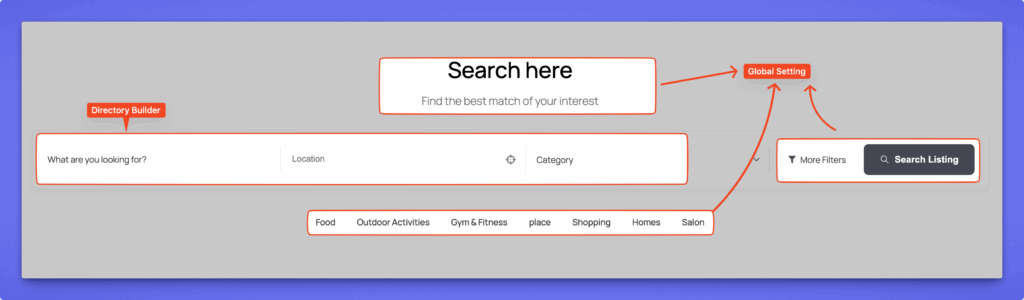

Global Settings #

Global Settings control the overall appearance and layout of the search section across your website — including the search bar, filter options, and category display on the search results page.

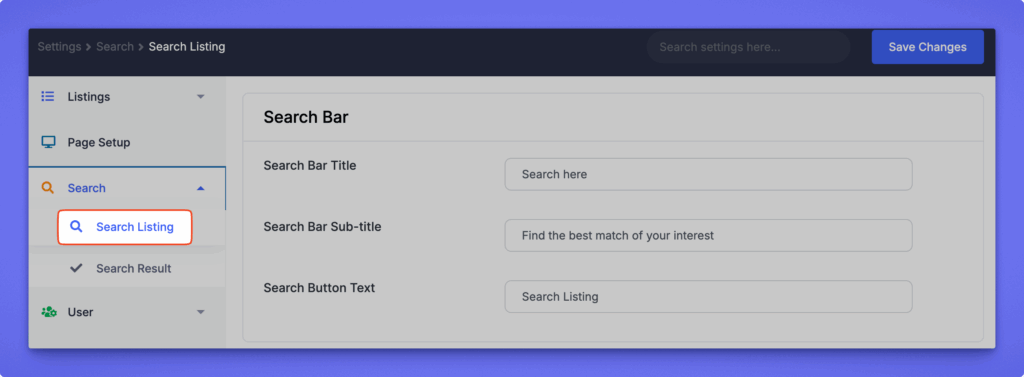
These settings are found under: Directorist → Settings → Search → Search Listing

When you install Directorist, the plugin automatically creates the Search Page. If the page is missing or not functioning correctly, you can recreate it manually:

  1. Create a new page from WordPress Dashboard → Pages → Add New.
  2. Add the following shortcode to the page content area:[directorist_search_listing]
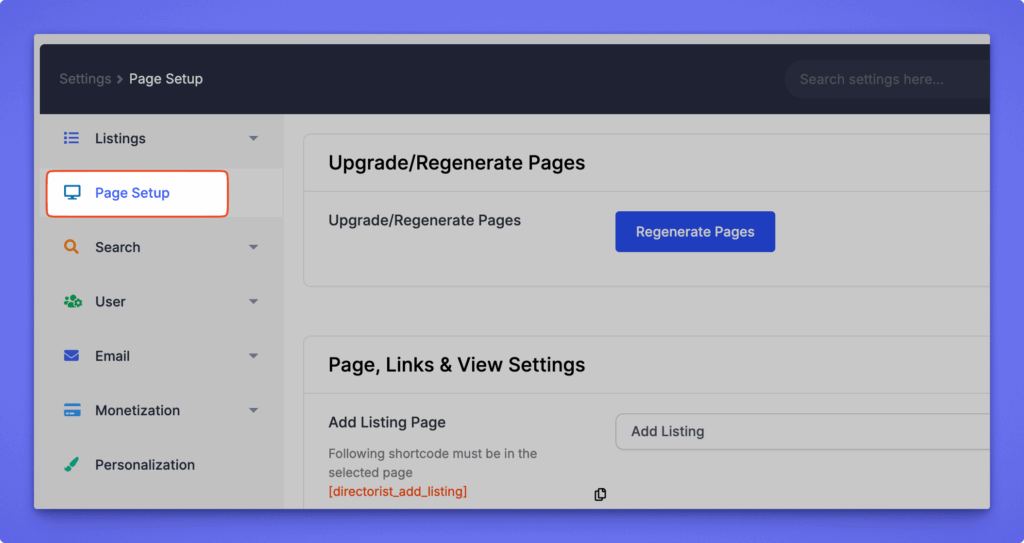
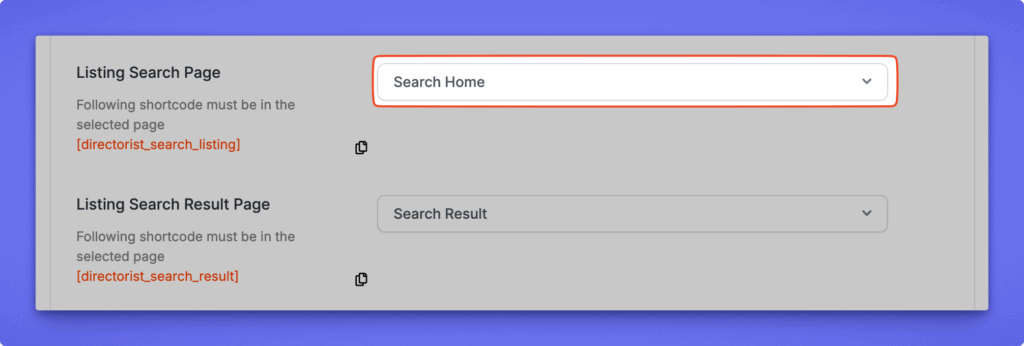
  3. Assign the page via Directorist Settings → Site & Pages → Pages → Search results Page.

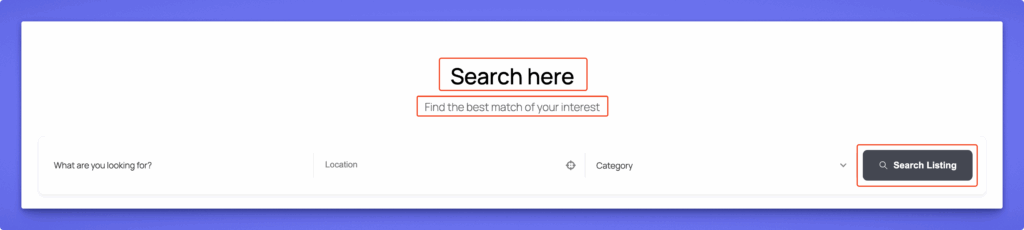
Search Bar #

Search Bar Title
Enter the title displayed at the top of the search bar.
Default: “Search here”

Search Bar Sub-title
Add a short descriptive line under the title to guide users.
Default: “Find the best match of your interest”

Search Button Text
Customize the label on the search button.
Default: “Search Listing”
Search Bar – Front-end view #

Filters #

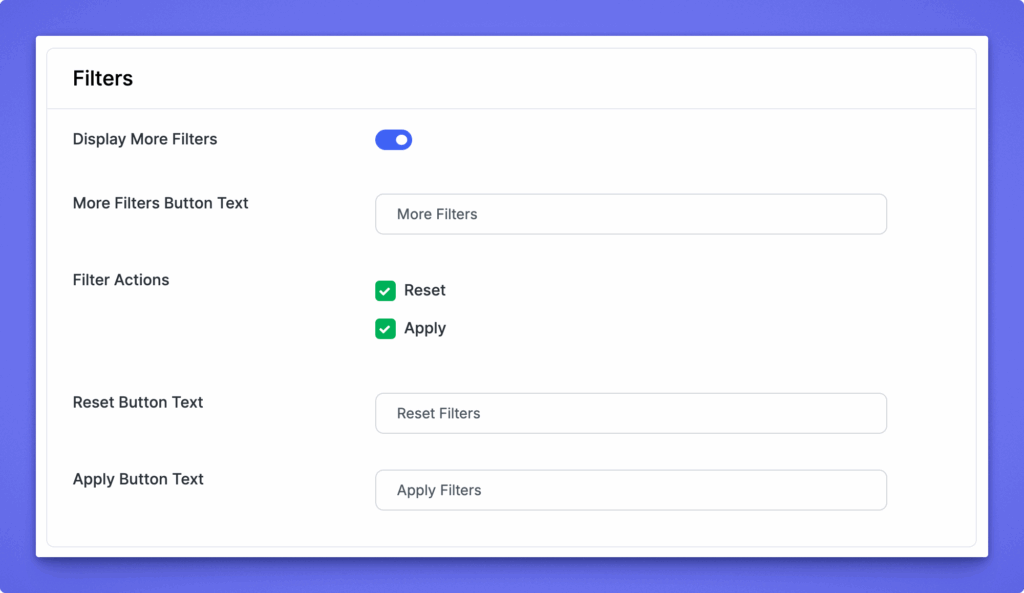
Display More Filters
Enable this to display additional filtering options on the search form.
Useful when you have multiple filter fields like category, price range, location, etc.

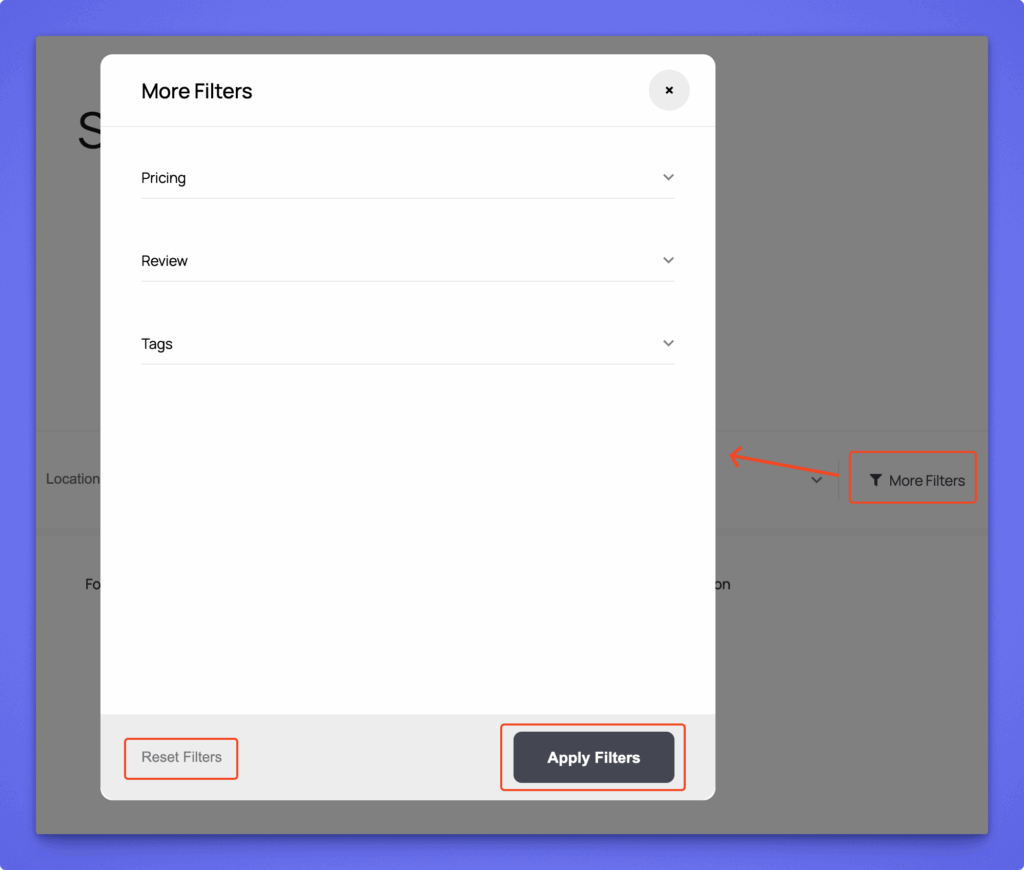
More Filters Button Text
Customize the text for the “More Filters” toggle button.
Default: “More Filters”

Filter Actions
Choose which filter actions appear below the filter area:

  • Reset – Clears all applied filters.
  • Apply – Applies the selected filters to show relevant listings.

Reset Button Text
Change the label of the reset button.
Default: “Reset Filters”

Apply Button Text
Change the label of the apply button.
Default: “Apply Filters”
Filter – Front-end view #

3. Popular Categories #

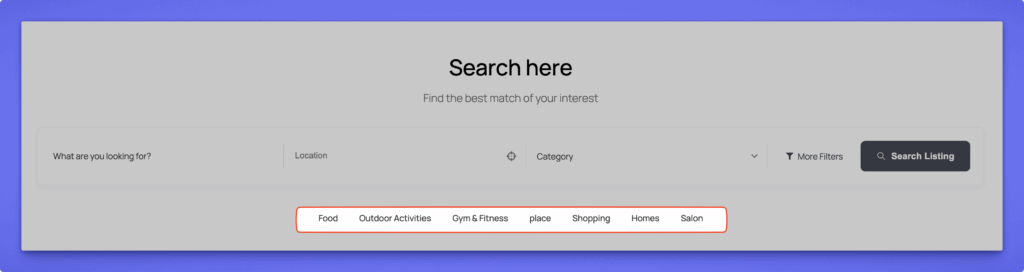
Display Popular Categories
Enable this to show popular categories directly within the search section, allowing users to quickly browse trending listing types.

Front-end view #

Directory Builder #

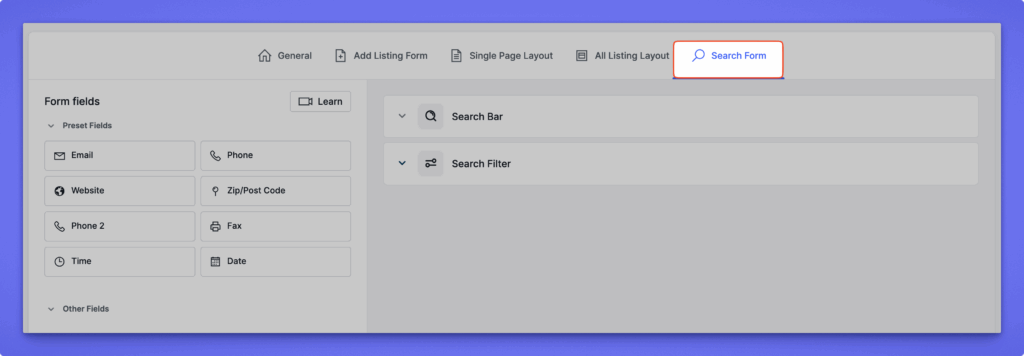
The Directory Builder controls the search form fields, meaning the actual elements inside the search form such as “What are you looking for?”, “Location”, “Category”, or any custom field. Each directory type can have its own unique search structure.

Search Form Structure #

The search form is organized into two main groups:

  • Basic Section – Common search fields used by most directories.
  • Advanced Section – Optional or extended filters for refined search control.

You can drag and drop any field to reorder it, add new ones, or remove unnecessary fields.

Access it via: Directorist → Directory Builder → Search Form

Basic Fields #

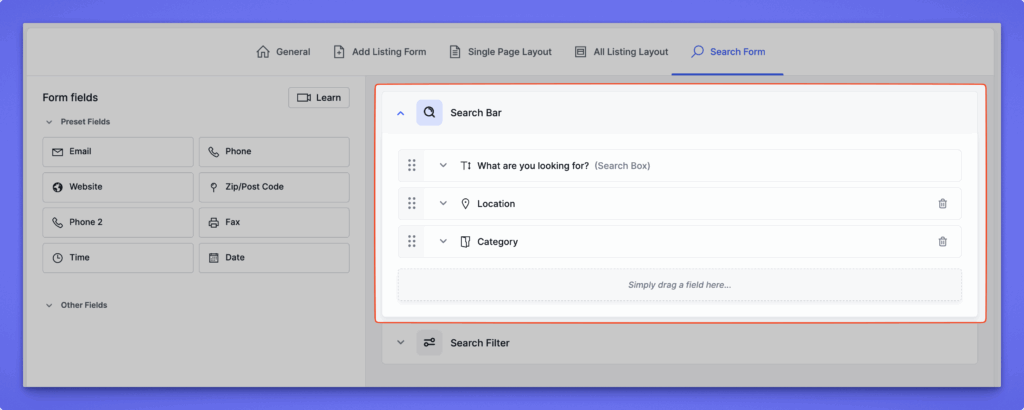
Common default fields include:

  • What are you looking for? – A general keyword search field.
  • Location – Helps users search listings based on location data. Location field can be customized with the following options:
    • Location Source – Choose how location data is displayed:
    • Display from Listing Location – Pulls location from the directory’s location taxonomy.
    • Display from Map API – Fetches live results from your integrated map provider (Google Map or OpenStreetMap).
  • Category – Enables users to narrow down listings by category.
Advanced Fields #

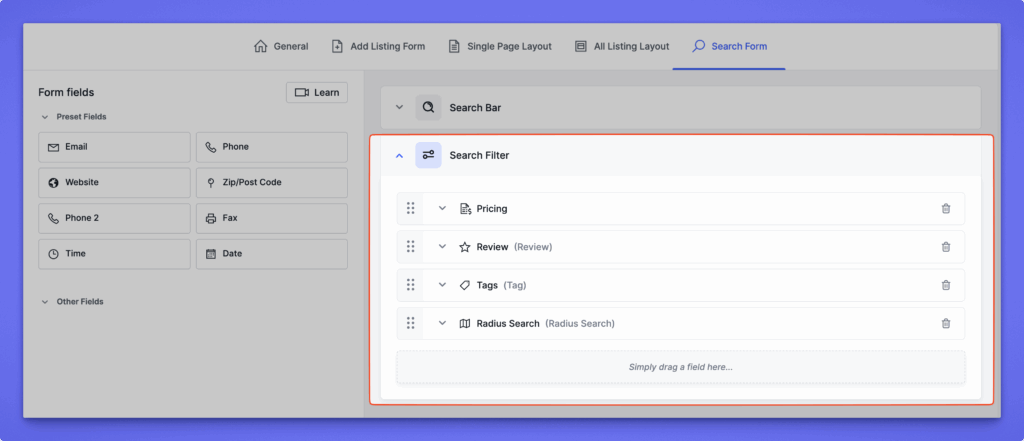
The Advanced section provides additional filters for precise search results. Common advanced fields include:

1. Pricing #

Lets users search listings by price range.

  • Price Type – Choose between:
    • Max-Min – Displays two fields (minimum and maximum price).
  • This is ideal for directories like real estate, car sales, or rentals.

2. Review #

Displays listings based on average user ratings. Users can filter to view higher-rated listings.

3. Tags #

Allows users to search by listing tags. Useful when listings are tagged with features like “Family-friendly,” “Pet allowed,” etc.

4. Radius Search #

Helps users find listings within a specified distance from a chosen location.

Settings available:

  • Label – Customize the field title (e.g., “Search Nearby”).
  • Default Radius Distance – Set a default search radius (e.g., 0 or 5 miles).
  • Maximum Radius Distance – Define the furthest searchable distance (e.g., 1000 miles).
  • Radius Search Unit – Choose the unit (Miles or Kilometers).
  • Radius Search Based On – Select whether distance is calculated from:
    • Address – Uses the full address field.
    • Zip Code – Uses postal codes for calculation.
Extending the Search Form #

These fields represent the core search options available in the Directorist plugin. However, you can extend the search capabilities further using additional Directorist extensions like Directorist AI Search, Directorist Universal Search, Directorist Search Alert or Directorist Announcement.

What are your Feelings

Share This Article :

  • Facebook
  • X
  • LinkedIn
  • Pinterest
Still stuck? How can we help?

How can we help?

Updated on Sep 15, 2026 3:31 pm
Nearby SortAdvanced Filter Widget
Table of Contents
  • Global Settings
    • Search Bar
      • Search Bar - Front-end view
    • Filters
      • Filter - Front-end view
      • 3. Popular Categories
      • Front-end view
  • Directory Builder
    • Search Form Structure
    • Basic Fields
    • Advanced Fields
      • 1. Pricing
      • 2. Review
      • 3. Tags
      • 4. Radius Search
    • Extending the Search Form
Directorist Directorist

Directorist

  • Integrations
  • Extensions
  • Mobile App
  • Roadmap
  • Features
  • Client Showcase

Themes

  • OneListing (FREE)
  • dClassified
  • dRestaurant
  • dRealestate
  • More

Quick Links

  • Custom Development
  • Documentation
  • Directory Ideas
  • Affiliate Program
  • Support Policy
  • Refund Policy
  • Done For You

Products

  • FormGent
  • HelpGent
  • Legal Page
  • Logo Showcase
  • More

Keep Updated

Subscribe to our email newsletter to receive updates.

Subscribe to our newsletter
A Product of
© Directorist 2026. All rights reserved.
  • Privacy Policy
  • Terms & Conditions
We use cookies to ensure the best browsing experience.