Holiday Revenue Starts Now. Save Up to 30%!

Build now. Be Ready for year-end demand.

OFFER ENDS IN

  • 00DAYS
  • 00HRS
  • 00MIN
  • 00SEC
Get Holiday-Ready →
Skip to content
  • Why Directorist
    Explore
    All Features Everything the plugin can do Solutions Directories you can build Integrations Plugins that work with Directorist Try Demo Click through real demo directories
    See the proof
    Comparison How we stack up against others Client Showcase Real sites built with Directorist
    Directorist AI
    Build your directory with AI

    Describe the directory you want and let AI build it for you.

    Try Directorist AI
  • Products
    Extensions

    Add powerful features

    Themes

    Ready-to-launch designs

    Templates

    Build pages faster

    Mobile App

    Native app for your directory

  • Resources
    Get help
    Documentation Product guides and how-tos Support Centre Get help from our team Contact Us Sales and general questions
    Learn
    Directorist Academy Courses on directory building Blog Tips, trends and growth ideas What's New Latest releases and fixes
    Company
    About Us Roadmap
    Hire us
    Custom Work, Handled

    Need a new build, custom feature, integration, fix, or ongoing maintenance? Tell us.

    See How It Works View Our Work
  • Pricing
  • Hire Us
Sign In Try For Free
Directorist
  • Why Directorist
    Explore
    All Features Everything the plugin can do Solutions Directories you can build Integrations Plugins that work with Directorist Try Demo Click through real demo directories
    See the proof
    Comparison How we stack up against others Client Showcase Real sites built with Directorist
    Directorist AI
    Build your directory with AI

    Describe the directory you want and let AI build it for you.

    Try Directorist AI
  • Products
    Extensions

    Add powerful features

    Themes

    Ready-to-launch designs

    Templates

    Build pages faster

    Mobile App

    Native app for your directory

  • Resources
    Get help
    Documentation Product guides and how-tos Support Centre Get help from our team Contact Us Sales and general questions
    Learn
    Directorist Academy Courses on directory building Blog Tips, trends and growth ideas What's New Latest releases and fixes
    Company
    About Us Roadmap
    Hire us
    Custom Work, Handled

    Need a new build, custom feature, integration, fix, or ongoing maintenance? Tell us.

    See How It Works View Our Work
  • Pricing
  • Hire Us
Sign In Get Directorist

Directorist Core

  • Directorist Settings
    • Directorist Settings Panel (General)
    • Directorist Settings Panel (Search)
    • Directorist Settings Panel (Users & Accounts)
    • Directorist Settings Panel (Monetization)
    • Directorist Settings Panel (Notifications)
    • Directorist Settings Panel (Site & pages)
    • Directorist Settings Panel (Extensions)
    • Directorist Settings Panel (Appearance)
    • Directorist Settings Panel (Import / Export)
  • Listings Management
    • Listing Rejection Flow
    • Adding a Listing
    • General Listing Settings
    • Guest Listing Submission
    • All Listing Settings
    • Single Listing Settings
    • Category & Location
    • Map Setting
    • Badges Setting
    • Review Setting
  • Directory Builder
    • Overview
    • Multiple Directories
    • Create with AI
    • General tab
    • Add Listing Form
    • Conditional Logic
    • Single Page Layout
    • FormGent Integration
    • All Listing Layout
    • Search Form
  • Monetization
    • Monetization Overview
    • Configurations
    • Managing Orders
  • Search and Filter Settings
    • Nearby Sort
    • Search Page
    • Advanced Filter Widget
    • Search Result Page
    • Advanced Search and Filter
  • Customization
    • Customize Appearance
    • Email Customization
    • Registration and Login
    • Author Page
  • Advanced Settings
    • Maintenance
    • Schema Markup
    • Search Engine Optimization (SEO)
  • Shortcodes Library
    • Using Shortcodes in WordPress
    • Directorist Shortcodes
    • Add Listing Form
    • All Listings Page
    • Single Category Page
    • Single Location Page
    • Tags Page
    • All Locations Page
    • Search Listings
    • Payment & Checkout Page
    • All Categories Page
    • Search Results
    • Login and Registration
    • User Dashboard
    • Author Profile
    • Search Results
  • Getting Started
    • Plugin Dashboard
    • Getting Started
    • Installation & Activation
    • Directorist Setup Wizard
    • Directorist Membership (Themes & Extensions)
    • Setting Up the Required Pages
    • Managing Categories
    • Managing Location
    • Manage Tags
    • Terms and Conditions Setup
    • Import and Export

Extensions

  • Installation
  • Activate/Renew License
  • Directorist Pay Per Lead
  • Directorist Gutenberg Integration
  • M-Pesa Payment Gateway
  • Mark as Sold
  • Directorist Ads Manager
  • Setting Up Directorist Live Chat
  • Directorist Coupons
  • Directorist – BuddyPress Integration
  • Setting Up Directory Linking
  • Job Manager
  • AddonsKit for Bricks
  • Mailchimp Integration
  • Directorist Announcement
  • Directorist Notifications Pro
  • Directorist Analytics
  • Directorist AI Search
  • Multi Directory Linking
  • Listing Importer
  • WooCommerce Pricing Plans
  • Business Hours
  • Universal Search
  • Search Alert
  • Advanced Review
  • PayPal Payment Gateway
  • Stripe Payment Gateway
  • Configuring the Authorize.net Payment Gateway
  • Listings Slider & Carousel Listing
  • WPML – Translation Guide
  • Listings with Map
  • Digital Marketplace
  • Job Manager
  • Claim Listing
  • Coupon
  • Image Gallery
  • Listing FAQs
  • Compare Listings
  • Directorist Mobile App 2.0
  • Divi Integration
    • Designing Single Listing Page with Divi
    • Designing All Listing Page with Divi
    • Getting Started with Divi Integration Extension
  • Booking
    • Installation & Configuration
    • Google Calendar Integration
    • Service Booking
    • Rental System
    • Event Booking
  • Pricing Plans
    • Directorist Pricing Plans Shortcode Guide
    • Migration Guide
    • Plan Creation and Full Workflow
    • Multiple Pricing Plans: Setup & How It Works
  • Elementor Integration
    • Getting Started with Directorist Elementor Integration

Themes

  • Getting Started with Theme
  • Quick Installation & Demo Import
  • Full Theme Setup & Customization

Tutorials

  • How to Build and Grow an Investors Directory
  • How to Make Money from Your Business Directory
  • How to Use Data to Build a Smarter and More Profitable Directory 
  • How to Build a Free University Directory
  • How to Translate Your Directory Theme and Plugin with Poedit
  • How to Create a Medical Directory Website
  • How to Make Your Directorist Website Multilingual

Developers Doc

  • Template Override
  • Action Hooks
  • Filter Hooks
  • API Reference
View Categories
  • Home
  • Docs
  • Extensions
  • Booking
  • Installation & Configuration

Installation & Configuration

Overview #

The Directorist Booking & Reservation Extension enables administrators and listing owners to accept and manage online bookings directly from the dashboard and admin panel. It enables visitors to check availability, schedule appointments and make reservations seamlessly.  The extension has been fully revamped with a modern, intuitive interface designed to deliver a seamless user experience. 

This makes it ideal for service-based businesses such as Hotels & accommodation providers, Salons & Wellness Centres, Event Venues, Rental Agencies, Tour & travel operators, Consultants and service professionals. 


Key Features #

  • Seamless Booking Management: Admins and listing owners can manage appointments and reservations directly from the dashboard.
  • Real-Time Availability: Visitors can check available slots and book services or rentals instantly.
  • Multiple Booking Types: Supports Service and Rental/Event bookings, with the flexibility to enable one or both types.
  • Guest Booking Option: Allow users to book without creating an account, or restrict bookings to registered users.
  • Commission Management: Set a commission percentage for the site owner on each booking.
  • Booking Visibility Control: Choose to enforce or allow hiding of booking functionality per listing type.
  • Customizable Labels: Rename fields such as Booking Type, Booking Hiding, Weekend Price, and Calendar Labels.
  • Booking Widgets: Add booking forms to listing sidebars for easy access.
  • Instant Booking: Enable automatic booking confirmation without manual approval.
  • Single Listing Integration: Fully integrated with listing pages, both frontend and backend, for a smooth user experience.
  • Flexible Form Builder: Customise the Add Listing Form and Single-Page Layout (Contents) to match your site’s requirements.

Installation  #

Follow the steps below to install and activate the Booking & Reservation Extension:

1. Install the Extension

  1. Navigate to Directorist > Themes & Extensions.
  2. Locate “Appointment & Booking” in the extensions list.
  3. Click Install, and once completed, select Activate

2. Enable the Extension

  1. Go to Directorist > Settings > Extensions > Extension General.
  2. Toggle Booking to enable the extension.
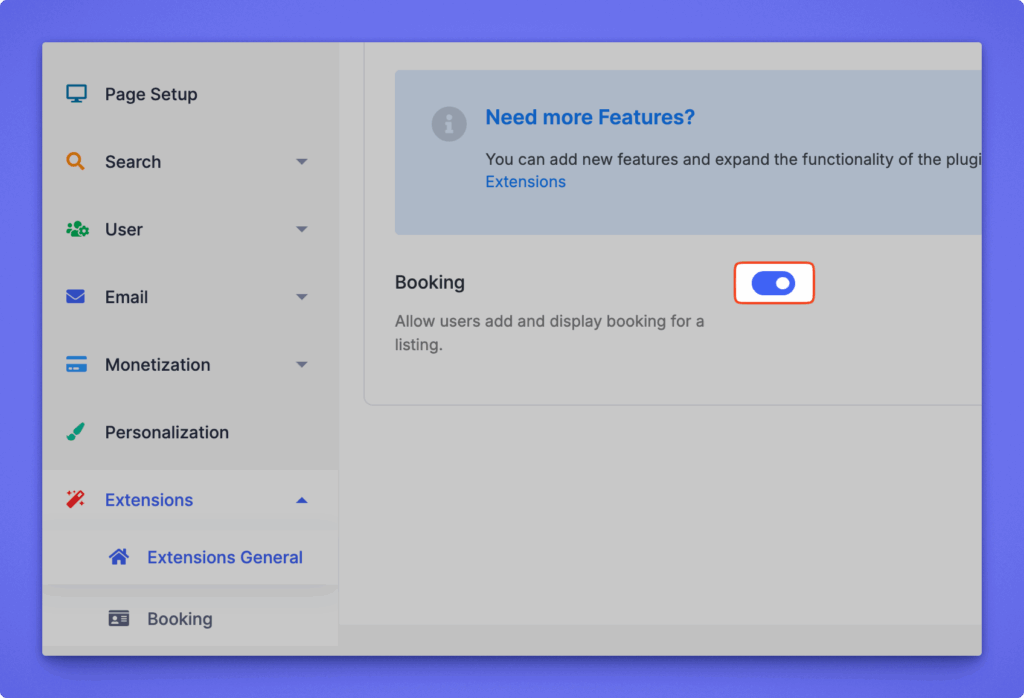
Click Save Changes to apply the settings.


Configuration  #

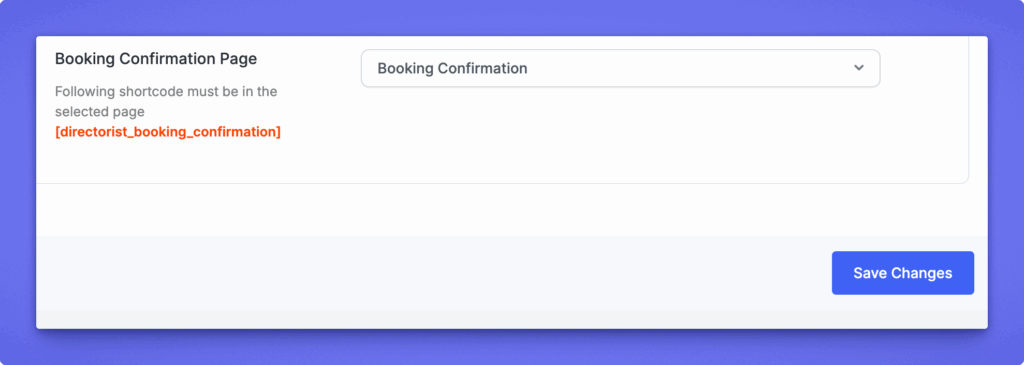
After activating the Booking & Reservation Extension, Directorist automatically creates a Booking Confirmation page containing the shortcode:
[directorist_booking_confirmation] 

This page is required to process and display booking confirmation details.

Assign the Confirmation Page

To ensure proper functionality, verify that the page is correctly assigned:

  1. Navigate to WP Admin Dashboard ➝ Directorist ➝ Settings.
  2. Go to Page Setup ➝ Pages, Links & Views.
  3. Locate the Booking Confirmation Page setting.
  4. Select the page containing the shortcode.
  5. Click Save Changes.

Setting the Sidebar

To enable users to initiate bookings directly from a single listing page, you must add the Directorist – Booking widget to the listing sidebar.

Add the Booking Widget

Follow the steps below:

  1. Navigate to Appearance → Widgets in your WordPress admin panel.
  2. Locate the widget named Directorist – Booking.
  3. Drag and drop it into the Directorist – Listing Right Sidebar area.

This widget provides the booking form and simplifies the process for users to schedule services, appointments, or events.
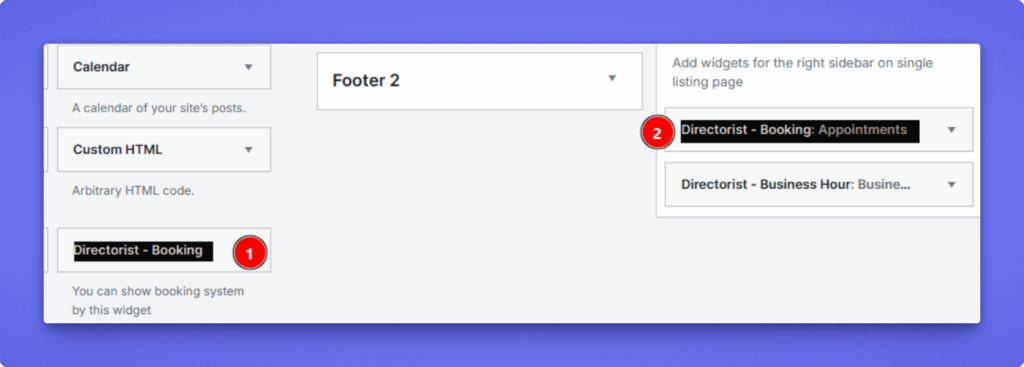
After adding the booking widget, it will appear in the single listing page “Directorist Listing Right Sidebar” 
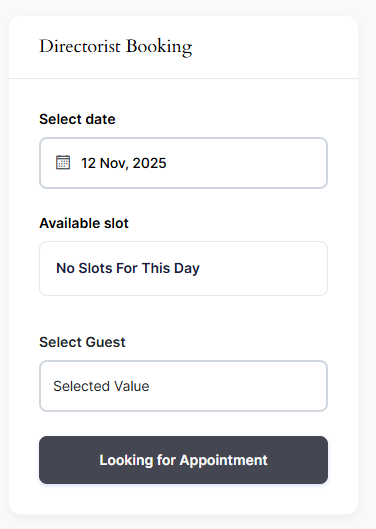
Additional Notes

To ensure the booking widget appears on the Single Listing Page, navigate to the Directory Builder and adjust the following layouts as needed:

  • Add Listing Form 
  • Single Page Layout

Booking Settings #

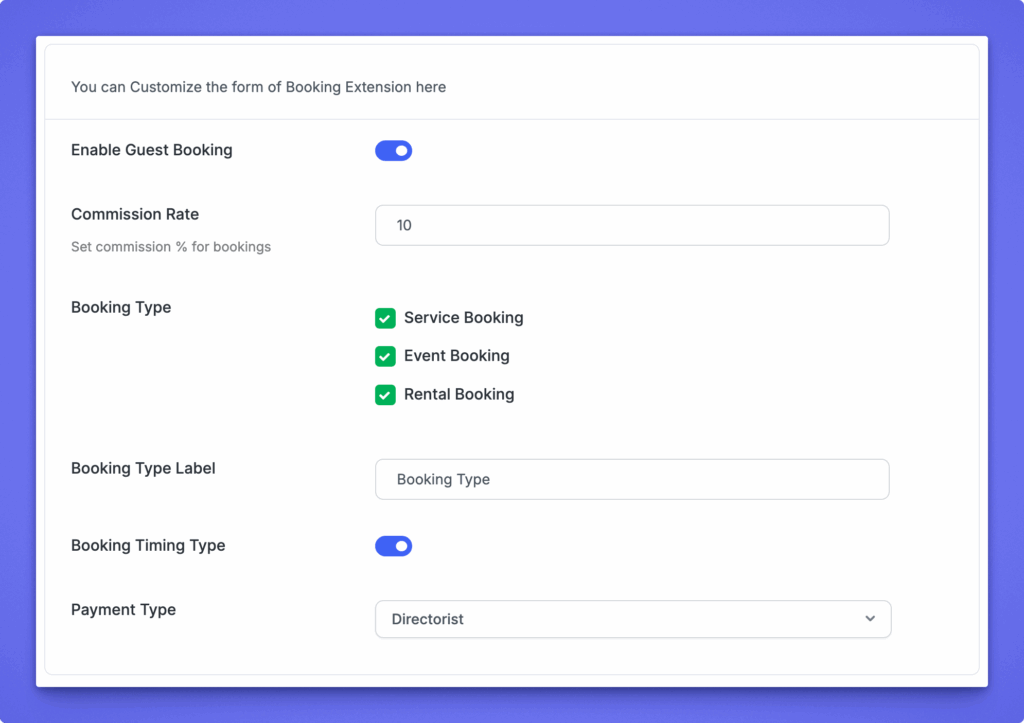
This helps you set global booking preferences, labels, and behavior for all listings across your directory. These settings ensure consistency while giving you the flexibility to customize how booking fields appear on the Add Listing form. After completing the configuration, listing owners can fine-tune their own booking options with confidence.

Path: Directory Listings > Settings > Extensions > Booking

Note: These settings only reflect on the add listing form.

Guest Booking Option: This option allows you to enable and disable the guest booking option.

Commission Rate: You can set and define the commission percentage of using the option. If the percentage is 10%, that means 10 of 100 will get the site owner and the rest 90 will get the listing owner.

Booking Type
Choose which booking types are available for your listings.

  • Service Booking – for services or appointments.
  • Event Booking – for event-based reservations.
  • Rental Booking – for rentals or time-based bookings.

Booking Type Label
Customize the label text that appears on the form for booking type selection.

Booking Timing Type
Enable this if you want to allow time-based bookings (e.g., hourly, daily).

Payment Type
Select the payment system to be used for bookings. By default, it uses Directorist default system.
Service Fields #

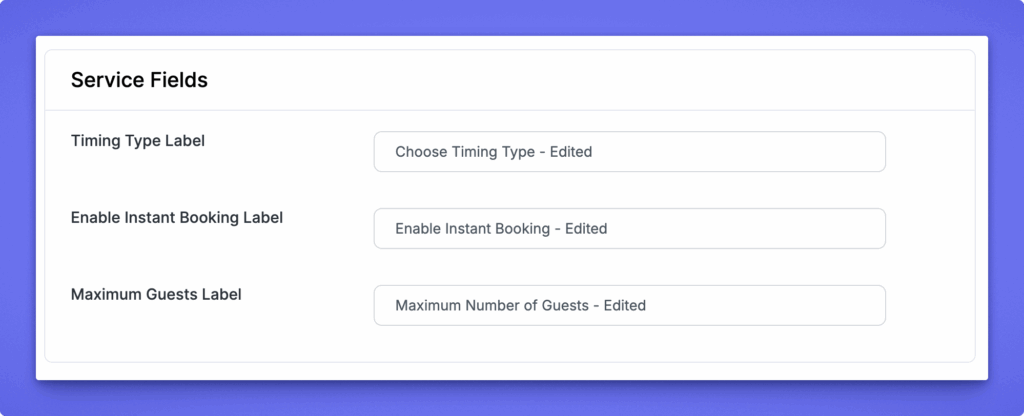
This section allows you to customize the label text used for service-based bookings. These settings only change the wording shown on the Add Listing form. They do not affect the booking logic or functionality.

Available Label Options #

  • Timing Type Label – Update the label for the timing selection field.
  • Enable Instant Booking Label – Customize the text for the instant booking toggle.
  • Maximum Guests Label – Change the label for the field where listing owners define the maximum number of guests allowed per booking.
Event Fields #

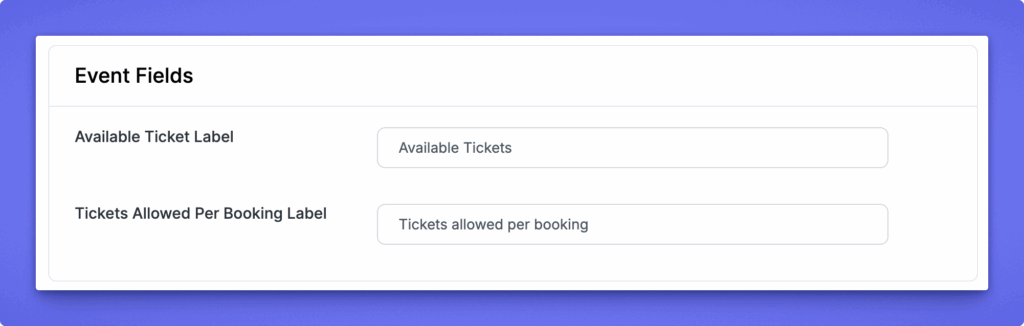
Customize the labels shown on the Add Listing form: Available Ticket Label (total tickets available) and Tickets Allowed Per Booking Label (maximum tickets a user can book per reservation).
Rent Fields #

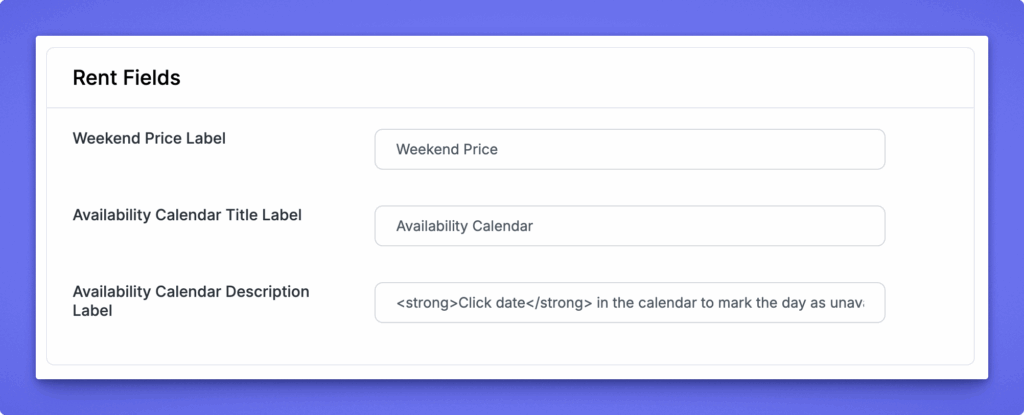
Customize the labels shown on the Add Listing form: Weekend Price Label, Availability Calendar Title Label, and Availability Calendar Description Label used to guide listing owners when setting rental availability
Single Listing #

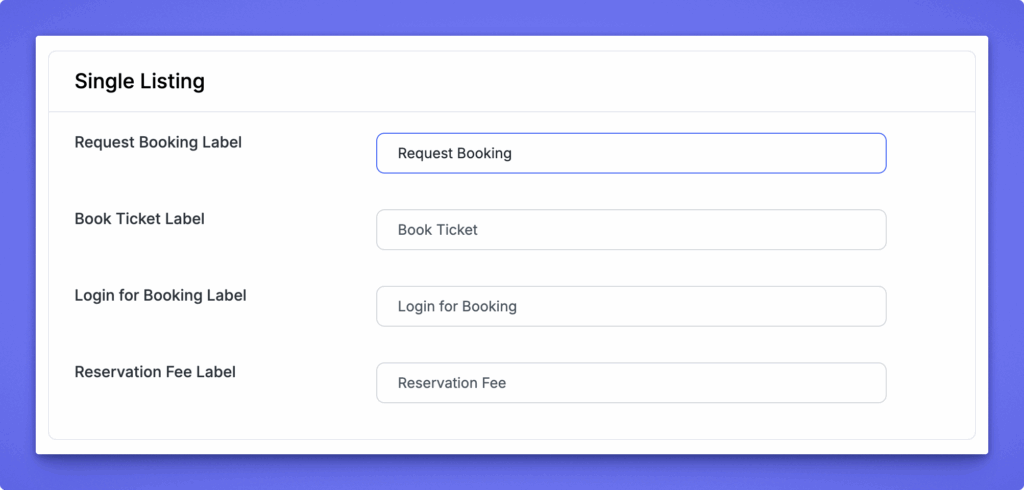
Customize the labels shown on the listing details page: Request Booking Label, Book Ticket Label, Login for Booking Label, and Reservation Fee Label used to control booking-related text on single listing pages.
Confirmation Page #

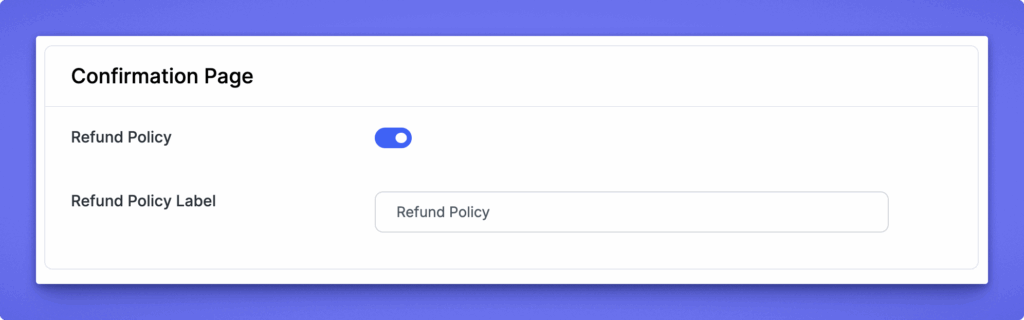
Enable or disable showing a refund policy on the confirmation page, and customize the Refund Policy Label to control how the refund policy text appears to users.
After updating your settings or labels, click Save Changes to apply all modifications.


What are your Feelings

Share This Article :

  • Facebook
  • X
  • LinkedIn
  • Pinterest
Still stuck? How can we help?

How can we help?

Updated on Aug 31, 2026 6:09 pm
Event BookingGoogle Calendar Integration
Table of Contents
  • Overview
  • Key Features
  • Installation 
  • Configuration 
  • Booking Settings
    • Service Fields
      • Available Label Options
    • Event Fields
    • Rent Fields
    • Single Listing
    • Confirmation Page
Directorist Directorist

Directorist

  • Integrations
  • Extensions
  • Mobile App
  • Roadmap
  • Features
  • Client Showcase

Themes

  • OneListing (FREE)
  • dClassified
  • dRestaurant
  • dRealestate
  • More

Quick Links

  • Custom Development
  • Documentation
  • Directory Ideas
  • Affiliate Program
  • Support Policy
  • Refund Policy
  • Done For You

Products

  • FormGent
  • HelpGent
  • Legal Page
  • Logo Showcase
  • More

Keep Updated

Subscribe to our email newsletter to receive updates.

Subscribe to our newsletter
A Product of
© Directorist 2026. All rights reserved.
  • Privacy Policy
  • Terms & Conditions
We use cookies to ensure the best browsing experience.