BFCM Alert! Drop 1 just landed. See what’s new. Drop 2 lands in 00d 00h 00m Explore Drop 1 →
Skip to content
  • Why Directorist
    Explore
    All Features Everything the plugin can do Solutions Directories you can build Integrations Plugins that work with Directorist Try Demo Click through real demo directories
    See the proof
    Comparison How we stack up against others Client Showcase Real sites built with Directorist
    Directorist AI
    Build your directory with AI

    Describe the directory you want and let AI build it for you.

    Try Directorist AI
  • Products
    Extensions

    Add powerful features

    Themes

    Ready-to-launch designs

    Templates

    Build pages faster

    Mobile App

    Native app for your directory

  • Resources
    Get help
    Documentation Product guides and how-tos Support Centre Get help from our team Contact Us Sales and general questions
    Learn
    Directorist Academy Courses on directory building Blog Tips, trends and growth ideas What's New Latest releases and fixes
    Company
    About Us Roadmap
    Hire us
    Custom Work, Handled

    Need a new build, custom feature, integration, fix, or ongoing maintenance? Tell us.

    See How It Works View Our Work
  • Pricing
  • Hire Us
Sign In Try For Free
  • Why Directorist
    Explore
    All Features Everything the plugin can do Solutions Directories you can build Integrations Plugins that work with Directorist Try Demo Click through real demo directories
    See the proof
    Comparison How we stack up against others Client Showcase Real sites built with Directorist
    Directorist AI
    Build your directory with AI

    Describe the directory you want and let AI build it for you.

    Try Directorist AI
  • Products
    Extensions

    Add powerful features

    Themes

    Ready-to-launch designs

    Templates

    Build pages faster

    Mobile App

    Native app for your directory

  • Resources
    Get help
    Documentation Product guides and how-tos Support Centre Get help from our team Contact Us Sales and general questions
    Learn
    Directorist Academy Courses on directory building Blog Tips, trends and growth ideas What's New Latest releases and fixes
    Company
    About Us Roadmap
    Hire us
    Custom Work, Handled

    Need a new build, custom feature, integration, fix, or ongoing maintenance? Tell us.

    See How It Works View Our Work
  • Pricing
  • Hire Us
Sign In Get Directorist

Directorist Core

  • Directorist MCP
    • Getting Started with Directorist MCP
  • Directorist Settings
    • Directorist Settings Panel (General)
    • Directorist Settings Panel (Search)
    • Directorist Settings Panel (Users & Accounts)
    • Directorist Settings Panel (Monetization)
    • Directorist Settings Panel (Notifications)
    • Directorist Settings Panel (Site & pages)
    • Directorist Settings Panel (Extensions)
    • Directorist Settings Panel (Appearance)
    • Directorist Settings Panel (Import / Export)
  • Listings Management
    • Listing Rejection Flow
    • Adding a Listing
    • General Listing Settings
    • Guest Listing Submission
    • All Listing Settings
    • Single Listing Settings
    • Category & Location
    • Map Setting
    • Badges Setting
    • Review Setting
  • Directory Builder
    • Overview
    • Multiple Directories
    • Create with AI
    • General tab
    • Add Listing Form
    • Conditional Logic
    • Single Page Layout
    • FormGent Integration
    • All Listing Layout
    • Search Form
  • Monetization
    • Monetization Overview
    • Configurations
    • Managing Orders
  • Search and Filter Settings
    • Nearby Sort
    • Search Page
    • Advanced Filter Widget
    • Search Result Page
    • Advanced Search and Filter
  • Customization
    • Customize Appearance
    • Email Customization
    • Registration and Login
    • Author Page
  • Advanced Settings
    • Maintenance
    • Schema Markup
    • Search Engine Optimization (SEO)
  • Shortcodes Library
    • Using Shortcodes in WordPress
    • Directorist Shortcodes
    • Add Listing Form
    • All Listings Page
    • Single Category Page
    • Single Location Page
    • Tags Page
    • All Locations Page
    • Search Listings
    • Payment & Checkout Page
    • All Categories Page
    • Search Results
    • Login and Registration
    • User Dashboard
    • Author Profile
    • Search Results
  • Getting Started
    • Plugin Dashboard
    • Getting Started
    • Installation & Activation
    • Directorist Setup Wizard
    • Directorist Membership (Themes & Extensions)
    • Setting Up the Required Pages
    • Managing Categories
    • Managing Location
    • Manage Tags
    • Terms and Conditions Setup
    • Import and Export

Extensions

  • Directorist Events
  • Installation
  • Activate/Renew License
  • Directorist Pay Per Lead
  • Directorist Gutenberg Integration
  • M-Pesa Payment Gateway
  • Paystack Payment Gateway
  • Mark as Sold
  • Directorist Ads Manager
  • Setting Up Directorist Live Chat
  • Directorist Coupons
  • Directorist – BuddyPress Integration
  • Setting Up Directory Linking
  • Job Manager
  • AddonsKit for Bricks
  • Mailchimp Integration
  • Directorist Announcement
  • Directorist Notifications Pro
  • Directorist Analytics
  • Directorist AI Search
  • Multi Directory Linking
  • Listing Importer
  • WooCommerce Pricing Plans
  • Business Hours
  • Universal Search
  • Search Alert
  • Advanced Review
  • PayPal Payment Gateway
  • Stripe Payment Gateway
  • Authorize.net Payment Gateway
  • Listings Slider & Carousel Listing
  • WPML – Translation Guide
  • Listings with Map
  • Digital Marketplace
  • Job Manager
  • Claim Listing
  • Coupon
  • Image Gallery
  • Listing FAQs
  • Compare Listings
  • Directorist Mobile App 2.0
  • Booking
    • Installation & Configuration
    • Google Calendar Integration
    • Service Booking
    • Rental System
    • Event Booking
  • Pricing Plans
    • Directorist Pricing Plans Shortcode Guide
    • Migration Guide
    • Plan Creation and Full Workflow
    • Multiple Pricing Plans: Setup & How It Works
  • Divi Integration
    • Designing Single Listing Page with Divi
    • Designing All Listing Page with Divi
    • Getting Started with Divi Integration Extension
  • Elementor Integration
    • Getting Started with Directorist Elementor Integration

Themes

  • dTour Theme
  • Importing dTour Templates
  • Getting Started with Theme
  • Quick Installation & Demo Import
  • Full Theme Setup & Customization

Tutorials

  • How to Build and Grow an Investors Directory
  • How to Make Money from Your Business Directory
  • How to Use Data to Build a Smarter and More Profitable Directory 
  • How to Build a Free University Directory
  • How to Translate Your Directory Theme and Plugin with Poedit
  • How to Create a Medical Directory Website
  • How to Make Your Directorist Website Multilingual

Developers Doc

  • Template Override
  • Action Hooks
  • Filter Hooks
  • API Reference
View Categories
  • Home
  • Docs
  • Extensions
  • Multi Directory Linking

Multi Directory Linking

Product Overview:

The Multi Directory Plugin is an extension for the Directorist plugin, designed for users to expand their individual listings with additional listings from various directory categories or types. This functionality is typically used by your user to display relevant listings on the single listing page.

For instance, You might have two directories. The first one is for hospitals, while the second one is for doctors. The doctors might now want to demonstrate that they are employed by a specific hospital. Similar to this, a hospital owner would want to show that a specific doctor or doctors are employed by their facility. As a result, they might all desire to link to entries from various sorts of directories in order to connect with one another. This interlinking allows for a seamless integration between the listings in different directory types.

To create the interconnection between listings in different directories, the Multi Directory Plugin provides a straightforward solution. It includes a multi-directory linking field within the directory builder options, which allows users to input relevant information on the add listing page. This field collects the necessary data, enabling users to specify connections between listings. 

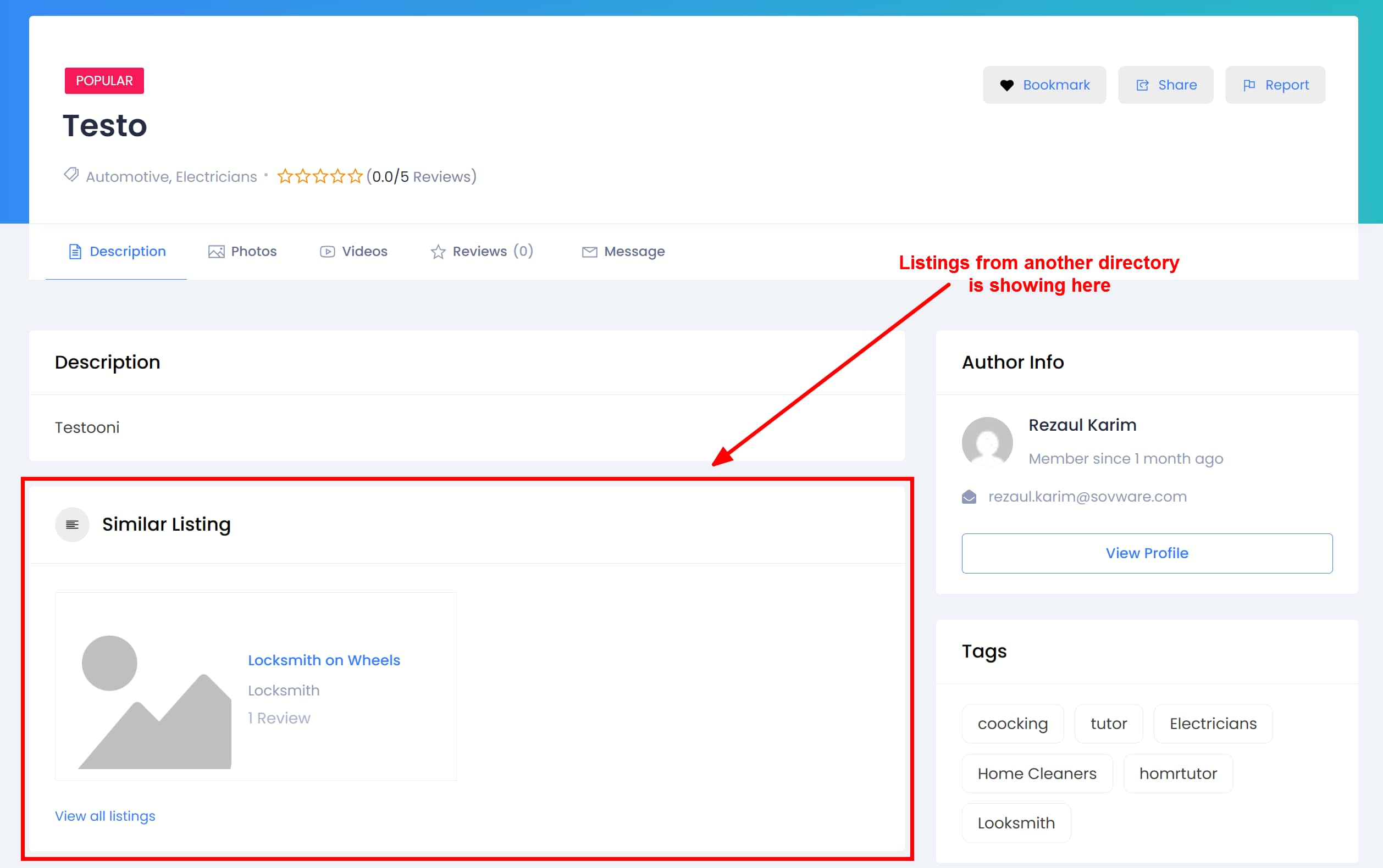
Additionally, when a visitor views a listing on the submission page, the multi-directory linking field displays the interconnected information. This ensures that visitors can easily see the associations between different listings from various directories, enhancing the browsing experience and promoting seamless navigation across interconnected directories.

Installation Guideline: 

Install “Multi Directory Linking” extension from you user dashboard by navigating WP Dashboard>Directorist>Themes and Extensions>Log in with your account> Install “Multi Directory Linking” > Activate.

Or

You can also download the zip file by signing in your account and uploading it.

To set up a multi directory linking plugin go to the WordPress admin dashboard panel. Navigate to the “Directorist” section in the left sidebar. Click on “Directory Builder” to access the available directory types. Here, you can see the existing directories and also have the option to create a new directory. 
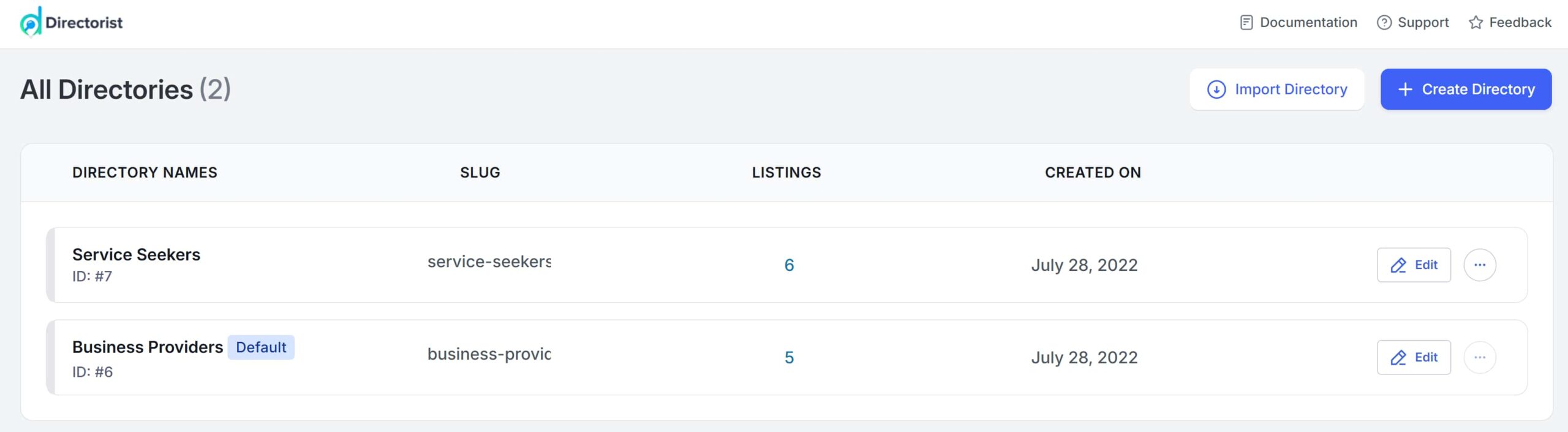
Directory Builder

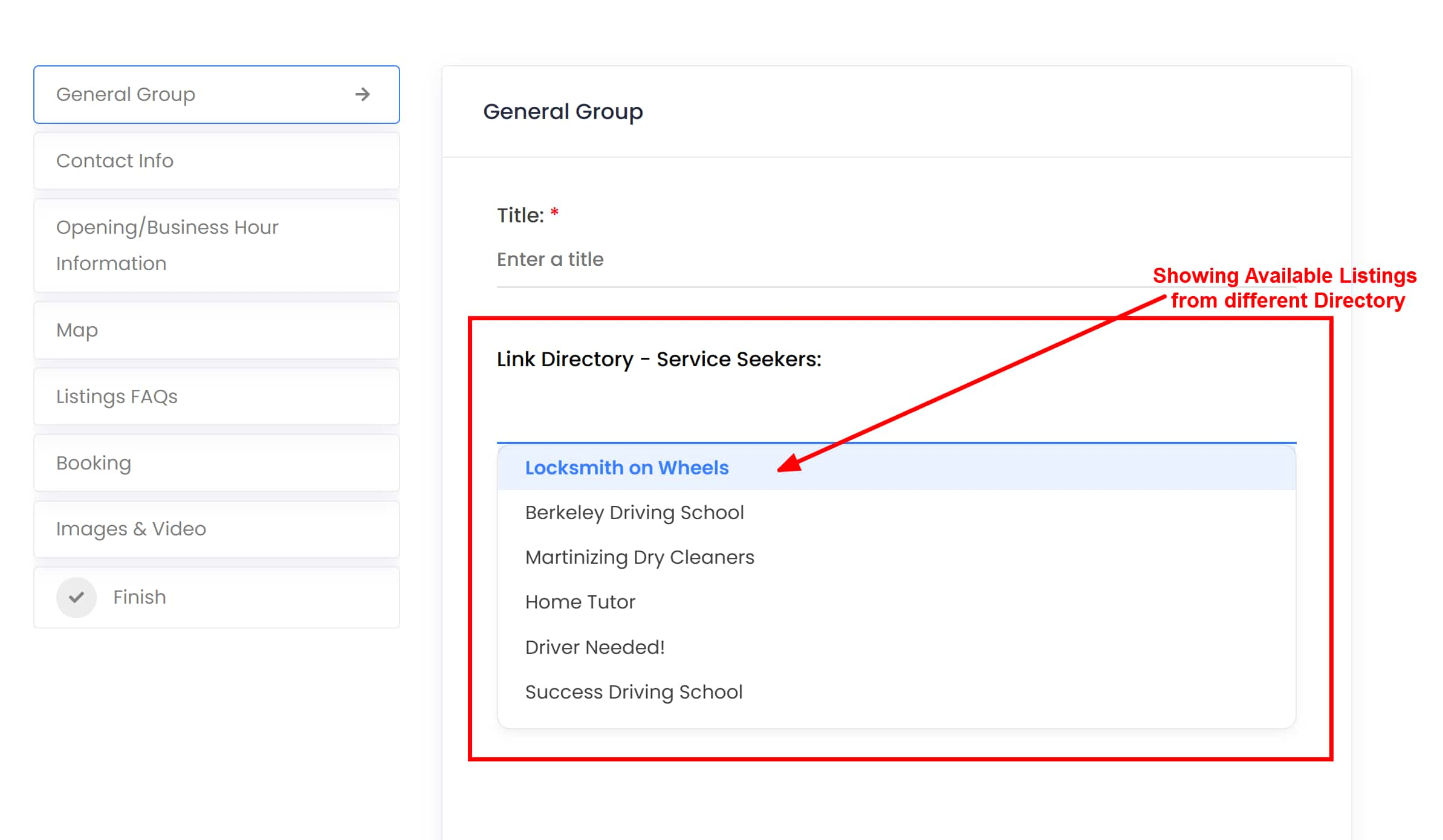
Choose the directory with which you want to establish a connection. Inside the selected directory, locate the “Add Listing Form” option. Within the “Add Listing Form,” you will find a list of available fields. To connect the desired directory, simply drag and drop “Link Directory-(Directory Name)” from the left side, where the form fields are located. Now set it on you desired place on the add listing form.
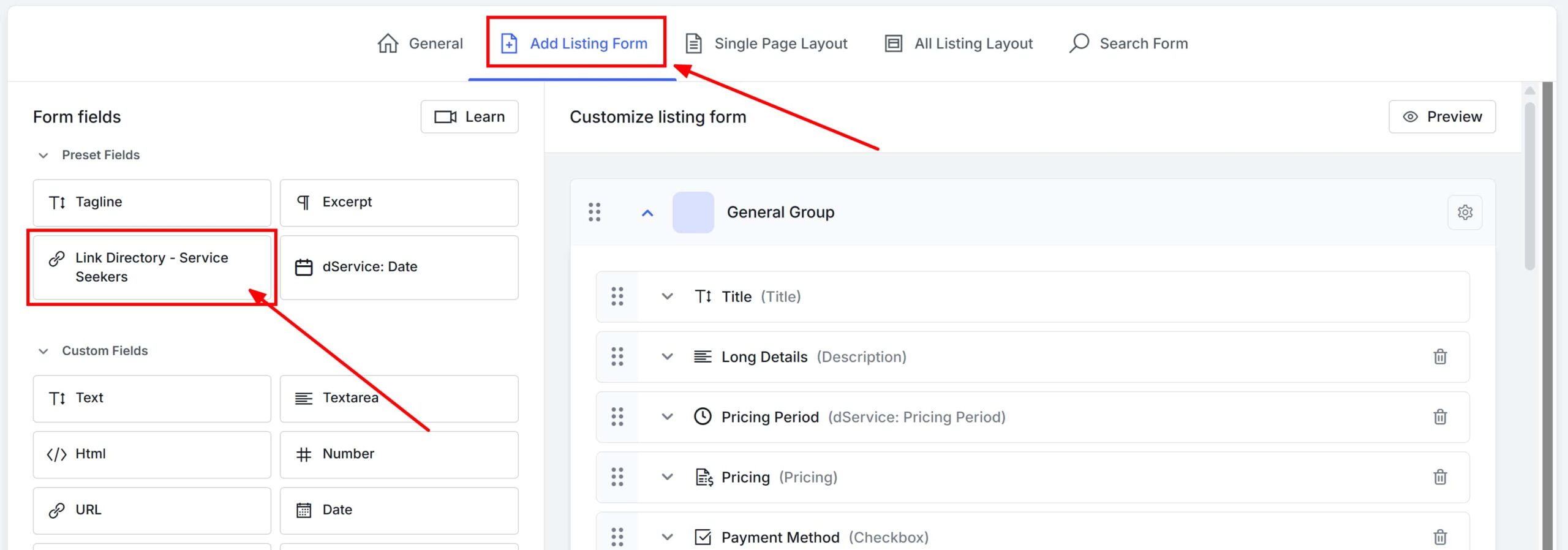
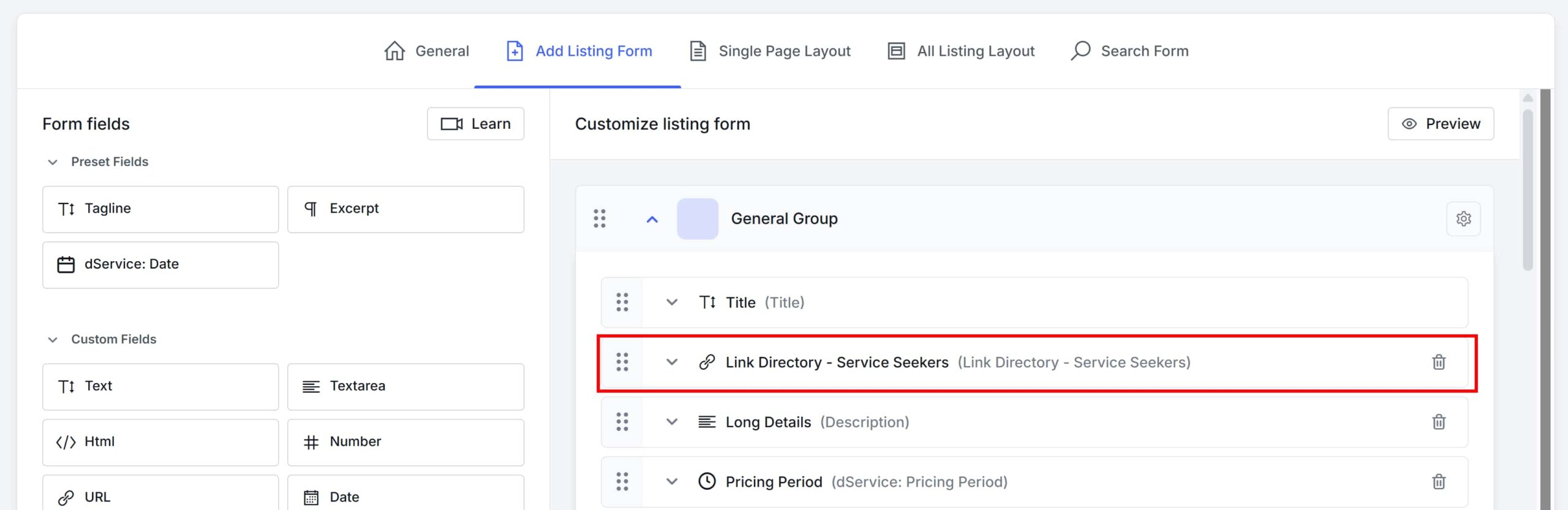
By doing this, you enable users to connect their listings with the selected directory while adding them to your site.
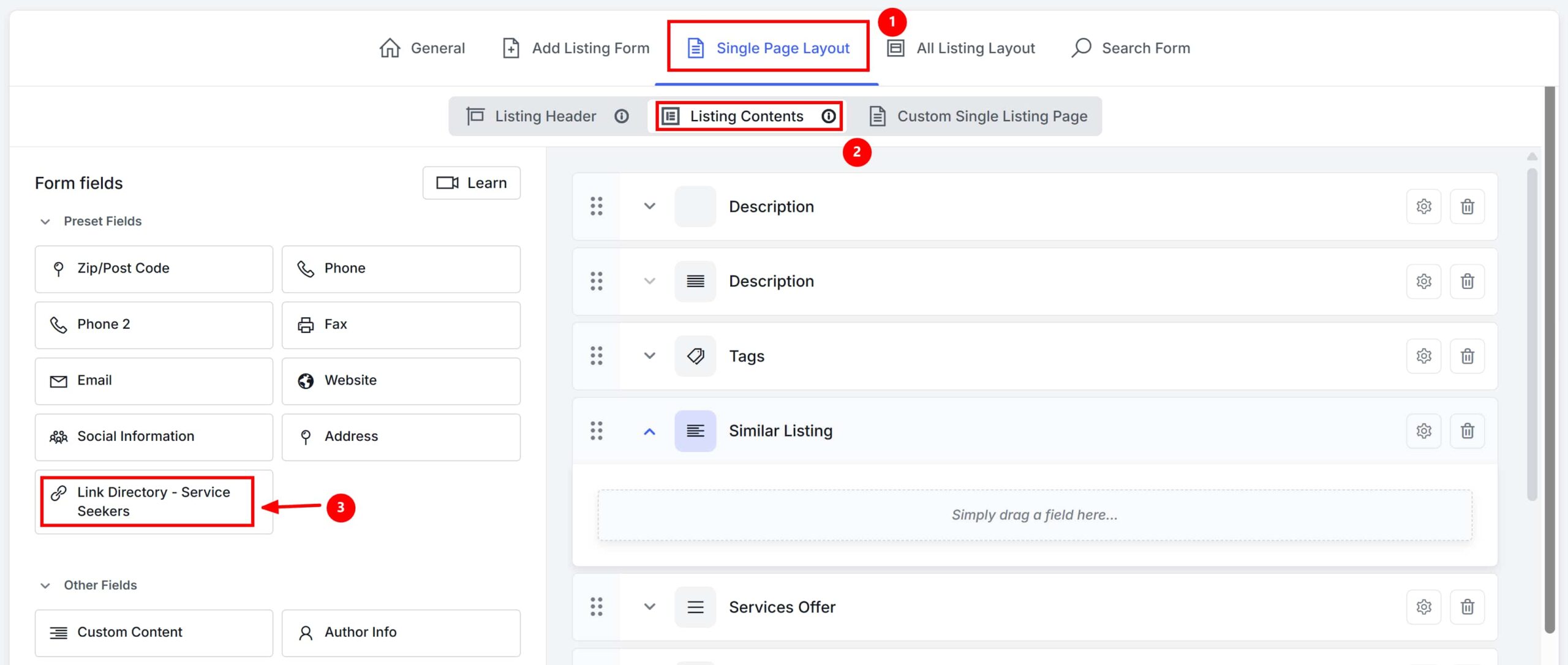
To show the linking directories go to “Single Page Layout” and click on “Listing Contents”. Then, drag and drop the link directory field to active fields.
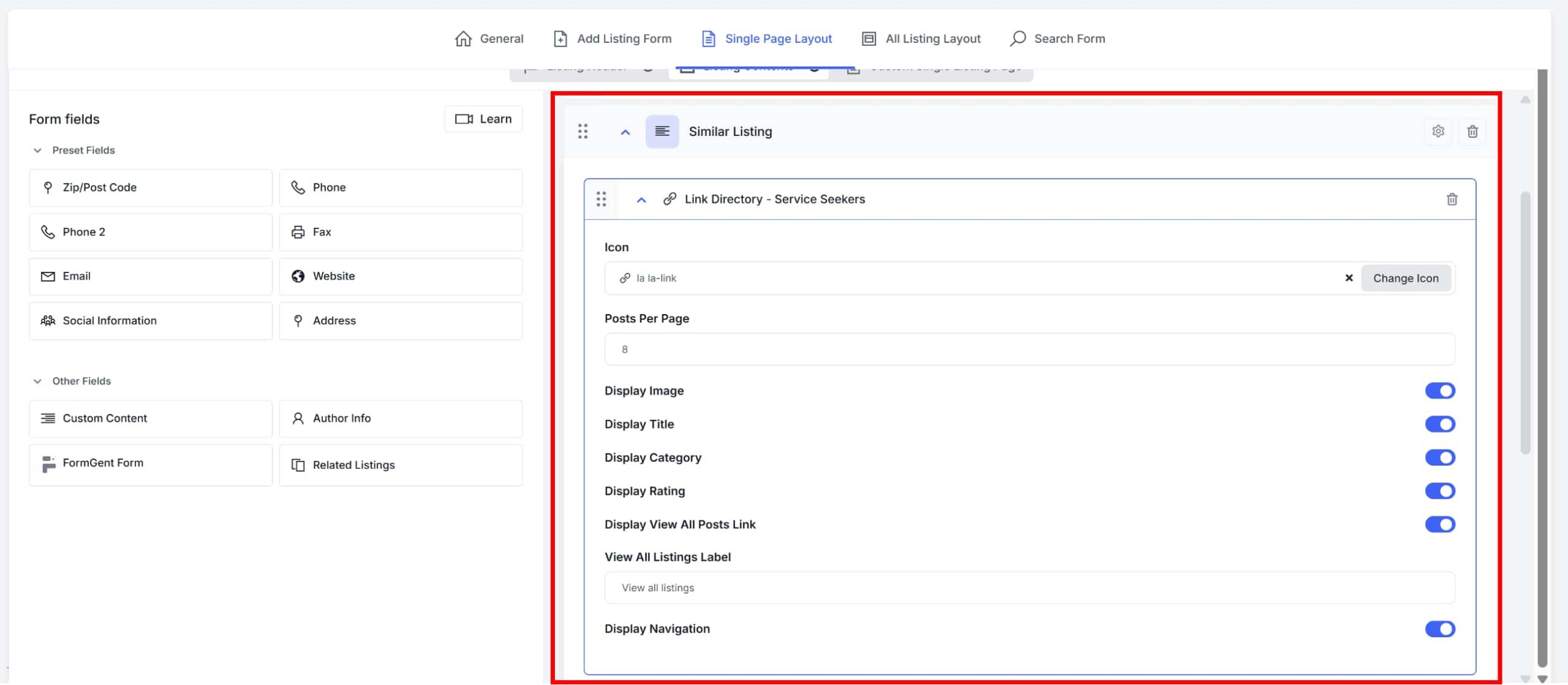
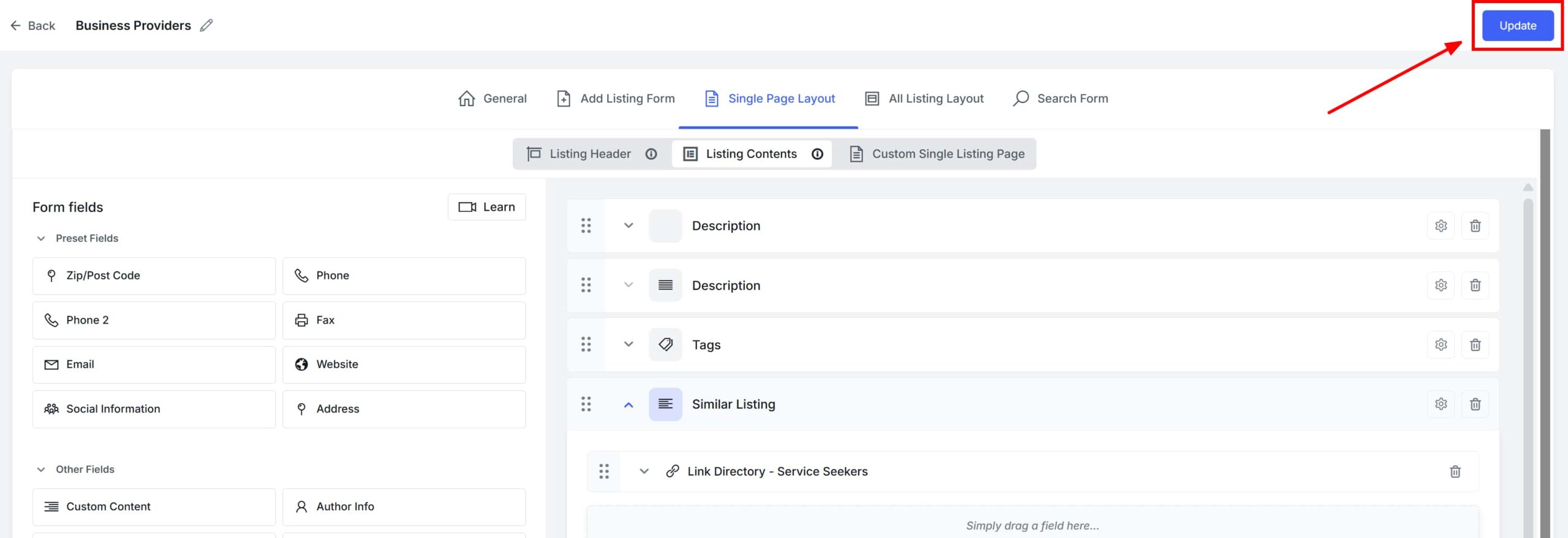
You can expand the options by clicking on the field and can customize the following options like Display Image, Title, Category and so on. After all settings done, make sure to click on “Update” to save all your changes.
Edit Setting: 

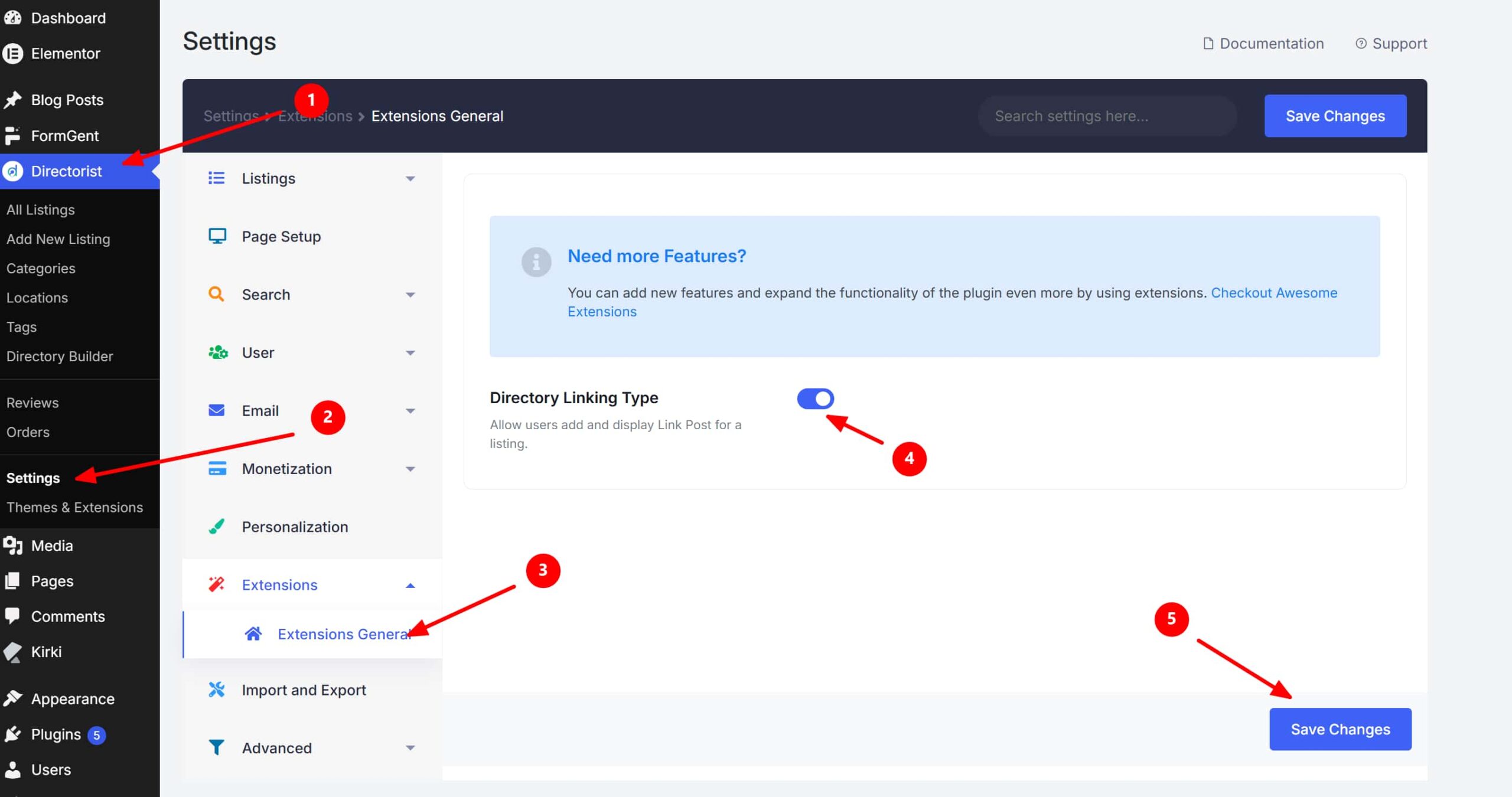
To change the settings of the Multi-Directory Linking plugin, navigate to WordPress Admin Dashboard> Directorist> Settings> Extensions> Extension general and turn on the Directory Linking type.

You can refer to the screenshot below for visual guidance:
Key Features : 

The Multi Directory Linking Plugin offers the following key features: 

Flexible Listing Linking: Connect any listing from one directory to another listing in a different directory, allowing for seamless interconnections between directories.

Multi-Directory Linking within Listings: Enable users to link listings from multiple directories within a single directory listing, providing comprehensive information and enhancing the user experience.

Pagination Functionality: Implement pagination to ensure a smooth and user-friendly browsing experience, especially when dealing with a large number of interconnected listings.

Monetization Opportunities: Leverage the extension’s features to generate revenue by including them in premium pricing plans, offering additional value to users. 

Easy Configuration: As a site owner, effortlessly configure the extension’s settings through the Directorist Directory Builder with just a few clicks, saving time and effort.

Customizable Heading Labels: Customize the labels for linked or connected listings, allowing for a personalized touch and better alignment with your directory’s branding.

Drag and Drop Functionality: Seamlessly add the multi-directory linking field to the add listing page and single listing page of the directory builder using an intuitive drag-and-drop interface, ensuring convenient customization.

Administrative Restriction: Restrict the usage of the multi-directory linking feature to administrators only, providing control over its implementation.

Required Linking Feature: Make the multi-directory linking feature mandatory for users when submitting a listing, ensuring consistent and interconnected data across directories.

Listing Selection Control: Choose whether users can select a single or multiple items when linking listings, tailoring the feature to your specific directory needs. 

With these features, the Multi Directory Linking Plugin enhances the functionality of your directories, promotes interconnectedness, and provides opportunities for customization and monetization.

Benefits for Service Listing Owners: 

Enabling service listing owners to sell their services brings several advantages, including: 

  • Increased Revenue Streams: By incorporating the services of individual professionals, service listing owners can diversify their revenue streams and potentially earn more through commissions or subscription fees. 
  • Enhanced Service Offerings: The ability to add professionals from different directories enhances the range and quality of services available on the platform, attracting more customers and improving user satisfaction. 
  • Competitive Advantage: The premium plan offers exclusive features and benefits, giving service listing owners a competitive advantage in the market and positioning their platform as a top choice for users. 
  • Establishing Partnerships: Collaborating with professionals from different directories opens up opportunities for partnerships and cross-promotion, expanding the reach and visibility of the service listing owner’s platform.

By giving service listing owners the ability to monetize their platforms, you may completely transform the way companies operate business. Service listing owners may reach into new revenue sources, improve their services, and get a competitive edge in the market by adopting free and premium plans, connecting payment gateways, and utilizing the multi-directory linking extension. With the help of this extension, owners of service offerings may achieve their revenue potential and build successful online marketplaces.

What are your Feelings

Share This Article :

  • Facebook
  • X
  • LinkedIn
  • Pinterest
Still stuck? How can we help?

How can we help?

Updated on Jun 25, 2026 11:31 am
Directorist AI SearchListing Importer
Directorist Directorist

Product

  • Features
  • Solutions
  • Extensions
  • Integrations
  • Mobile App
  • Roadmap

Popular

  • OneListing (Free)
  • dClassified
  • dRestaurant
  • dRealestate
  • All Themes
  • Templates

Services

  • Done For You
  • Custom Development
  • Portfolio
  • Contact Sales

Resources

  • Documentation
  • Blog
  • Directorist Academy
  • Directory Ideas
  • What's New

Quick Links

  • About Us
  • Client Showcase
  • Support Policy
  • Refund Policy
  • Affiliate Program

Keep Updated

Subscribe to our email newsletter to receive updates.

Subscribe to our newsletter
© Directorist 2026 A product of
Also by wpWax FormGent HelpGent
  • Privacy Policy
  • Terms & Conditions